npm yarn (original) (raw)
Last Updated : 23 Jul, 2025
In the world of JavaScript development, where npm (Node Package Manager) and Yarn are widely used to manage javascript projects. These tools are indispensable for managing dependencies efficiently and ensuring project scalability. In this article, we aim to make you understand about npm and Yarn, offering insights into their distinctions, functionalities, and best practices.
Table of Content
What is npm?
npm, short for Node Package Manager, is the default package manager for Node.js. It allows developers to install, share, and manage code packages (modules) in their projects. npm is widely used and comes bundled with Node.js, Open source developers from every continent use npm to share and borrow packages.
**Installation:
npm is installed automatically with Node.js. You can verify the installation with:
node -v
npm -v
What is yarn?
yarn is an established open-source package manager used to manage dependencies in JavaScript projects. It is developed by facebook which assists with the process of installing, updating, configuring, and removing package dependencies, eventually helping you reach your objectives faster with fewer distractions.
**Installation:
You can install Yarn using npm or by downloading it from the Yarn website. To install Yarn using npm:
npm install -g yarn
**Output:

yarn installation
How npm and Yarn are different?
npm fetches dependencies from the npm registry during every ‘npm install‘ command while yarn stores dependencies locally, and fetches from the disk during a ‘yarn add‘ command.
npm and yarn are both package managers for javascript but they have some differences mentioned below int the table.
| Feature | npm | Yarn |
|---|---|---|
| Installation Speed | Generally slower | Faster due to parallel installations |
| Dependency Resolution | Less consistent | Deterministic and consistent |
| Offline Mode | Limited | Full support |
| Security | Basic checks | Enhanced checks |
| Default Lockfile | package-lock.json | yarn.lock |
| Install dependencies | npm install | npm install |
| Install package | npm install package_name@version_number | yarn add package_name@version_number |
| View package | npm view package_name | yarn info package_name |
Examples for npm and yarn:
Now, we will see one example for both. Here we are going to install axios package using npm and then using yarn. The axios is a js library which is used to make HTTP request from browser and Node.js.
Installing axios package using npm
- Installing axios library using yarn
- Installing axios library using yarn
For installing axios package using npm, we need to run the following command:
npm install axios
**Output:
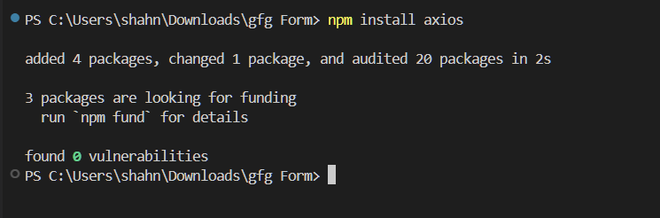
Example for npm
For installing axios package **using yarn, we need to run the following command:
**Output:

Example for yarn
Conclusion
Features: npm and Yarn are both really useful tools for developers. npm is popular and works well with Node.js, while Yarn is known for being really fast and for making sure everything you add to your project is correct. Yarn also has some cool extras, like being able to work without an internet connection and installing things all at once.