Signup Form Using Node.js and MongoDB (original) (raw)
Last Updated : 27 Feb, 2026
Signup Form using Node.js and MongoDB allows users to register by storing their details securely in a MongoDB database. It connects the frontend form with a Node.js backend to handle validation and data storage.
Installations
Include a few packages for our Nodejs application.
npm install express --save
Express allows us to set up middlewares to respond to HTTP Requests.
npm install body-parser --save
To read HTTP POST data , you have to use the "body-parser" node module.
npm install mongoose --save
Mongoose is an object document mapping (ODM) layer which sits on the top of Node's MongoDB driver.
app.js
This is the main executable application file
index.html `
Signup Form<br>
<br>
<br>
<div class="container" >
<div class="row">
<div class="col-md-3">
</div>
<div class="col-md-6 main">
<form action="http://localhost:3000/sign_up" method="post">
<h1> Signup form </h1>
<input class="box" type="text" name="name" id="name"
placeholder="Name" required /><br>
<input class="box" type="email" name="email" id="email"
placeholder="E-Mail " required /><br>
<input class="box" type="password" name="password"
id="password" placeholder="Password " required/><br>
<input class="box" type="text" name="phone" id="phone"
placeholder="Phone Number " required/><br>
<br>
<input type="submit" id="submitDetails"
name="submitDetails" value="Submit" /><br>
</form>
</div>
<div class="col-md-3">
</div>
</div>
</div>signup\_success.html
    <div class="col-md-6 main">

        <h1> Signup Successful</h1>

    </div>


    <div class="col-md-3">
    </div>

    </div>
</div>
style.css
.main{ padding:20px; font-family: 'Helvetica', serif; box-shadow: 5px 5px 7px 5px #888888;
} .main h1{ font-size: 40px; text-align:center; font-family: 'Helvetica', serif;
} input{ font-family: 'Helvetica', serif; width: 100%; font-size: 20px; padding: 12px 20px; margin: 8px 0; border: none; border-bottom: 2px solid #767474; } input[type=submit] { font-family: 'Helvetica', serif; width: 100%; background-color: #767474; border: none; color: white; padding: 16px 32px; margin: 4px 2px; border-radius: 10px; }
app.js
var express=require("express"); var bodyParser=require("body-parser");
const mongoose = require('mongoose'); mongoose.connect('mongodb://localhost:27017/gfg'); var db=mongoose.connection; db.on('error', console.log.bind(console, "connection error")); db.once('open', function(callback){ console.log("connection succeeded"); })
var app=express()
app.use(bodyParser.json()); app.use(express.static('public')); app.use(bodyParser.urlencoded({ extended: true }));
app.post('/sign_up', function(req,res){ var name = req.body.name; var email =req.body.email; var pass = req.body.password; var phone =req.body.phone;
var data = {
    "name": name,
    "email":email,
    "password":pass,
    "phone":phone
}
db.collection('details').insertOne(data,function(err, collection){ if (err) throw err; console.log("Record inserted Successfully");
});

return res.redirect('signup_success.html');
})
app.get('/',function(req,res){ res.set({ 'Access-control-Allow-Origin': '*' }); return res.redirect('index.html'); }).listen(3000)
console.log("server listening at port 3000");
`
Start the MongoDB, run:
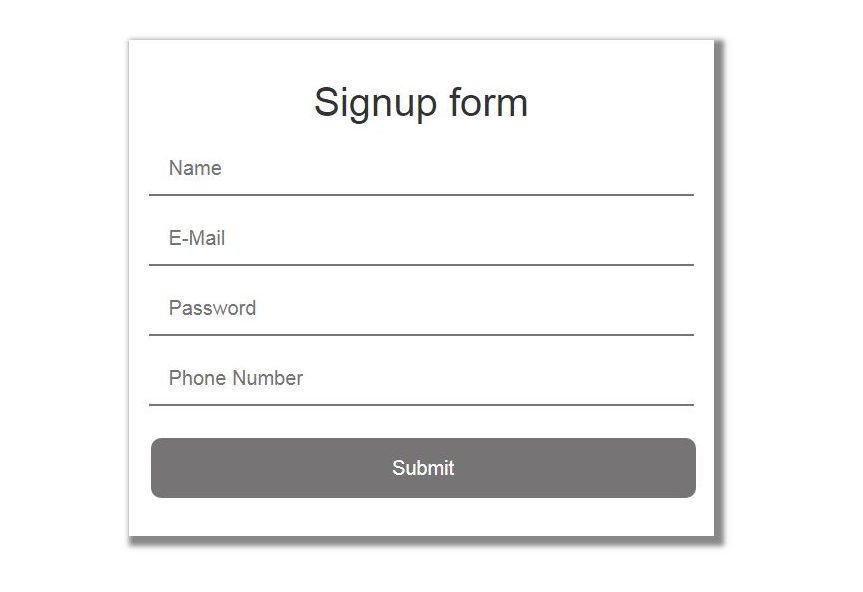
node app.jsGo to the browser and open http://127.0.0.1:3000/
**Fill the above form
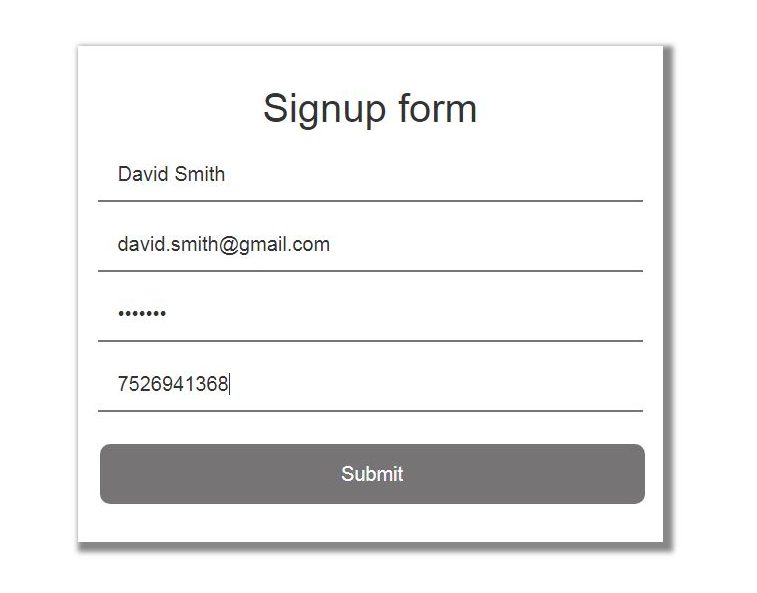
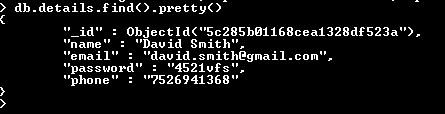
This will add a record named "David Smith" in MongoDB. Let's have a check in MongoDB for the same record. The record is now saved in the "gfg" database in "details" collection.