User Mode and Kernel Mode (original) (raw)
Last Updated : 5 Dec, 2025
User mode and kernel mode are two key states in an operating system. User mode runs regular applications with limited access to system resources, while kernel mode runs the core OS with full control over hardware. This separation ensures security, stability, and efficient resource management.
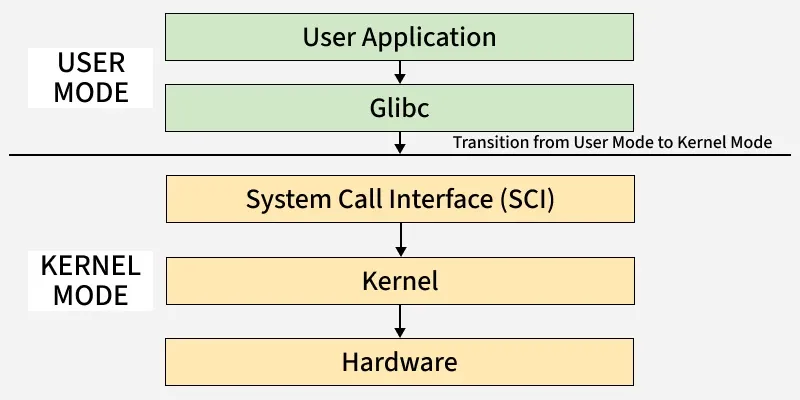
User and Kerel mode
User Mode
User Mode is a restricted environment where application programs run. When a program starts, the OS creates a separate process and assigns it its own memory space.
Programs in user mode can’t access hardware or kernel memory directly. They must request access through system calls to the kernel.
Key Features of User Mode
- **Isolated Environment: Each process runs in its own memory space.
- **No Direct Hardware Access: Only accessible through kernel services.
- **Safe Execution: Errors or crashes don’t affect the whole system.
Advantages
- **Easier Debugging: Bugs are contained to individual applications.
- **Crash Containment: Only the crashing application is affected.
- **Process Isolation: One app can’t read or corrupt another’s memory.
- **Controlled Access: Kernel checks and authorizes requests.
- **Stability and Reliability: Applications can’t directly affect the kernel or other processes, reducing the risk of full-system crashes.
- **Security: Direct access to critical resources is blocked, preventing unauthorized use.
Disadvantages
- **Performance Overhead: System calls require switching between user and kernel mode, adding latency.
- **Limited Capability: Low-level tasks (like direct I/O) cannot be done.
- **System Call Latency: Frequent transitions to kernel mode can slow performance.
- **Dependence on Kernel: User programs rely on the kernel to perform essential functions.
- **Reduced Real-Time Use: Less suitable for systems needing low-latency execution.
- **Less Developer Control: Access to memory and execution is restricted.
Kernel Mode
Kernel Mode is the **privileged mode where the core part of the operating system, the **kernel executes. It has **unrestricted access to all machine resources including CPU, memory, storage, and connected devices.
When a program running in user mode makes a request that requires hardware access, the system switches the CPU into **kernel mode to perform the task. After execution, control returns to user mode.
Key Features of Kernel Mode
- **Direct Hardware Interaction: Can communicate with I/O devices, memory, and processor.
- **Complete System Control: Manages process scheduling, memory, and device drivers.
- **Privileged Instructions: Executes instructions that affect system-wide behavior.
Advantages
- **Full Hardware Access: Required for tasks like device management and memory allocation.
- **Efficient Resource Management: Can directly manage CPU time, RAM, and I/O devices.
- **Custom Optimization: OS developers can fine-tune for performance or hardware.
- **Low Overhead: Handles system calls and process management efficiently.
- **Advanced Scheduling: Controls multitasking, thread synchronization, and context switches.
Disadvantages
- **High Risk of System Crash: Errors or bugs can bring down the whole OS.
- **Harder to Debug: Mistakes in kernel code are difficult to trace and fix.
- **Security Vulnerabilities: A single faulty kernel driver can compromise the system.
- **Complex Development: Requires deep knowledge of OS internals.
- **No Process Isolation: Memory is shared; bugs can corrupt the entire kernel.
Visual Representation
**User Mode
- Applications run here with restricted access to system resources.
- Programs must use system calls to request services from the OS.
**Kernel Mode
- The operating system runs here with full access to hardware and memory.
- It performs critical tasks like scheduling, memory management, and I/O control.
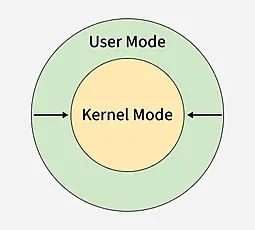
User Mode and Kernel Mode
Difference Between Kernel Mode and User mode
| **Kernel Mode | **User Mode |
|---|---|
| The program has direct and unrestricted access to system resources. | The application program do not have direct access to system resources. In order to access the resources, a system call must be made. |
| The whole operating system might go down if any faults or errors occurs. | A single process fails if an interrupt occurs. |
| Kernel mode is also known as the master mode, privileged mode or system mode. | User mode is also known as the unprivileged mode, restricted mode. |
| All processes share a single virtual address space. | All processes get separate virtual address space. |
| The applications have more privileges as compared to user mode. | While in user mode the applications have fewer privileges. |
| As kernel mode can access both the user programs as well as the kernel programs there are no restrictions. | While user mode needs to access kernel programs as it cannot directly access them. |
| The mode bit of kernel-mode is 0. | While the mode bit of user-mode is 1. |
| It is capable of referencing both memory areas. | It can only make references to memory allocated for user mode. |
| A system crash in kernel mode is severe and makes things more complicated. | A system crash can be recovered by simply resuming the session. |
| Only essential functionality is permitted to operate in this mode. | User programs can access and execute in this mode for a given system. |
| The kernel mode can refer to any memory block in the system and can also direct the CPU for the execution of an instruction, making it a very potent and significant mode. | The user mode is a standard and typical viewing mode, which implies that information cannot be executed on its own or reference any memory block; it needs an Application Protocol Interface (API) to achieve these things. |