Overlays in Memory Management (original) (raw)
Last Updated : 15 Apr, 2026
Overlays are a memory management technique used to efficiently manage limited memory by loading only necessary parts of a program into memory at a time. This allows larger programs to run smoothly, even when the available memory is smaller than the program's size.
- To load only the portion of a program that is needed for the current task.
- The unused parts of the program are stored on disk or other storage and are loaded into memory as needed.
- Once a part of the program finishes executing, it is unloaded from memory, freeing up space for the next part to be loaded.
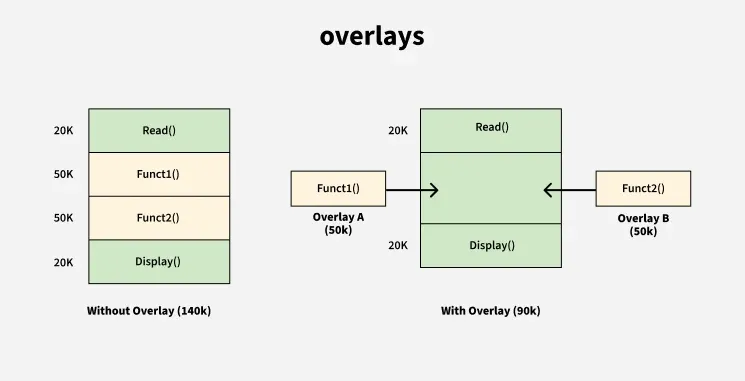
Overlay
**Note: In fixed partitioning, If a process exceeds the size of assigned fixed-sized partition, it cannot span across multiple partitions. Overlays solve this issue by allowing parts of the program to be loaded and unloaded as needed, making better use of the available memory.
How Overlays Work:
- The program is divided into smaller modules or segments.
- Only the module needed at a specific time is loaded into memory.
- Once the module finishes executing, it is unloaded and another module is loaded into the same space.
- The program remains functional as only the necessary parts are in memory at any given time.
Example of Overlays -> Assembler with Two Passes:
Consider an assembler that works in two passes. In this, only one pass can be performed at a time. The assembler finishes the first pass and once it's completed, it moves on to the second pass. Let's assume the available main memory size is 150 KB and the total code size is 200 KB. Here's how the program is structured:
- **Pass 1: 70 KB
- **Pass 2: 80 KB
- **Symbol Table: 30 KB
- **Common Routine: 20 KB
Problem:
Since the total code size is 200 KB and the available memory is 150 KB, it is not possible to load both passes into memory at the same time. Therefore, we need to use the overlays technique to efficiently manage the memory.
How Overlays Work in This Case:
As here, only one pass is needed at a time. Both passes always require the symbol table and common routine. So, the overlays technique works by loading one pass at a time, along with the shared symbol table and common routine and then swapping out the pass once it is done.
Memory Requirements:
**For Pass 1:
- Pass 1 = 70 KB
- Symbol Table = 30 KB
- Common Routine = 20 KB
- Overlays Driver = 10 KB
**Total memory required for Pass 1 = 70 KB + 30 KB + 20 KB + 10 KB = 130 KB.
**For Pass 2:
- Pass 2 = 80 KB
- Symbol Table = 30 KB
- Common Routine = 20 KB
- Overlays Driver = 10 KB
**Total memory required for Pass 2 = 80 KB + 30 KB + 20 KB + 10 KB = 140 KB.
Minimum Partition Size:
Since Pass 1 requires 130 KB and Pass 2 requires 140 KB, the minimum partition size required for this overlay process is 140 KB. This allows us to load either pass into memory along with the shared resources (symbol table, common routine and overlays driver) without exceeding the available memory.
Overlays Driver
The overlays driver is the user's responsibility. The operating system does not provide an automatic mechanism for swapping the different parts of the program in and out of memory. The user must manually manage the overlay process.
- The user must load the required part (either Pass 1 or Pass 2) into memory.
- After one pass completes, the user must unload that pass from memory and load the next pass.
- The overlays driver facilitates this by managing the swapping of code in and out of memory.
**Question: In The below overlay tree for a program, What will be the size of the partition (in physical memory) required to load (and run) this program?
- 12 KB
- 14 KB
- 10 KB
- 8 KB
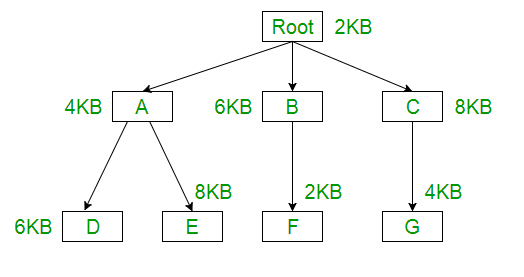
**Explanation: Using the overlay concept we need not actually have the entire program inside the main memory. Only we need to have the part which are required at that instance of time, either we need Root -> A -> D or Root -> A -> E or Root -> B -> F or Root -> C -> G part.
Root + A + D = 2KB + 4KB + 6KB = 12KB
Root + A + E = 2KB + 4KB + 8KB = 14KB
Root + B + F = 2KB + 6KB + 2KB = 10KB
Root + C + G = 2KB + 8KB + 4KB = 14KB
**Answer: (2) 14 KB, So if we have 14 KB size of partition then we can run any of them.