Page Table Entries in Page Table (original) (raw)
Last Updated : 8 Sep, 2025
A Page Table is a data structure that maps virtual addresses (used by processes) to physical addresses (actual locations in memory). The size and format of a PTE vary by system architecture and OS, but it always contains enough information for efficient memory management and protection.
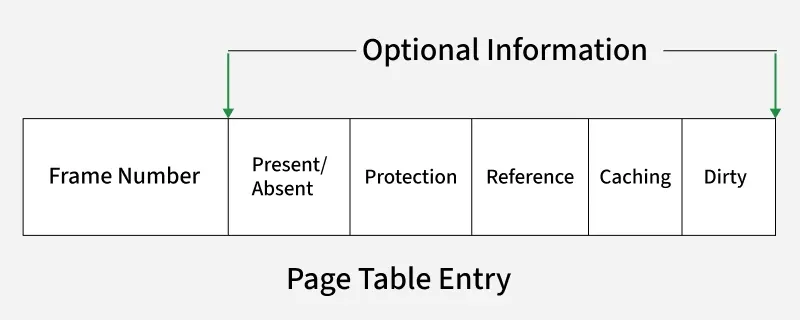
**Note: Each mapping in the table is stored in a Page Table Entry (PTE), which contains critical information required for efficient memory management, protection and address translation.
Information Stored in Page Table Entry
A Page Table Entry (PTE) stores the necessary metadata about a page, allowing the system to manage memory safely and efficiently. The exact format and size of a PTE depend on the system’s architecture (32-bit, 64-bit) and the operating system implementation, but typical fields include the following:
1. Frame Number
- Identifies the frame in physical memory where the page is stored.
- Number of bits required \text{=} \log_2 (\frac{\text{Size of Physical Memory}}{\text{Frame Size}})
2. Present/Absent Bit (Valid/Invalid Bit)
Indicates whether the page is currently loaded in memory or not.
- **Present (1): Page is in physical memory.
- **Absent (0): Page fault occurs when accessed and the OS must load it from disk.
3. Protection Bits
- Define the allowed operations on the page:
Read (R)
Write (W)
Execute (X)
- These bits prevent unauthorized memory access
- Control access permissions (read, write, execute).
- Helps protect memory from unauthorized access.
4. Referenced Bit
- Set automatically by hardware when the page is accessed (read or written).
- Used by page replacement algorithms (e.g., LRU – Least Recently Used).
5. Caching Enabled/Disabled
- Determines whether the page should be cached.
- **Use case example: Disable caching for memory-mapped I/O (keyboard or hardware registers) to always get fresh data.
6. Modified Bit (Dirty Bit)
- Indicates if the page has been written to.
- If set (1), the page must be written back to disk when evicted; otherwise, it can be discarded.
**Example: For a 32-bit virtual address space with 4 KB pages:
\text{Number of Pages} = \frac{\text{Total Words}}{\text{Words per Page}}
Here for words per page we have 4KB
i.e 4KB = 2^{10} \times 2^2 = 2^{10 + 2} = 2^{12}
12 bits words per page.
- Number of pages \text{ = } \frac{2^{32}}{2^{12}} = 2^{20} \quad \text{(about 1 million entries)}
- If each PTE takes 4 bytes, total Page Table size ≈ 2^{20} \times 4 \text{ bytes} = 4 \text{ MB}
**Note: For 64-bit systems, a flat page table becomes too large, so hierarchical structures (multi-level page tables) are used to manage memory efficiently.
Pros of Using a Page Table in a Virtual Memory
- **Efficient Memory Use: Only allocates frames for pages that are actually used.
- **Protection: Control over access permissions helps prevent illegal memory access.
- **Flexibility: Supports multiple processes safely accessing different address spaces.
- **Address Translation: Seamless mapping of virtual to physical addresses with little programmer involvement.
- **Scalability: Hierarchical page tables (e.g., 4-level page table in x86-64) handle huge address spaces without huge memory overhead.
**Note: The Page Table Entry (PTE) is a small but powerful structure that plays a central role in modern memory management. Its fields support address translation, memory protection, efficient caching and effective handling of dynamic processes in an operating system.