Structures of Directory in Operating System (original) (raw)
Last Updated : 25 Apr, 2026
The operating system uses directories to track where files are stored, just like using folders to organise papers.
- Different directory structures can be used to suit various organisational needs.
- Understanding directory structures helps in organising and accessing files more easily.
By using these structures, it becomes simpler to manage and navigate files on your computer.

Different Types of Directories in OS
In an operating system, there are different types of directory structures that help organise and manage files efficiently. Each type of directory has its own way of arranging files and directories, offering unique benefits and features. These are
- Single-Level Directory
- Two-Level Directory
- Tree Structure/ Hierarchical Structure
- Acyclic Graph Structure
- General-Graph Directory Structure
1) Single-Level Directory
The single-level directory is the **simplest directory structure. In it, all files are contained in the same directory which makes it easy to support and understand.
A single level directory has a significant limitation, however, when the number of files increases or when the system has more than one user. Since all the files are in the same directory, they must have a **unique name. If two users call their dataset test, then the unique name rule violated.

- Since it is a single directory, so its implementation is very easy.
- If the files are smaller in size, searching will become faster.
- The operations like file creation, searching, deletion, updating are very easy in such a directory structure.
**Advantages
- **Logical Organization: .Simple to implement and suitable for small systems.
- **Efficiency: Faster file searching and access.
- **Security: Restrict access at directory level to protect data.
- **Backup & Recovery: Simplifies locating and restoring files.
- **Scalability: Easily supports growth with new files and directories
**Disadvantages
- There may chance of name collision because two files can have the same name.
- Searching will become time taking if the directory is large.
- This can not group the same type of files together.
2) Two-Level Directory
In a two-level directory structure, each user has a separate User File Directory (UFD) containing only their files. A Master File Directory (MFD) stores entries for all users and points to their respective UFDs, preventing filename conflicts between users.
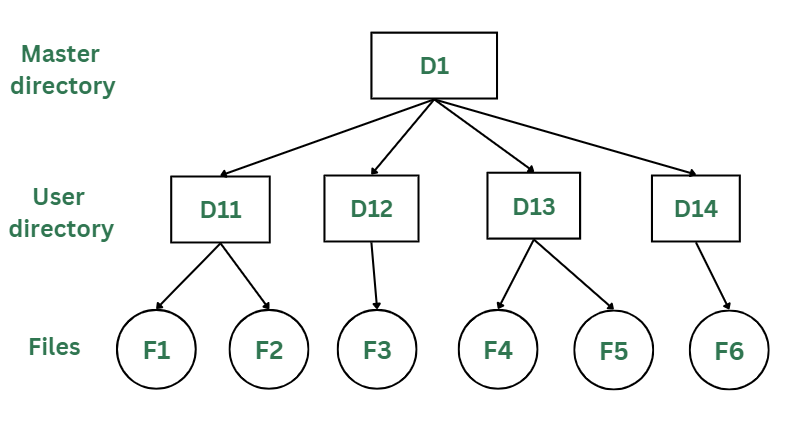
Two-Levels Directory Structure
Advantages
- Different users can have files with the same name.
- A security would be there which would prevent user to access other user's files.
- Searching of the files becomes very easy in this directory structure.
Disadvantages
- File sharing is limited and less convenient between users.
- Unlike the advantage users can create their own files, users don't have the ability to create subdirectories.
- Scalability is not possible because one user can't group the same types of files together.
3) Tree Structure/ Hierarchical Structure
The tree directory structure is the most common in personal computers. It resembles an upside-down tree, with the root directory at the top containing all user directories. Each user can create files and subdirectories within their own directory but cannot access or modify the root or other users’ directories.
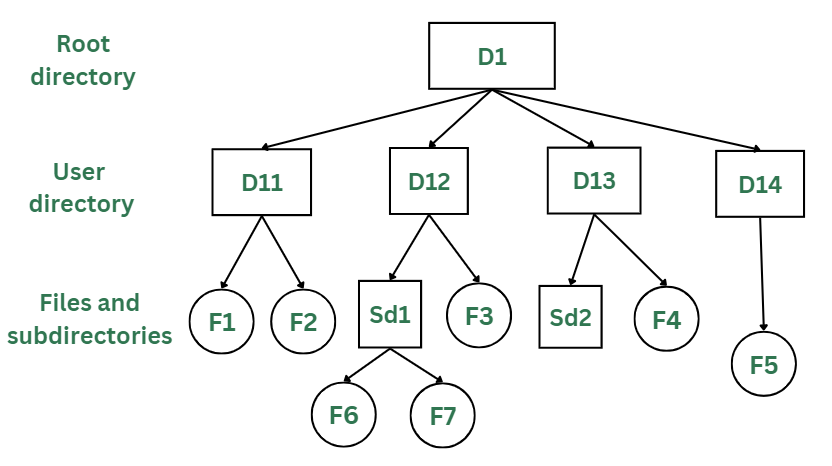
Tree/Hierarchical Directory Structure
Advantages
- This directory structure allows subdirectories inside a directory.
- The searching is easier.
- It helps in organizing files by importance, making important files easier to locate.
- This directory is more scalable than the other two directory structures explained.
Disadvantages
- As the user isn't allowed to access other user's directory, this prevents the file sharing among users.
- As the user has the capability to make subdirectories, if the number of subdirectories increase the searching may become complicated.
- Users cannot modify the root directory data.
- Searching may become complex as the directory depth increases.
4) Acyclic Graph Structure
In the earlier directory structures, a file could only be accessed from the directory it was stored in. The acyclic graph directory structure solves this by allowing a file or subdirectory to be shared across multiple directories using links. Changes made by one user are visible to all users sharing that file.
In the below figure, this explanation can be nicely observed, where a file is shared between multiple users. If any user makes a change, it would be reflected to both the users.

Acyclic Graph Structure
Advantages
- Sharing of files and directories is allowed between multiple users.
- Searching becomes too easy.
- Flexibility is increased as file sharing and editing access is there for multiple users.
Disadvantages
- Because of the complex structure it has, it is difficult to implement this directory structure.
- The user must be very cautious to edit or even deletion of file as the file is accessed by multiple users.
- If we need to delete the file, then we need to delete all the references of the file inorder to delete it permanently.
5) General-Graph Directory Structure
Unlike the acyclic-graph directory, which avoids loops, the general-graph directory can have cycles, meaning a directory can contain paths that loop back to the starting point. This can make navigating and managing files more complex.
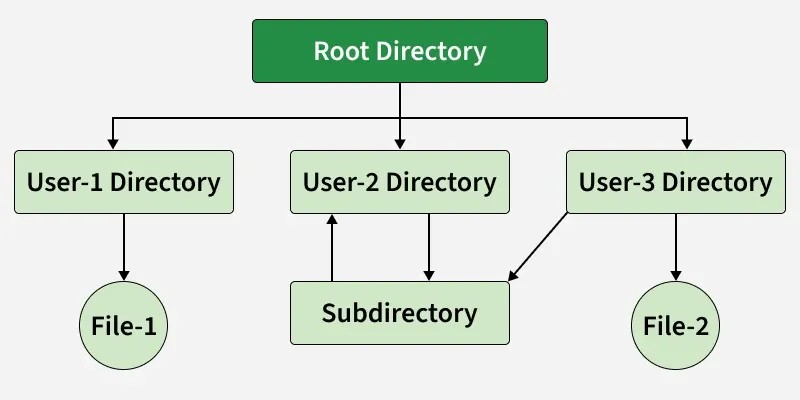
General Graph Directory Structure
In the above image, you can see that a cycle is formed in the User 2 directory. While this structure offers more flexibility, it is also more complicated to implement.
**Advantages of General-Graph Directory
- More flexible than other directory structures.
- Allows cycles, meaning directories can loop back to each other.
**Disadvantages of General-Graph Directory
- More expensive to implement compared to other solutions.
- Requires garbage collection to manage and clean up unused files and directories.