Virtual Machines in Operating System (original) (raw)
Last Updated : 5 Dec, 2025
A Virtual Machine (VM) is a software-based computer that runs within a physical computer (known as the host). It emulates the behavior of a physical machine and can run its own operating system (guest OS) and applications independently just like a real computer.
For example, you can run a Linux VM inside a Windows PC using tools like VirtualBox or VMware.
Working of Virtual Machines
A VM uses virtualization technology to abstract the hardware of a physical machine (CPU, memory, storage, etc.) into a virtual environment. This is managed by a special software called a hypervisor, which allocates system resources to multiple VMs.
Each VM behaves like a separate computer, even though it's running on shared hardware. It includes:
- Virtual CPU
- Virtual memory
- Virtual disk (storage)
- Network interface card (NIC)
**Example: When you run multiple processes on a regular OS, they appear to have separate CPUs and memory (thanks to CPU scheduling and virtual memory). A VM extends this illusion to the OS level itself.
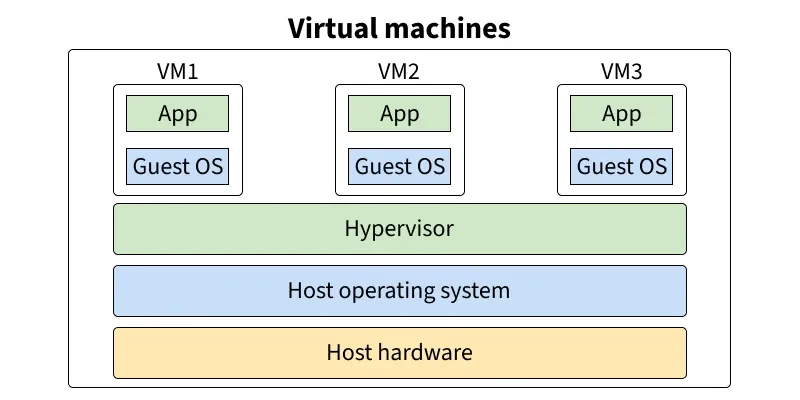
Virtual Machines Diagram
Types of Virtual Machines
There are **two main types of VMs:
**1. Process Virtual Machine
- Designed to run a single application (or process).
- Example: Java Virtual Machine (JVM), which allows Java programs to run on any platform.
**2. System Virtual Machine
- Emulates an entire physical machine.
- Can run a full OS like Linux, Windows, or macOS.
- Example: VMs created using VirtualBox, VMware, or Hyper-V.
**➣Learn More About : Types of Virtual Machines
How to Set Up a Virtual Machine
Setting up a VM involves the following steps (example for installing a Linux VM):
- Create a new virtual machine
- Allocate virtual disk space
- Attach a virtual network adapter
- Install the guest operating system (Linux)
- Register and activate the VM (if needed)
- Install necessary drivers or guest additions
Most platforms like VirtualBox or VMware offer wizards to simplify this setup.
Uses of Virtual Machines
- Running multiple OSs on a single machine
- Testing new software or OS safely (sandboxed)
- Running legacy applications
- Server virtualization (hosting multiple VMs on a single server)
- Secure development and debugging (isolate risky tasks)
Hypervisor
A hypervisor is software (sometimes firmware or hardware-based) that enables virtualization by separating physical resources from VMs.
There are **two types:
- **Type 1 (Bare Metal): Runs directly on hardware (e.g., VMware ESXi, Microsoft Hyper-V)
- **Type 2 (Hosted): Runs on top of a host OS (e.g., VirtualBox, VMware Workstation)
The hypervisor is responsible for assigning CPU, memory, disk, and network to each VM.
Advantages of Virtual Machines
- **Isolation: Each VM is fully independent and secure from others.
- **Flexibility: Run different OSs on one device.
- **Cost & energy saving: Multiple VMs can run on a single machine.
- **Disaster recovery: Easy to back up, clone, and restore.
- **Legacy support: Run old apps on modern hardware.
- **Simplified testing: Perfect for software development and security testing.
Types of Virtualization (Beyond VM)
Virtualization is not limited to just virtual machines. Here are 5 major types:
1. Hardware Virtualization (Server Virtualization)
Hardware virtualization is the process of creating multiple virtual machines (VMs) that run on a single physical server using a **hypervisor.
- A hypervisor (like VMware ESXi or Microsoft Hyper-V) directly interacts with the physical hardware.
- It allocates physical resources (CPU, memory, storage) to each VM.
- Each VM operates independently with its own OS and applications.
**Benefits:
- Efficient hardware utilization.
- Cost savings (fewer physical servers needed).
- Scalability and easier deployment of services.
- Fault isolation: if one VM crashes, others remain unaffected.
2. Software Virtualization
Software virtualization allows an operating system or application to run in an environment that is different from its native platform.
- A software layer mimics the required hardware or operating system.
- Example: Running Android OS on a Windows PC using an emulator like BlueStacks.
**Benefits:
- Cross-platform compatibility.
- Testing apps on different OS versions.
- Reduced software conflicts
3. Storage Virtualization
Storage virtualization combines multiple physical storage devices into a single **logical storage pool, making management easier and more flexible.
- Software abstracts the physical storage from multiple devices.
- The system presents the unified storage as a single resource to users and applications.
**Benefits:
- Centralized storage management.
- Better performance through load balancing.
- Easier scaling and disaster recovery.
4. Network Virtualization
Network virtualization abstracts network resources, allowing multiple virtual networks to be created on a single physical infrastructure.
- Combines hardware (switches, routers) and software resources into a virtual network.
- Divides bandwidth into independent channels for better resource allocation.
**Benefits:
- Improved network efficiency and security.
- Easier management and scaling.
- Dynamic provisioning of network resources.
5. Desktop Virtualization
Desktop virtualization separates the desktop environment from the physical machine and stores it on a remote server.
- Users access their virtual desktop over a network using any device (PC, tablet, thin client).
- All processing and data remain on the central server.
**Benefits:
- Centralized control and security.
- Easier software updates and patches.
- Flexibility for remote work.