What happens when we turn on computer? (original) (raw)
Last Updated : 14 Apr, 2026
A computer without a running program is nothing more than an inert collection of electronic components. The true magic begins the moment we press the power button, a chain reaction of events unfolds from hardware checks to firmware initialization, boot loader execution, and operating system startup.
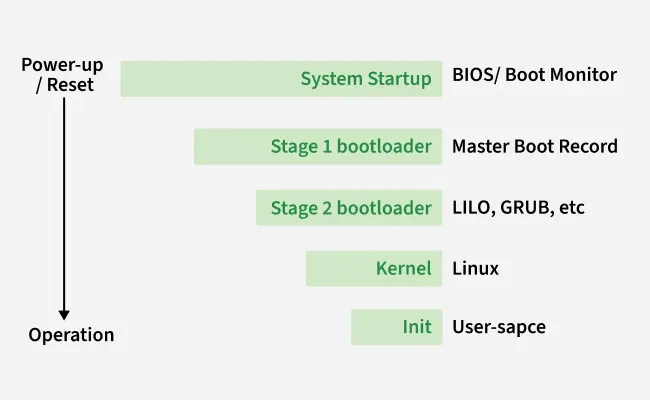
System Startup
**Note: The boot process may be invisible to most users, but it is one of the most critical foundations of modern computing.
Steps of Boot Process
Behind the scenes, a series of well-defined steps take place that bring the system from an inactive state to a fully functional machine running its operating system (OS). This sequence is known as the boot process.
1. Power Supply Initialization
The process begins when the power supply unit (PSU) sends electricity to the computer’s essential components such as:
- Motherboard
- Processor (CPU)
- Memory (RAM)
- Hard drive or SSD
- Cooling fans
**Note: At this stage, the components receive stable power so they can operate correctly.
2. BIOS/UEFI Startup and POST
Modern computers contain a BIOS (Basic Input/Output System) or UEFI (Unified Extensible Firmware Interface) firmware chip. This firmware is responsible for:
- **Power-On Self-Test (POST): The POST checks whether critical hardware components like RAM, CPU, video card, and storage devices are functioning correctly.
- **Error Handling: If an issue is detected, the system either displays an error message on the screen or emits a series of beeps called POST beep codes.
- **Hardware Initialization: The BIOS/UEFI configures connected devices and prepares the system for the next stage of booting.
3. Loading the Boot Loader (MBR and UEFI Process)
Once POST completes successfully, the BIOS/UEFI looks for a bootable device based on the configured boot order (hard drive, USB, DVD, etc.).
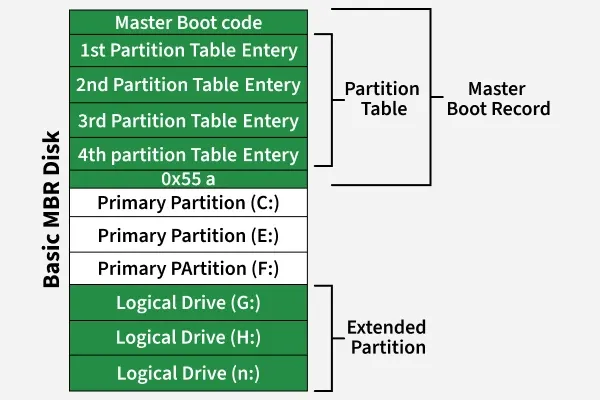
- In traditional systems, the BIOS searches the Master Boot Record (MBR) located in the first sector of the boot disk.
- In modern systems, UEFI uses the GUID Partition Table (GPT) and locates the EFI System Partition (ESP).
- The boot sector contains a small program known as the boot loader.
Basic MBR Disk
**Example:
- GRUB or LILO (Linux)
- Windows Boot Manager (Windows)
**Note: The job of the boot loader is to load the actual operating system kernel into memory.
4. Kernel and Init Process
After the boot loader runs, the OS kernel is loaded into RAM. The kernel is the core of the operating system and performs tasks such as:
- Managing CPU, memory, and hardware devices
- Initializing system drivers
- Preparing user space
- The final step of kernel initialization is to start the init process, which decides the system’s run level.
**Example:
- **Runlevel 3: Multiuser mode with networking (text-based)
- **Runlevel 5: Multiuser mode with GUI and display manager
**Note: Modern systems often use systemd or upstart instead of the traditional SysV init.
5. Starting System Services and Daemons
The init/systemd process then launches background services known as daemons, such as:
- Networking services
- Printing services
- Security services
- Graphical display manager (X server or Wayland)
**Note: At this point, the system either displays a login screen (GUI) or a command-line login prompt.
6. User Login and Desktop Environment
Finally, after the user logs in, the OS loads the desktop environment (such as Windows Desktop, macOS Finder, or Linux GNOME/KDE). This gives the user a graphical interface to interact with applications and the underlying hardware.
Functions of BIOS/UEFI During Boot
- **POST: Tests hardware devices to ensure they function properly.
- **MBR/GPT Handling: Locates and loads the boot loader from the storage device.
- **init: It is used to determine the initial run level of the system.
- **System Configuration: Allows users to set time/date, boot order, CPU and memory settings.
- **Security Features: Provides password protection, secure boot, and TPM (Trusted Platform Module) support.