How to Load a Massive File as small chunks in Pandas? (original) (raw)
Last Updated : 15 Jul, 2025
When working with massive datasets, attempting to load an entire file at once can overwhelm system memory and cause crashes. **Pandas provides an efficient way to handle large files by processing them in smaller, memory-friendly chunks using the chunksize parameter.
Using chunksize parameter in read_csv()
For instance, suppose you have a large CSV file that is too large to fit into memory. The file contains **1,000,000 ( 10 Lakh ) rows so instead we can load it in chunks of 10,000 ( 10 Thousand) rows- 100 times rows i.e You will process the file in **100 chunks, where each chunk contains 10,000 rows using Pandas like this:
Python `
import pandas as pd
Load a large CSV file in chunks of 10,000 rows
for chunk in pd.read_csv('large_file.csv', chunksize=10000): print(chunk.shape) # process the shape of each chunk
`
**Output:

Load a Massive File as small chunks in Pandas
This example demonstrates how to use chunksize parameter in the read_csv function to read a large CSV file in chunks, rather than loading the entire file into memory at once.
How to Use the chunksize Parameter?
- **Specify the Chunk Size: You define the number of rows to be read at a time using the chunksize parameter.
- **Iterate Over Chunks: The read_csv function returns a TextFileReader object, which is an iterator that yields DataFrames representing each chunk.
- **Process Each Chunk: Perform operations like filtering, aggregation, or transformation on each chunk before moving to the next. After processing all chunks, combine the results if necessary using methods like
concat().
Loading a massive file in smaller chunks****: Examples**
**Example 1: Handling large files and creating a consolidated output file incrementally.
Python `
import pandas as pd
Load a large CSV file in chunks of 10,000 rows
for chunk in pd.read_csv('large_file.csv', chunksize=10000): # Process the chunk (e.g., save it to a separate file) chunk.to_csv('chunk_file.csv', index=False, mode='a', header=False)
`
Input file large_file.csv has **1,000,000 rows, so this loop will:
- Process the file in **100 chunks of 10,000 rows each.
- Append each chunk to
chunk_file.csvuntil the entire file is saved.
**Parameters:
index=False: Excludes the index column from being written to the file.mode='a': Appends each chunk to the file instead of overwriting it.header=False: Skips writing the header (column names) for every chunk, assuming the header is written once in the destination file.
**Example: If your dataset has 10 lakh rows and each row is 1 KB, the full dataset size is ~1 GB. On a system with 4 GB RAM (shared with the OS and other processes), chunking ensures:
- Only 10,000 rows (~10 MB) are loaded into memory at any given time, leaving ample memory for processing and other tasks.
Chunking is thus a practical solution to balance **memory, performance, and scalability when dealing with massive datasets.
**Example 2: Load the dataset and Get insights on it
First Lets load the dataset and check the different number of columns and get more insights about the type of data and number of rows in the dataset.
Python `
import pandas as pd
Load only the header of the CSV to get column names
columns = pd.read_csv('large_file.csv', nrows=0).columns print(columns)
`
**Output:
Index(['Customer_ID', 'Name', 'Age', 'Gender', 'Country', 'Purchase_Amount',
'Purchase_Date', 'Product_Category', 'Feedback_Score'],
dtype='object')
**Parameters:
nrows=0: Tellspd.read_csvto load no data rows **but still read the header (column names)..columns: Retrieves the column names as anIndexobject.
**Why This is Efficient:
- Avoids loading unnecessary data chunks into memory.
- Quickly provides the column names regardless of file size.
How to Use Generators for Efficiency?
Using **generators allows you to process large datasets **lazily without loading everything into memory at once, improving memory efficiency. Let's first understand what generators are and how they can help you work with large files in a more efficient way.
A **generator in Python is a special type of iterator that allows you to iterate over data, but it doesn't store the entire dataset in memory at once. Instead, generators **yield one item at a time, which makes them highly memory-efficient when working with large datasets or streams of data. **Generators are defined using functions with the yield keyword. When a function contains a yield statement, it becomes a generator function. When you call this function, it returns a generator object that can be iterated over. The state of the generator is maintained between iterations, **so each time you call next() on the generator, it yields the next value.
Python `
def read_large_file(file_path, chunk_size): for chunk in pd.read_csv(file_path, chunksize=chunk_size): yield chunk
for data_chunk in read_large_file('large_file.csv', 1000): # Process each data_chunk print(data_chunk.head())
`
**Output:
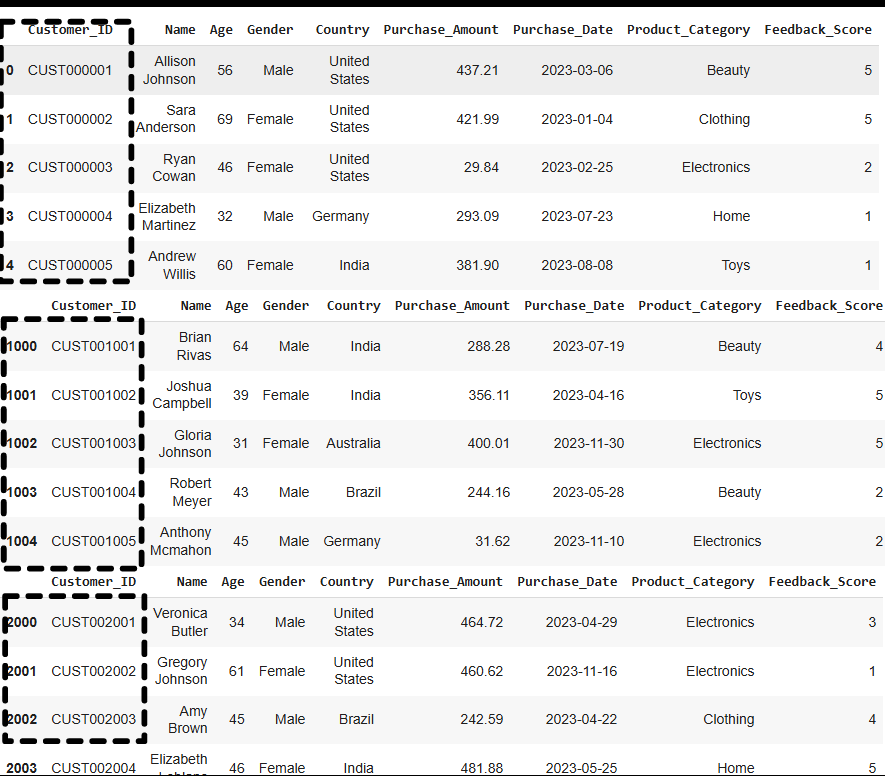
Load a Massive File as small chunks in Pandas
**Notice: How customer_id columns is repesenting the no. of rows, based on each chunk.