PHP Cookies (original) (raw)
Last Updated : 31 May, 2025
A cookie is a small text file that is stored in the user's browser. Cookies are used to store information that can be retrieved later, making them ideal for scenarios where you need to remember user preferences, such as:
- User login status (keeping users logged in between sessions)
- Language preferences
- Shopping cart contents
- Tracking user activity for analytics purposes
Cookies in PHP are created using the setcookie() function. When a cookie is set, the data is stored in the user’s browser and sent to the server with each subsequent request made by the browser.
**Syntax:
setcookie(name, value, expire, path, domain, security);
**In this syntax:
- **Name: It is used to set the name of the cookie.
- **Value: It is used to set the value of the cookie.
- **Expire: It is used to set the expiry timestamp of the cookie, after which the cookie can't be accessed.
- **Path: It is used to specify the path on the server for which the cookie will be available.
- **Domain: It is used to specify the domain for which the cookie is available.
- **Security: It indicates that the cookie should be sent only if a secure HTTPS connection exists.
How Do Cookies Work?
Cookies work in the following ways:
- **Setting Cookies: A cookie is set using the setcookie() function in PHP. The cookie data is stored on the user’s browser and sent along with each HTTP request to the server.
- **Reading Cookies: Once a cookie is set, it can be accessed using the $_COOKIE superglobal array. This allows you to retrieve cookie values that were set on the user’s browser.
- **Expiration of Cookies: Cookies can be set to expire after a certain period. When a cookie expires, it is automatically deleted by the browser. Cookies can also be manually deleted by calling the setcookie() function with a past expiration date.
- **Sending Cookies to the Browser: Cookies are sent to the browser as HTTP headers. Since HTTP headers must be sent before any actual content (HTML, etc.), setcookie() must be called before any output is sent to the browser.
How to Use Cookies in PHP?
**1. Creating Cookies
Create a cookie named Auction_Item and assign the value Luxury Car to it. The cookie will expire after 2 days(2 days * 24 hours * 60 mins * 60 seconds).
**Example: This example describes the creation of the cookie in PHP.
PHP `
Note: You might have to reload the page to see the value of the cookie.
`
**Note: Only the name argument in the setcookie() function is mandatory. To skip an argument, the argument can be replaced by an empty string("").
**Output:

Cookie creation in PHP
**In this example:
- The setcookie() function is used to create a cookie named "Auction_Item" with the value "Luxury Car". The cookie will expire in 2 days (calculated as time() + 2 * 24 * 60 * 60).
- The echo statement prints the message "cookie is created." on the webpage, confirming that the cookie has been set.
- The cookie will expire after 2 days from the current time, meaning the browser will store it for that period before it’s automatically deleted.
- The note tells the user that they might need to reload the page to see the value of the cookie, as the cookie data is available after the page is refreshed.
**2. Checking Whether a Cookie Is Set Or Not
It is always advisable to check whether a cookie is set or not before accessing its value. Therefore, to check whether a cookie is set or not, the PHP isset() function is used. To check whether a cookie "Auction_Item" is set or not, the isset() function is executed as follows:
**Example: This example describes checking whether the cookie is set or not.
PHP `
Note: You might have to reload the page to see the value of the cookie.
`
**Output:
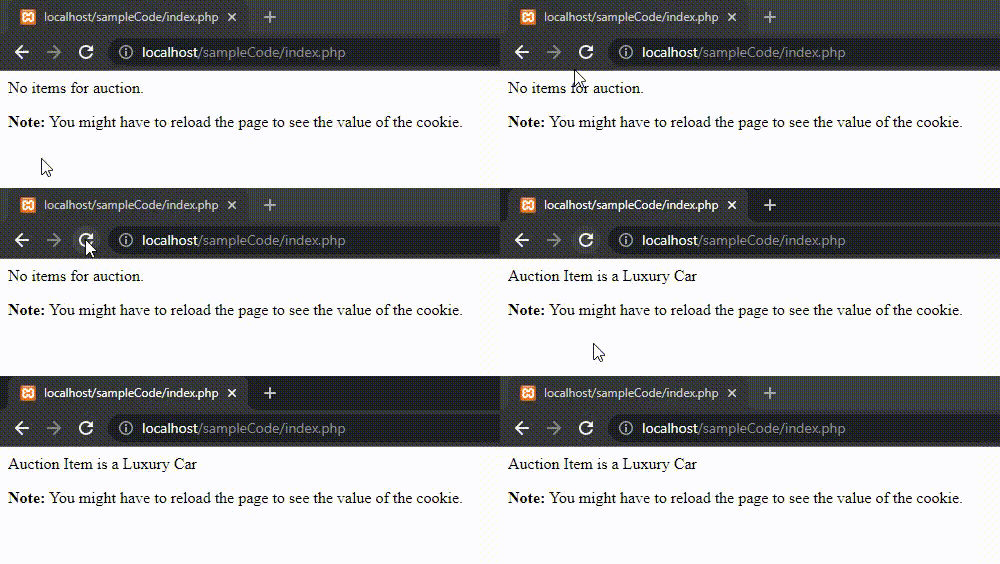
Checking for the cookie to be set
**In this example:
- The setcookie() function is used to create a cookie named "Auction_Item" with the value "Luxury Car". The cookie will expire after 2 days from the current time (time() + 2 * 24 * 60 * 60).
- The isset($_COOKIE["Auction_Item"]) checks if the cookie "Auction_Item" exists. If it exists, it displays the message "Auction Item is a Luxury Car". If the cookie doesn't exist, it displays "No items for auction.".
- Depending on whether the cookie is set, the page will show either the auction item (Luxury Car) or a message indicating there are no items for auction.
- The note explains that the user might have to reload the page to see the value of the cookie because cookies are sent with the next request, which typically requires a page reload.
**3. Accessing Cookie Values
For accessing a cookie value, the PHP $_COOKIE superglobal variable is used. It is an associative array that contains a record of all the cookies values sent by the browser in the current request. The records are stored as a list where the cookie name is used as the key. To access a cookie named "Auction_Item", the following code can be executed.
**Example: This example describes accessing & modifying the cookie value.
PHP `
Note: You might have to reload the page to see the value of the cookie.
`
**Output:

Accessing the Cookie value
**In this example:
- The PHP function setcookie() is used to create a cookie named "Auction_Item" with the value "Luxury Car". The cookie is set to expire after 2 days (time() + 2 * 24 * 60 * 60), meaning it will remain in the user's browser for 2 days.
- The code attempts to display the value of the cookie Auction_Item by using $_COOKIE["Auction_Item"]. This will output the value of the cookie (which is "Luxury Car") on the page if the cookie is set and accessible.
- The note advises the user that they may need to reload the page to see the value of the cookie. This is because cookies are sent with the HTTP request during subsequent page loads, so the value will not be immediately available on the first page load.
- On the initial page load, the cookie is set but not yet sent to the server. Therefore, trying to access the cookie immediately after setting it will result in an undefined value for $_COOKIE["Auction_Item"] on the first request. A page reload is required for the cookie to be available.
- The echo statement outputs the value of the cookie Auction_Item on the page. However, since the cookie is set in the same script, its value will not be available until the page is reloaded.
**4. Deleting Cookies
The setcookie() function can be used to delete a cookie. For deleting a cookie, the setcookie() function is called by passing the cookie name and other arguments or empty strings, however, this time, the expiration date is required to be set in the past. To delete a cookie named "Auction_Item", the following code can be executed.
**Example: This example describes the deletion of the cookie value.
PHP `
Note: You might have to reload the page to see the value of the cookie.
`
**Output:

Deleting the Cookie
**In this example:
- The setcookie() function is used to create a cookie named "Auction_Item" with the value "Luxury Car". The cookie is set to expire in 2 days (time() + 2 * 24 * 60 * 60).
- The setcookie() function is called again, but this time with an empty value for the "Auction_Item" cookie and an expiration time set to 1 minute ago (time() - 60). This effectively deletes the cookie by instructing the browser to remove it.
- The message "cookie is deleted" is displayed on the page using the echo statement, indicating that the cookie has been deleted.
- The note informs the user that they might need to reload the page to see the value of the cookie, which is true for both setting and deleting cookies. After the page reloads, the cookie will be deleted and no longer available.
Use Cases for Cookies
Cookies are used in various scenarios, including:
- **User Authentication: Cookies can be used to keep users logged in between sessions. For example, when a user logs in, a session ID or a token can be stored in a cookie. On later visits, the website can check the cookie and log the user in automatically.
- **User Preferences: Cookies are useful for remembering user settings, such as theme preferences, language settings, or page layout preferences.
- **Shopping Carts: For e-commerce sites, cookies are commonly used to store the contents of a user’s shopping cart. This allows users to continue shopping after they leave the site and return later.
- **Tracking and Analytics: Cookies can be used to track user behavior on a website. This data can be used for analytics or to provide personalized content based on past interactions.