PostgreSQL ALTER SCHEMA (original) (raw)
Last Updated : 15 Jul, 2025
In **PostgreSQL, the **ALTER SCHEMA statement is a powerful tool that allows you to modify the definition of an existing schema. By understanding how to use ALTER SCHEMA effectively is crucial for managing your database schemas. This article will provide a detailed exploration of the ALTER SCHEMA statement, complete with syntax explanations and practical examples to enhance your **PostgreSQLskills.
**Syntax
**ALTER SCHEMA schema_name ACTION xyz;
Let's analyze the above syntax:
- ****'schema_name'**: Specify the name of the schema you want to modify.
- ****'ACTION'**: Define the operation you wish to perform, such as renaming the schema or changing its owner. Common actions include '**RENAME' and '**OWNER TO'.
PostgreSQL ALTER SCHEMA Examples
The **ALTER SCHEMA statement can perform a variety of operations, but two of the most common are renaming a schema and changing its owner. Let’s take some examples of using the ALTER SCHEMA statement to get a better understanding.
**Example 1: Renaming a Schema
This example uses the *ALTER SCHEMA statement to rename the schema '*geeksforgeeks' to 'gfg'**:
**ALTER SCHEMA geeksforgeeks RENAME **TO gfg;
To verify the change use the below statement:
**SELECT * FROM pg_catalog.pg_namespace **ORDER BY nspname;
**Output:
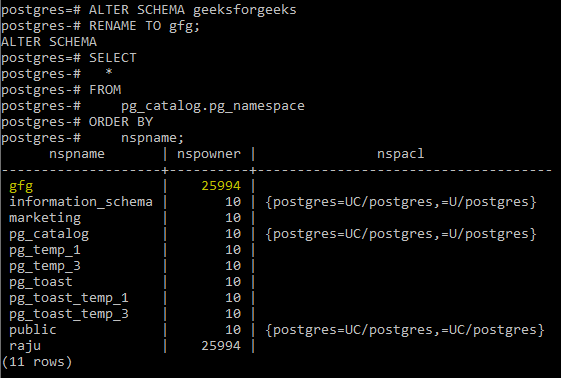
This query will list all schemas, allowing you to confirm that the name change has been applied.
**Example 2: Changing the Owner of a Schema
Another common operation is changing the owner of a schema. For example, if you want to change the owner of the schema '**gfg' from a user named '**Raju' to the default '**postgres' user, you would execute the following command:
**ALTER SCHEMA gfg OWNER **TO postgres;
To verify the change use the below statement:
**SELECT * FROM pg_catalog.pg_namespace **ORDER BY nspname;
**Output:
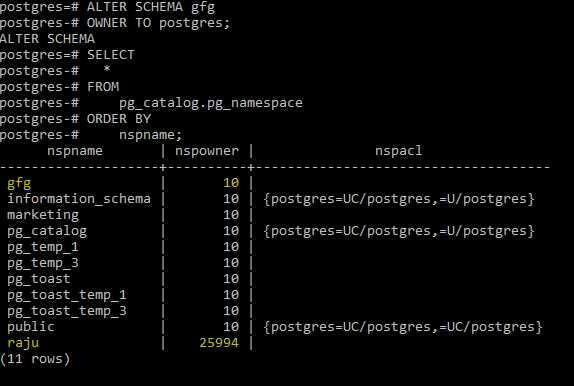
This will show you the updated owner for the schema '**gfg', confirming that the ownership change has been successfully applied.
Important Points About PostgreSQL ALTER SCHEMA Statement
- The **ALTER SCHEMA statement is relatively limited in scope. Unlike **ALTER TABLE, which allows a wide variety of modifications, **ALTER SCHEMA mainly supports renaming the schema and changing its owner.
- Changing the schema owner does not automatically alter the access privileges for the schema. Existing privileges granted to roles or users on the schema remain intact after an ownership change.
- Once a schema has been renamed or its ownership changed, the action cannot be undone through a simple rollback. You'll need to explicitly rename it back or change the owner again if needed.
- If you rename a schema that is included in the database's search path, you’ll need to update the search path accordingly. Failure to do so may result in queries failing because they can no longer find the expected schema.