PostgreSQL CREATE TABLE AS (original) (raw)
Last Updated : 15 Jul, 2025
The **CREATE TABLE AS statement in **PostgreSQL is a powerful tool used to create a new table and populate it with data returned by a query. This functionality allows you to generate tables on the fly based on query results, which can be very useful for reporting, analysis, and other tasks.
Let us better understand the **CREATE TABLE AS statement in **PostgreSQLfrom this article.
**Syntax
**CREATE TABLE new_table_name **AS query;
Parameters
Let's analyze the above syntax:
- **CREATE TABLE new_table_name: First, specify the new table name after the **CREATE TABLE clause.
- **AS query: Finally, provide a query whose result set is added to the new table after the **AS keyword.
Temporary Tables
The '**TEMPORARY' or '**TEMP' keyword allows you to create a temporary table. Temporary tables are automatically dropped at the end of a session or a transaction, making them ideal for transient data that does not need to persist.
**Syntax:
**CREATE TEMP TABLE new_table_name **AS query;
Unlogged Tables
The '**UNLOGGED' keyword creates an unlogged table. Unlogged tables are faster because they do not write data to the write-ahead log, but they are not crash-safe and their contents are lost in the event of a crash.
**Syntax:
**CREATE UNLOGGED TABLE new_table_name **AS query;
Specifying Column Names
The columns of the new table will have the names and associated with the output columns of the clause.If you want the table columns to have different names, you can specify the new table columns after the new table name as below.
**Syntax:
**CREATE TABLE new_table_name ( column_name_list) **AS query;
Using IF NOT EXISTS
In case one wants to avoid an error by creating a new table that already exists, you can use the '**IF NOT EXISTS' option as follows.
**Syntax:
**CREATE TABLE IF NOT EXISTS new_table_name **AS query;
PostgreSQL CREATE TABLE AS Statement Examples
Let us take a look at some of the examples of CREATE TABLE AS Statement in PostgreSQL to better understand the concept. For examples we will be using the sample database (ie, dvdrental).
**Example 1: Creating a Table of Action Films
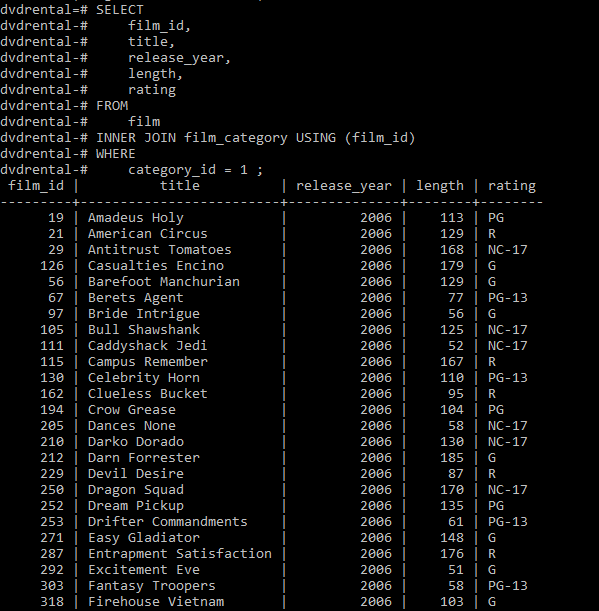
In this example, we will use the '**film' and '**film_category' tables to create a table of action films that belong to category **1.
**CREATE TABLE action_film **AS **SELECT film_id, title, release_year, length, rating **FROM film **INNER JOIN film_category USING (film_id) **WHERE category_id = 1 ;
Now we can verify the new table using the below statement:
**SELECT * FROM action_film **ORDER BY title;
**Output:
**Example 2: Creating a Table with Summary Data
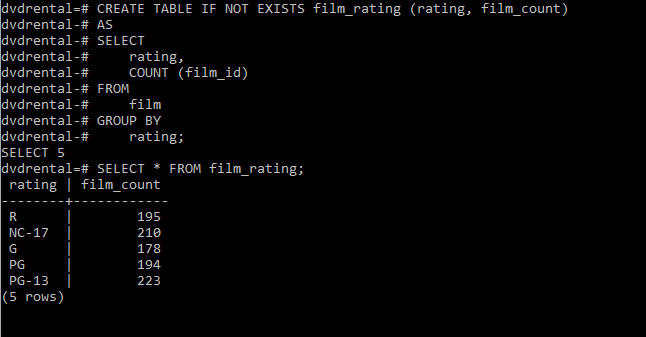
In this example, we will create a new table '**film_rating' and populate it with summary data from the '**film' table.
**CREATE TABLE IF **NOT EXISTS film_rating (rating, film_count) **AS **SELECT rating, **COUNT (film_id) **FROM film **GROUP BY rating;
Now to verify the new table, use the below statement:
**SELECT * FROM film_rating;
**Output:
Important Points About PostgreSQLCREATE TABLE AS Statement
- Use the **TEMPORARY or **TEMP keyword to create a table that exists only for the duration of the session.
- Use the **UNLOGGED keyword to create a table that is not logged in the write-ahead log, offering better performance at the cost of crash-safety.
- Use the **IF NOT EXISTS clause to avoid an error if the table already exists.
- The new table does not inherit indexes or constraints from the source table. These need to be added manually if required.