PostgreSQL DATE_PART Function (original) (raw)
Last Updated : 15 Jul, 2025
Handling **dates and **times efficiently is essential for **data-driven applications, and **PostgreSQL provides powerful **built-in functions for managing and manipulating time-based data. One such function is the DATE_PART() function, which allows us to extract specific **subfields from **date and **timestamp values.
In this article, we will cover the **syntax, common **use cases, and practical **examples of the DATE_PART() function, enabling us to work with **time-related data effectively in **PostgreSQL.
**What is the DATE_PART() Function in PostgreSQL?
The DATE_PART() function is a **PostgreSQL date and time function that extracts a specified subfield (such as year, month, day, or hour) from a given **timestamp or **date. It allows us to query and manipulate time-related data by **isolating individual components from larger date-time values.
The **DATE_PART() function works with timestamps, **dates, and **intervals to provide smaller information about various parts of the time. This can be particularly useful for tasks like **generating reports, aggregating data by specific time units (e.g., by month or by day), and performing **time-based calculations.
**Syntax
DATE_PART(field, source)
**Key Terms
- **field: An identifier specifying which subfield to extract from the source.
- **source: The date or time value from which to extract the subfield.
Permitted Field Values
In the above syntax, the field is an **identifier that is used to set the field to extract the data from the source. The permitted field values are mentioned below:
- **century: Extract the century (e.g., 20th century = 20).
- **decade: Extract the decade (e.g., 1980s = 198).
- **year: Extract the year.
- **month: Extract the month (1–12).
- **day: Extract the day of the month (1–31).
- **hour: Extract the hour (0–23).
- **minute: Extract the minute (0–59).
- **second: Extract the second (0–59).
- **microseconds: Extract the microsecond.
- **milliseconds: Extract the millisecond.
- **dow: Extract the day of the week (0–6, with Sunday as 0).
- **doy: Extract the day of the year (1–366).
- **epoch: Extract the number of seconds since the Unix epoch (1970-01-01 00:00:00 UTC).
- **isodow: Extract the ISO day of the week (1–7, with Monday as 1).
- **isoyear: Extract the ISO year.
- **timezone: Extract the time zone.
- **timezone_hour: Extract the hour part of the time zone.
- **timezone_minute: Extract the minute part of the time zone.
Return Value of DATE_PART()
- The **DATE_PART() function returns a double precision type value.
Examples of PostgreSQL DATE_PART Function
Let us take a look at some of the examples of **DATE_PART Function to better understand the concept. Examples of **PostgreSQL DATE_PART Function help illustrate its **flexibility and how it can be used to **extract specific components from date and time values for more detailed analysis.
**Example 1: Extracting the Century from a Timestamp
In this example, we will use **DATE_PART() function to extract the data regarding the **century from a **timestamp.
**Query:
SELECT date_part('century', TIMESTAMP '2020-01-01');
**Output

**Example 2: Extracting Hour, Minute, and Second from a Timestamp
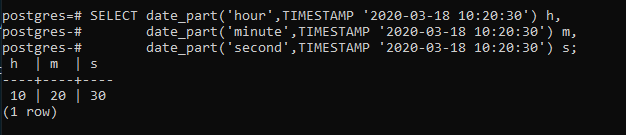
In this example we will extract the **hour, **minute, **second from a **time stamp type value, by passing the corresponding value hour, minute and second to the DATE_PART() function.
**Query:
SELECT date_part('hour', TIMESTAMP '2020-03-18 10:20:30') **h,
date_part('minute', TIMESTAMP '2020-03-18 10:20:30') **m,
date_part('second', TIMESTAMP '2020-03-18 10:20:30') **s;
**Output
**Example 3: Extracting Day of the Week and Day of the Year from a Timestamp
In this example, we will query for the **day of week and **day of the year from a timestamp, through the use of the following statement.
**Query:
SELECT date_part('dow', TIMESTAMP '2020-03-18 10:20:30') dow,
date_part('doy', TIMESTAMP '2020-03-18 10:20:30') doy;
**Output

Important Points About PostgreSQL DATE_PART Function
- **Precision of Return Value: The **DATE_PART function returns a value of type double precision useful for calculations that may involve fractional seconds or other subfields that require precise representation.
- **ISO 8601 Support: The fields
isodow(ISO day of the week) andisoyear(ISO year) allow us to extract date parts based on the **ISO 8601 standard, crucial for international applications or standards compliance. - **Working with Epoch: Using the
epochfield, **DATE_PART can extract the number of seconds since 1970-01-01 00:00:00 UTC (the Unix epoch), facilitating easy conversion between date formats and Unix timestamps. - *Time Zone Extraction: The *DATE_PART function can extract time zone information using fields like '*
timezone'*, 'timezone_hour', and 'timezone_minute'.
Conclusion
The DATE_PART() function in **PostgreSQL is an essential tool for **extracting specific date or time components from a **timestamp or **date value. By using this function, we can easily **manipulate and **analyze time-based data, enabling more precise **reporting and **calculations. Whether we're extracting the **day of the week, epoch time, or **time zone information, **DATE_PART() enhances our ability to work with temporal data in PostgreSQL.