PostgreSQL DROP INDEX (original) (raw)
Last Updated : 15 Jul, 2025
In **PostgreSQL, indexes are essential for improving **query performance but sometimes we may need to remove them when they are no longer effective or necessary. This is where the **DROP INDEX statement comes in. It allows us to delete an existing index from the **database, ensuring that our **PostgreSQL environment remains efficient and optimized.
In this article, we will explain **how to remove an index in PostgreSQL, explain the **DROP INDEX IF EXISTS option, and demonstrate how to use **DROP INDEX CONCURRENTLY for safe index removal. We will also provide **detailed examples to illustrate these concepts.
PostgreSQL - DROP INDEX
The PostgreSQL **DROP INDEX command is used to remove an existing index from a database, freeing up system resources and improving performance. It includes options like **IF EXISTS to prevent errors and **CONCURRENTLY to drop indexes without blocking other operations, making it easier to remove unused or unnecessary indexes without disturbing the database.
**Syntax
DROP INDEX [ CONCURRENTLY ] [ IF EXISTS ] index_name [ CASCADE | RESTRICT ];
Key Terms
**1. index_name: This is the name of the index we want to drop. It is a **mandatory parameter.
**Example:
DROP INDEX idx_actor_first_name;**2. IF EXISTS: Use this option to avoid errors when attempting to drop a **non-existent index. **PostgreSQL will issue a notice instead of an error.
**Example:
DROP INDEX IF EXISTS idx_actor_first_name;**3. CASCADE: Automatically drops any **dependent objects. Use this option when the index has **dependencies that also need to be removed.
**Example:
DROP INDEX idx_actor_first_name CASCADE;**4. RESTRICT: Default behavior that prevents the index from being dropped if there are dependent objects. Use this option to ensure that no dependencies are **unintentionally **removed.
**Example:
DROP INDEX idx_actor_first_name RESTRICT;**5. CONCURRENTLY: Allows the DROP INDEX command to be executed without blocking other transactions. Useful for maintaining high availability and **reducing downtime.
**Example:
DROP INDEX CONCURRENTLY idx_actor_first_name;Important Points for CONCURRENTLY:
- We **cannot use the CASCADE option with
CONCURRENTLY. DROP INDEX CONCURRENTLY**cannot be executed within a transaction block.- It **cannot be used on indexes for **partitioned tables.
Examples of PostgreSQL DROP INDEX
For the purpose of example, we will use the **actor table from the sample database to demonstrate how to manage and remove indexes effectively, ensuring optimal **database performance.
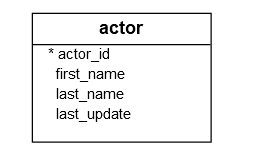
Step 1: Creating an Index
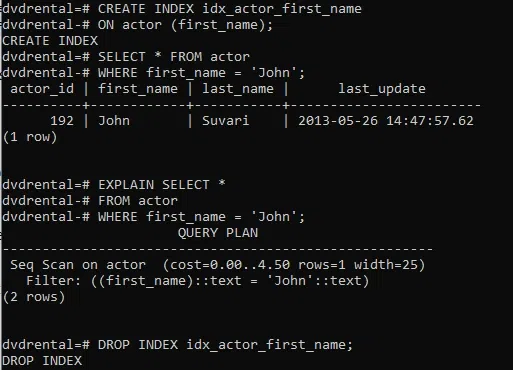
The following statement creates an index for the first_name column of the **actor table. This index will help optimize queries that filter by the **first_name**column.
**Query:
CREATE INDEX idx_actor_first_name
ON actor (first_name);
Step 2: Checking Index Usage
Sometimes, the **PostgreSQL query optimizer may choose not to use an index if it determines that a **sequential scan is more efficient. For example, the following statement finds the actor with the name '**John'.
**Query:
SELECT * FROM actor
WHERE first_name = 'John';
The query did not use the **idx_actor_first_nameindex defined earlier as explained in the following EXPLAIN statement:
EXPLAIN SELECT * FROM actor
WHERE first_name = 'John';
If the **query optimizer decides to perform a full table scan instead of using the **idx_actor_first_name**index, it indicates that the index is not useful for this query.
Step 3: Dropping the Index
If the index is not being used or has become **Outdated, we can safely remove it using the **DROP INDEX command. This will remove the index and improve database performance by reducing unnecessary **overhead.
**Query:
DROP INDEX idx_actor_first_name;
Using IF EXISTS
If we are unsure whether the index exists and want to avoid an error, we can add the **IF EXISTS option:
DROP INDEX IF EXISTS idx_actor_first_name;
Using CONCURRENTLY for Non-blocking Removal
In production environments where downtime is critical, we can use **DROP INDEX CONCURRENTLY to avoid blocking other transactions:
DROP INDEX CONCURRENTLY idx_actor_first_name;
This allows other **SELECT, INSERT, UPDATE, and DELETE operations to continue while the index is being dropped.
Dropping Indexes with Dependencies Using CASCADE
If the index has dependent objects (e.g., unique constraints), we can use the **CASCADE option to automatically drop those objects. However, be careful with **CASCADE, as it will remove all objects that depend on the index.
**Query:
DROP INDEX idx_actor_first_name CASCADE;
**Output
DROP INDEX
Important Points about DROP INDEX statement in PostgreSQL
- The DROP INDEX statement is used to remove an existing index from a **PostgreSQL database.
- Before dropping an index, use the **
EXPLAIN**statement to analyze whether the index is being used by the query optimizer. - To avoid errors during the removal process, use the **
IF EXISTS**option. - Be cautious of dependent objects when using the **
CASCADE**option. - Use the **
CONCURRENTLY**option to minimize the impact on database availability during the index removal.
Conclusion
The **PostgreSQL DROP INDEX command is a powerful tool for managing and optimizing your database. By understanding its various options like **DROP INDEX IF EXISTS, CASCADE, and **CONCURRENTLY, we can efficiently manage and remove indexes without causing errors or disrupting ongoing database operations. Whether we are dropping a single index or multiple indexes, this command ensures that our **PostgreSQL environment stays **efficient and **optimized.