PostgreSQL DROP SCHEMA (original) (raw)
Last Updated : 15 Jul, 2025
**PostgreSQL offers a powerful **schema management system, allowing **database administrators to **organize and **manage objects within specific **schemas. The **DROP SCHEMA statement in PostgreSQL provides a straightforward way to delete entire schemas and the associated objects, making it a **valuable tool for **database maintenance.
In this article, we will explain **how to use the DROP SCHEMA statement in PostgreSQL with **practical examples, **syntax, and key usage tips to enhance our PostgreSQL schema **management skills.
What is DROP SCHEMA in PostgreSQL ?
The **DROP SCHEMA statement in PostgreSQL is used to delete a schema and optionally all objects within it. This command is useful when we want to **reorganize or clean up our database by removing unused schemas or objects within schemas. Schemas act as containers for objects like **tables, **views, **sequences, **functions, and **types, enabling **structured management of these objects
**Syntax
DROP SCHEMA [IF EXISTS] schema_name [CASCADE | RESTRICT];
**Key Terms
- **Schema Name: First, specify the name of the schema from which you want to remove after the DROP SCHEMA keywords.
- **IF EXISTS: Second, use the IF EXISTS option to conditionally delete schema only if it exists.
- **CASCADE: Third, use CASCADE to delete schema and all of its objects, and in turn, all objects that depend on those objects. If you want to delete schema only when it is empty, we can use the **RESTRICT option. By default, PostgreSQL uses **RESTRICT.
Permissions Required for DROP SCHEMA
To execute the DROP SCHEMA statement, we must either be the owner of the schema or a superuser. Ensure we have the necessary permissions before attempting to **drop a schema.
Dropping Multiple Schemas in PostgreSQL
In **PostgreSQL, we can delete multiple schemas at once using a single **DROP SCHEMA statement, which can be helpful for **managing databases with numerous schemas.
**Query:
DROP SCHEMA IF EXISTS schema1, schema2;
**Explanation:
This command removes **schema1**and **schema2**if they exist, ensuring efficient **database maintenance.
Examples of PostgreSQL DROP SCHEMA
Now let's look into some examples of the **DROP SCHEMA Statement in **PostgreSQL to better understand how to use this statement for **schema management and **deletion in various scenarios.
**Example 1: Dropping a Single Schema
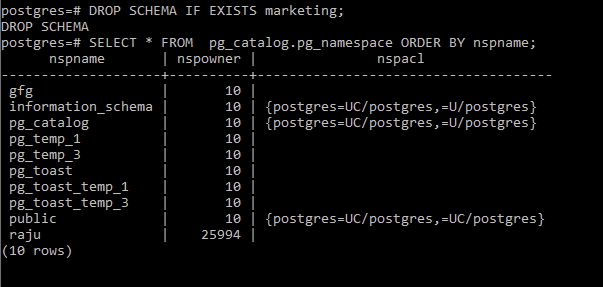
The following example demonstrates how to use the DROP SCHEMA statement to remove the marketing schema from the database.
**Query:
DROP SCHEMA IF EXISTS marketing;
-- Verify the schema removal
SELECT * FROM pg_catalog.pg_namespace ORDER BY nspname;
**Output
**Explanation:
The '**marketing'schema and its objects are deleted, and we can verify its removal using the 'pg_namespace'**catalog table, which lists existing **schemas in the **database
**Example 2: Dropping Multiple Schemas
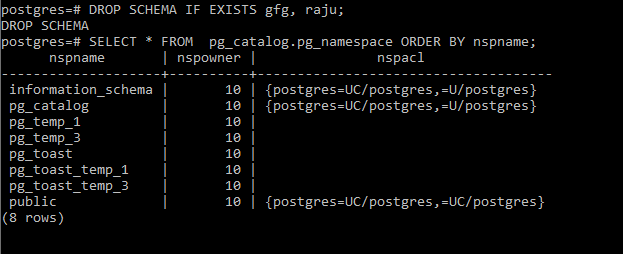
This example shows how to drop multiple schemas ('gfg'and 'raju') using a single **DROP SCHEMA**statement.
**Query:
DROP SCHEMA IF EXISTS gfg, raju;
-- Verify the schema removal
SELECT * FROM pg_catalog.pg_namespace ORDER BY nspname;
**Output
**Explanation
Both '**gfg'and 'raju'schemas are removed, and we can verify their removal using the 'pg_namespace'**catalog table. Dropping multiple schemas at once can **streamline database cleanup processes.
Example 3: Handling Dependencies with CASCADE
When we use the **CASCADE**option, PostgreSQL automatically removes all objects within the schema and any objects that depend on them.
**Query:
DROP SCHEMA marketing CASCADE;
**Output
In this example, all tables, views, and other objects within themarketing schema, along with any **dependent objects, are removed. Be cautious when using **CASCADE since it permanently deletes all **contained and **dependent items.
Important Points About PostgreSQL DROP SCHEMA
- The
DROP SCHEMAcommand in PostgreSQL removes all objects within the schema, such as tables, views, sequences, functions, and types. - Always use the
IF EXISTSoption to prevent errors if the schema does not exist. - Only the owner of the schema or a superuser can drop a schema.
- Use **
CASCADE**with caution, as it will delete all dependent objects, potentially impacting other parts of the database. - PostgreSQL logs schema drop operations. Monitor the logs to track schema deletions and ensure they are authorized.
Conclusion
The **DROP SCHEMA statement is a **powerful tool in PostgreSQL for **schema management, allowing users to delete schemas and their associated objects. Using **IF EXISTS enhances error handling, while **CASCADE enables automatic cleanup of dependencies. Always ensure we have the necessary permissions before dropping schemas to maintain database integrity.