PostgreSQL Rename Database (original) (raw)
Last Updated : 15 Jul, 2025
Renaming a **PostgreSQL database is a simple yet essential task for **developers and **database administrators. Whether we're migrating data, restructuring our database, or just managing our server efficiently, the ability to **rename a PostgreSQL database can **streamline our workflow.
In this article, we will walk through the steps on **how to rename a PostgreSQL database efficiently, both through the **command line and using tools like **cPanel, ensuring a seamless process for **developers and **database administrators.
PostgreSQL Rename Database
**Renaming a PostgreSQL database can be a straightforward operation but requires careful handling, especially when **active connections are involved. The process involves **disconnecting from the database, **terminating active sessions, and using the **ALTER DATABASE statement to change the database name.
This process ensures that the database is correctly renamed without causing any disturbance to the **underlying data or **performance. Understanding the **PostgreSQL rename database procedure is essential for **maintaining a **clean and **organized database environment.
Syntax
ALTER DATABASE old_db_name RENAME TO new_db_name;
**Key Terms
old_db_nameis the current name of the database.new_db_nameis the desired new name of the database.
**Key Points to Remember:
- We cannot rename a database while connected to it.
- We need to **terminate all active connections to the database you wish to rename.
- **ALTER DATABASE is the only command that can rename a database in **PostgreSQL.
**Why Rename a PostgreSQL Database?
Renaming a **PostgreSQL database may be necessary in various scenarios, such as:
- Migrating data between systems
- Changing the database name for clarity or consistency
- Updating our database’s name after **restructuring our application
- **Rebranding our application or project
How to Rename a PostgreSQL Database
In PostgreSQL, the **ALTER DATABASE RENAME TO statement is used to rename a database. The below steps need to be followed while **renaming a database:
- **Disconnect from the database that we want to rename by connecting to a different database.
- **Terminate all connections, connected to the database to be renamed.
- Now we can use the ALTER DATABASE statement to **rename the database.
Examples of Renaming a PostgreSQL Database
Now let's look into the below example to see how to **rename a database in **PostgreSQL. This will help us understand the process step by step and ensure a smooth **renaming operation.
Step 1: Create a Database
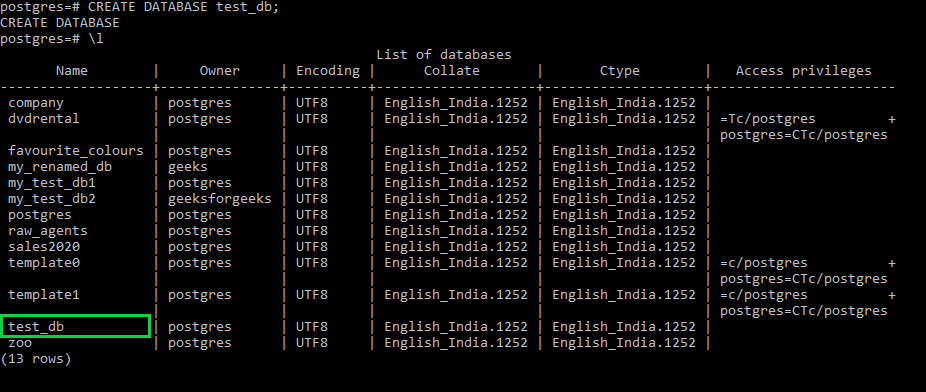
Create a database named "**test_db" using the below commands. This will create a new database named **test_db. Now, let’s rename this database.
**Query:
CREATE DATABASE test_db;
**Output
Step 2: Disconnect from the Database
Now to rename the "**test_db" database, disconnect from that database using the below command and connect to the Postgres database:
**Query:
test_db=# \connect postgres;
**Output

Step 3: Check Active Connections
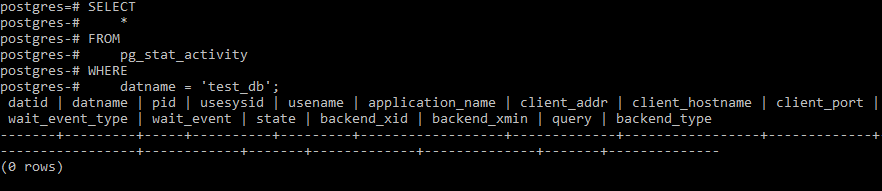
Before **renaming the database, we need to ensure there are **no active connections to test_db. Use the following query to see all connections to the **test_db**database:
**Query:
SELECT
*
FROM
pg_stat_activity
WHERE
datname = 'test_db';
**Output
Step 4: Terminate Active Connections
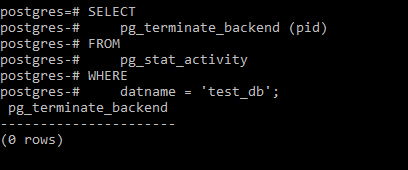
Now, terminate any **active connections to **test_db**using the **pg_terminate_backend**function:
**Query:
SELECT
pg_terminate_backend (pid)
FROM
pg_stat_activity
WHERE
datname = 'test_db';
**Output
**Step 5: Rename the Database
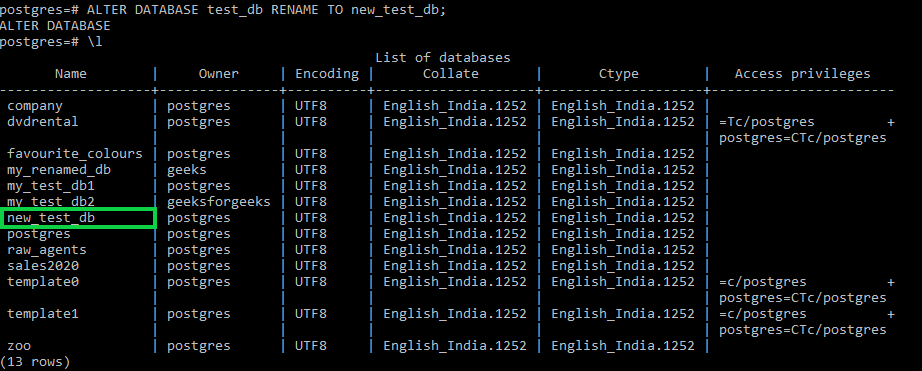
Now use the **ALTER DATABASE RENAME TO statement to rename the database as "**new_test_db"(say) as follows:
**Query:
ALTER DATABASE test_db RENAME TO new_test_db;
**Output
ALTER DATABASE RENAME TO
Conclusion
In conclusion, the **PostgreSQL rename command using the **ALTER DATABASE RENAME TO statement is an efficient way to rename a database in **PostgreSQL. By following the **PostgreSQL database rename process, we can quickly change the name of our databases with minimal disruption. Always ensure that we are not connected to the **target database and that all active connections are terminated before proceeding.