PostgreSQL REVOKE (original) (raw)
Last Updated : 15 Jul, 2025
In **PostgreSQL, the **REVOKE statement plays a crucial role in managing database security by removing previously granted privileges from roles or users.
Let us better understand the **REVOKE Statement in **PostgreSQL from this article.
**Syntax
The following shows the syntax of the REVOKE statement:
**REVOKE privilege | **ALL
**ON TABLE tbl_name | **ALL TABLES **IN SCHEMA schema_name
**FROM role_name;
Let's analyze the above syntax:
- **Privilege: Specify the privileges that are to be revoked. Use the ALL option to revoke all previously granted privileges.
- **Table Specification: Then, set the name of the table after the **ON keyword.
- **Role: Finally, specify the name of the role whose privileges are to be revoked.
**PostgreSQL REVOKE Statement Example
Let us look into an example of **REVOKE statement in **PostgreSQL.
**1. Log into PostgreSQL
First, log into the dvdrental sample database as Postgres:
psql -U postgres -d dvdrental
2. Create a Role
Now initialize a role called '**abhishek' with the **LOGIN and **PASSWORD attributes as shown below:
**CREATE ROLE abhishek
**LOGIN
**PASSWORD 'geeks12345';
3. Grant Privileges
Now grant all privileges on the '**film' table to the role '**abhishek' as shown below:
**GRANT ALL
**ON film
**TO abhishek;
Now provide the **SELECT privilege on the actor table to the role '**abhishek' as shown below:
**GRANT SELECT
**ON actor
**TO abhishek;
4. Revoke Specific Privileges
Here we will revoke the **SELECT privilege on the '**actor' table from the role '**abhishek', as shown below:
**REVOKE SELECT
**ON actor
**FROM abhishek;
5. Revoke All Privileges
If you wish to revoke all privileges on the film table from the role '**abhishek', make use of the **REVOKE statement with the ALL option as shown below:
**REVOKE ALL
**ON film
FROM abhishek;
**Output:
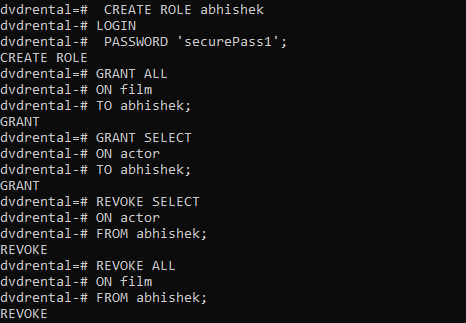
Important Points About PostgreSQL REVOKE Statement
- Revoking privileges does not affect existing data in the database but prevents the role from performing actions (like querying or modifying data) as specified by the revoked privileges.
- The **REVOKE command can only remove privileges that were previously granted to the role.
- If a role has been granted privileges through other roles (i.e., role hierarchies), revoking privileges from the parent role may affect child roles as well.
- If you attempt to revoke privileges that a role does not have, PostgreSQL will not produce an error; the command will simply have no effect.