PostgreSQL Show Databases (original) (raw)
Last Updated : 15 Jul, 2025
In **PostgreSQL, viewing a list of all databases on a server requires specific commands, as it doesn’t support a direct SHOW DATABASES statement like MySQL. Instead, you can use the \l or \l+ commands in psql or query the pg_database view to display all databases.
In this article, we will guide us through various ways to **list databases in PostgreSQL and explore methods to **show all databases efficiently using **psql**commands and **SQL queries.
Ways to List All Databases in PostgreSQL
There are a couple of ways to list all the databases present on a **PostgreSQL server. Understanding these methods is essential for efficient **database management, especially when working with multiple **databases in a development or production environment. In this section, we will explore both **command-line tools and SQL **queries to help us easily access and manage our **databases.
1. Using the pSQL command
To list all the database present in the current **database server use one of the following commands:
**Syntax
\l
or
\l+
**Example:
First log into the PostgreSQL server using the pSQL shell:
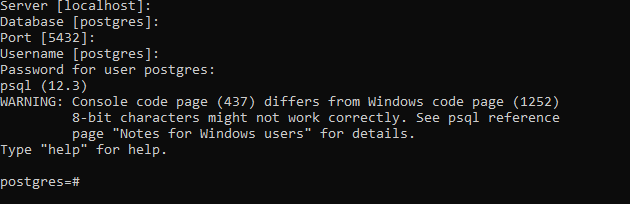
Now use the below command to list all databases using a superuser such as postgres:
\l
**Output

Alternatively one can use the below command:
\l+
**Output

2. Using SELECT statement:
The SELECT statement can also be used to list all the databases present on the server by querying the **pg_database**view.
**Syntax:
SELECT datname FROM pg_database;
**Example
Below is the simple use of the **SELECT statement to list all database present on the server:
SELECT datname FROM pg_database;
**Output
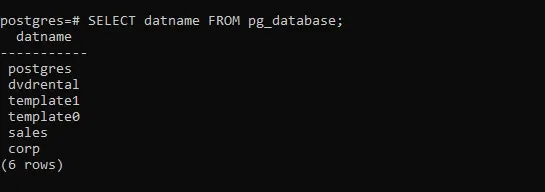
Using SELECT Statement Example
Conclusion
To **display databases in PostgreSQL, the \l command and the **pg_database**view offer reliable options for **listing all databases on a server. By using these methods, we can easily view essential details about each database. Understanding how to **show databases in PostgreSQL with these commands is crucial for efficient database management and exploration. Whether we are a developer or a **database administrator, mastering these commands will enhance our ability to manage **PostgreSQL databases effectively.