PostgreSQL SUM() Function (original) (raw)
Last Updated : 15 Jul, 2025
The **SUM() function in **PostgreSQL is used to calculate the sum of values in a numeric column. This article will guide you through the syntax, important considerations, and practical examples of using the SUM() function in **PostgreSQL.
**Syntax
SUM(column)
The following points need to be kept in mind while using the above function:
- **NULL Values: The **SUM() function ignores all **NULL values in the column.
- **DISTINCT Operator: When used with the '**DISTINCT' operator (e.g., '**SUM(**DISTINCT column)'), it skips duplicate values.
- **SELECT Clause: Using '**SUM()' with a '**SELECT' clause returns '**NULL' instead of zero if there are no matching rows.
PostgreSQL SUM() Function Examples
For example, we will be using the sample database (ie, dvdrental).
Example 1: Calculating Total Amount Paid by Each Customer
In this example, we will calculate the total amount paid by each customer using the **SUM() function combined with the **GROUP BY clause.
**Query:
**SELECT customer_id, SUM (amount) AS total **FROM payment **GROUP BY customer_id;
**Output:
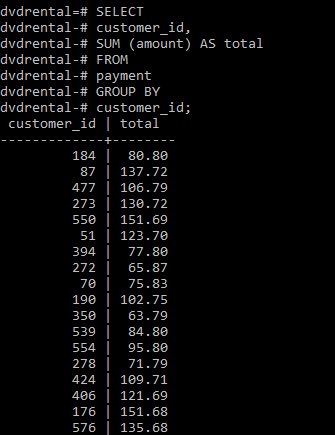
**Explanation: The output will display the '**customer_id' and the total amount paid by each customer.
**Example 2: Top 10 Customers Who Paid the Most
In this example we will query for the top 10 customers who paid the most as follows.
**Query:
**SELECT customer_id, SUM (amount) AS total **FROM payment **GROUP BY customer_id **ORDER BY total **DESC LIMIT 10;
**Output:
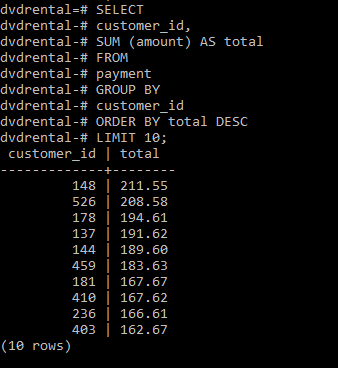
**Explanation: The output will display the '**customer_id' and the total amount paid by the top 10 customers.
Important Points About PostgreSQL SUM() Function
- The **SUM() function automatically ignores **NULL values in the calculation, which ensures that the sum is accurate based on non-null entries.
- When using the **SUM() function on columns with decimal values, the result retains the precision of the column type, ensuring accurate summation of financial or other precise data.
- If the **SUM() function is used with a **SELECT clause and there are no matching rows, it returns **NULL instead of zero.