Power BI DAX Information Functions (original) (raw)
Last Updated : 12 Jun, 2026
Data Analysis Expressions (DAX) is a formula language used in Power BI to perform calculations, create custom measures and analyze data. It helps users derive meaningful insights and enhance reporting capabilities.
- Creates custom measures and calculated columns
- Performs data analysis and calculations
- Helps generate actionable business insights
- Widely used in Power BI data models
DAX Functions
A DAX function is a predefined formula that performs calculations using arguments such as columns, numbers, text or logical values. These arguments must be provided in a specific order and each function applies a defined operation to them.
**Types of DAX Functions:
- Date and Time Functions
- Time Intelligence Functions
- Information Functions
- Logical Functions
- Mathematical and Trigonometric Functions
- Statistical Functions
- Text Functions
- Parent-Child Functions
- Table Functions
DAX Information Functions
DAX Information Functions evaluate a value or expression and return information about its type or status. For example, the ISERROR function returns TRUE if the value contains an error. Below are some DAX Information Functions along with their outputs. Refer to the dataset screenshot for better understanding.
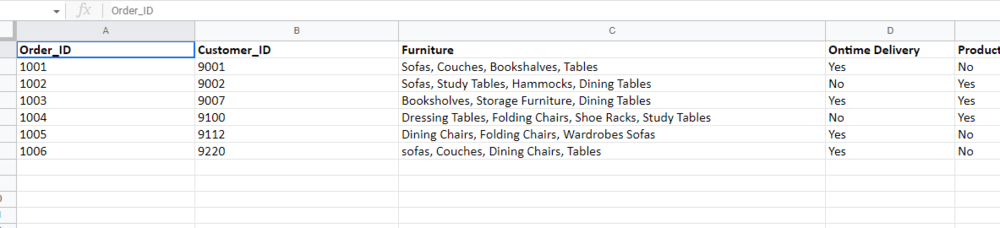
Contains
The function returns TRUE if values exist in all the referenced columns; otherwise, it returns FALSE.
**Syntax: CONTAINS(
, [, ]…)
**Example :
-(1)______________________________.png)
CONTAINS - DAX Information Function
ContainsString
Depending on whether one string contains another, this function returns true or false.
**Syntax: CONTAINSSTRING(, )
**Example:
-(1)-_________________________________________.png)
CONTAINSSTRING- DAX Information Function
ContainsStringExact
Whether one string contains another is indicated by a return value of TRUE or FALSE.
**Syntax: CONTAINSSTRINGEXACT(<within_text>, <find_text>)
**Example:
-(1)______________________________________.jpg)
CONTAINSSTRINGEXACT - DAX Information Function
IsBlank
If the value is blank, this function returns true;
**Syntax: ISBLANK()
**Example:
________________________________.png)
ISBLANK - DAX Information Function
IsNumber
This function determines whether a value is a number before returning either true or false.
**Syntax: ISNUMBER()
**Example:

ISNUMBER - DAX Information Function
**Here is the list of DAX Information Functions:
| Functions | Description | Syntax |
|---|---|---|
| CONTAINS | Verifies if specified values are present in a table. | CONTAINS( |
| CONTAINSROW | Returns statistics for columns in the data model. | CONTAINSROW(, [, ,…]) |
| CONTAINSSTRING | Checks if a text contains another text. | CONTAINSSTRING(, ) |
| CONTAINSSTRINGEXACT | Checks if a text contains another text (case-sensitive). | CONTAINSSTRINGEXACT(<within_text>, <find_text>) |
| CUSTOMDATA | Returns custom connection data. | CUSTOMDATA() |
| HASONEFILTER | Checks if a column has exactly one direct filter. | HASONEFILTER() |
| HASONEVALUE | Checks if only one value exists in the current context. | HASONEVALUE() |
| ISBLANK | If the value is blank, this function returns true; | ISBLANK() |
| ISERROR | Checks if a value contains an error. | ISERROR() |
| ISLOGICAL | Checks if a value is TRUE or FALSE. | ISLOGICAL() |
| ISNUMBER | Checks if a value is numeric. | ISNUMBER() |
| ISNONTEXT | This function determines whether a value is nontext (blanks are treated as non-text), in which case it returns true or false. | ISNONTEXT() |
| ISTEXT | This function determines whether a value is text before returning true or false. | ISTEXT() |
| ISCROSSFILTERED | When columnName or another column in the same or related table is being filtered, this function returns TRUE. | ISCROSSFILTERED() |
| ISEMPTY | verifies whether a table is empty. | ISEMPTY(<table_expression>) |
| ISEVEN | If the number is even, it returns TRUE; otherwise, it returns FALSE. | ISEVEN(number) |
| ISFILTERED | when columnName is being directly filtered, returns TRUE. | ISFILTERED() |
| ISINSCOPE | When a column is the level in a hierarchy of levels, this function returns true. | ISINSCOPE() |
| ISODD | Returns FALSE if the number is even or TRUE if the number is odd. | ISODD() |
| ISSELECTEDMEASURE | Expressions for calculation items use this information to determine whether the measure being referenced is one of the ones listed in the list of measures. | ISSELECTEDMEASURE( M1, M2, ... ) |
| SELECTEDMEASURE | Returns the currently selected measure. | SELECTEDMEASURE() |