2048 Game in Python (original) (raw)
2048 is a popular single-player puzzle game. The goal is to combine tiles with the same number to create a tile with the value 2048. In this guide, we implement the 2048 game in Python using a matrix-based approach without relying on a graphical interface.
The program is divided into two files:
- **logic.py: contains all the game logic functions.
- **2048.py: main driver code that runs the game.
How to play 2048
1. There is a 4*4 grid which can be filled with any number. Initially two random cells are filled with '2' in it. Rest cells are empty.
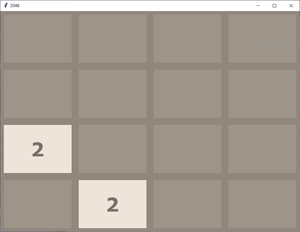
2. Players can press one of the four keys to move tiles:
- W / w – Move Up
- S / s – Move Down
- A / a – Move Left
- D / d – Move Right
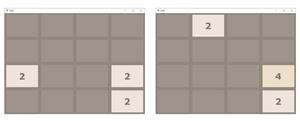
3. After this grid compression any random empty cell gets itself filled with 2.
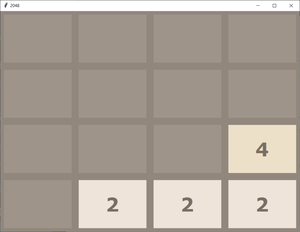
4. Following the above process, we have to double the elements by adding up and make 2048 in any of the cell. If we are able to do that we win.
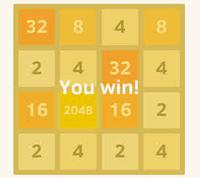
5. But if during the game there is no empty cell left to be filled with a new 2, then the game goes over.
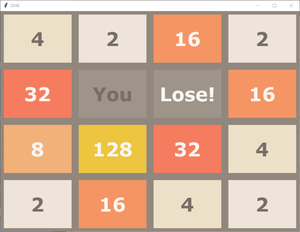
In the above process, snapshots show the graphical interface of the 2048 game. However, all the logic is in the code. To understand it clearly, we can represent the grid as a 4×4 matrix (a list with four rows and four columns) and take input/output directly in the console, without using a GUI.
**Example:
Commands are as follows:
'W' or 'w': Move Up
'S' or 's': Move Down
'A' or 'a': Move Left
'D' or 'd': Move Right
[0, 0, 0, 0]
[0, 0, 0, 0]
[0, 0, 0, 0]
[0, 0, 2, 0]
Press the command: a
GAME NOT OVER
[0, 0, 0, 2]
[0, 0, 0, 0]
[0, 0, 0, 0]
[2, 0, 0, 0]
Press the command: s
GAME NOT OVER
[0, 0, 0, 0]
[0, 0, 0, 0]
[0, 0, 2, 0]
[2, 0, 0, 2]
Press the command: d
GAME NOT OVER
[0, 0, 0, 0]
[0, 0, 0, 0]
[2, 0, 0, 2]
[0, 0, 0, 4]
Press the command: a
GAME NOT OVER
[0, 2, 0, 0]
[0, 0, 0, 0]
[4, 0, 0, 0]
[4, 0, 0, 0]
Press the command: s
GAME NOT OVER
[0, 0, 0, 0]
[0, 0, 0, 0]
[0, 0, 0, 0]
[8, 2, 0, 2]
.
.
.
And the series of input output will go on till we lose or win!
Programming Approach
The game can be logically represented as a 4×4 matrix. Each movement can be broken down into a series of steps:
- **Left swipe: Compress tiles to the left -> Merge identical tiles -> Compress again.
- **Right swipe: Reverse the matrix -> Perform left swipe -> Reverse again.
- **Up swipe: Transpose the matrix -> Perform left swipe -> Transpose back.
- **Down swipe: Transpose the matrix -> Perform right swipe -> Transpose back.
Helper functions like compress(), merge(), reverse(), and transpose() are used to implement these moves.
logic.py
This file contains all the helper functions required for the game logic.
Python `
import random
def start_game(): mat =[] for i in range(4): mat.append([0] * 4)
print("Commands are as follows : ")
print("'W' or 'w' : Move Up")
print("'S' or 's' : Move Down")
print("'A' or 'a' : Move Left")
print("'D' or 'd' : Move Right")

add_new_2(mat)
return mat
def findEmpty(mat):
"""Finds the first empty (0) cell in the grid."""
for i in range(4):
for j in range(4):
if mat[i][j] == 0:
return i, j
return None, None
def add_new_2(mat):
"""Adds a new '2' in a random empty cell in the grid."""
if all(all(cell != 0 for cell in row) for row in mat):
return
tries = 0
while tries < 30:
    r = random.randint(0, 3)
    c = random.randint(0, 3)
    if mat[r][c] == 0:
        mat[r][c] = 2
        return
    tries += 1

r, c = findEmpty(mat)
if r is not None and c is not None:
    mat[r][c] = 2
def get_current_state(mat):
for i in range(4):
    for j in range(4):
        if(mat[i][j]== 2048):
            return 'WON'

for i in range(4):
    for j in range(4):
        if(mat[i][j]== 0):
            return 'GAME NOT OVER'

for i in range(3):
    for j in range(3):
        if(mat[i][j]== mat[i + 1][j] or mat[i][j]== mat[i][j + 1]):
            return 'GAME NOT OVER'

for j in range(3):
    if(mat[3][j]== mat[3][j + 1]):
        return 'GAME NOT OVER'

for i in range(3):
    if(mat[i][3]== mat[i + 1][3]):
        return 'GAME NOT OVER'


return 'LOST'
def compress(mat):
changed = False
new_mat = []
for i in range(4):
    new_mat.append([0] * 4)

for i in range(4):
    pos = 0
    for j in range(4):
        if(mat[i][j] != 0):
            new_mat[i][pos] = mat[i][j]

            if(j != pos):
                changed = True
            pos += 1

return new_mat, changed
def merge(mat):
changed = False

for i in range(4):
    for j in range(3):

        if(mat[i][j] == mat[i][j + 1] and mat[i][j] != 0):

            mat[i][j] = mat[i][j] * 2
            mat[i][j + 1] = 0
            changed = True

return mat, changed
def reverse(mat): new_mat =[] for i in range(4): new_mat.append([]) for j in range(4): new_mat[i].append(mat[i][3 - j]) return new_mat
def transpose(mat): new_mat = [] for i in range(4): new_mat.append([]) for j in range(4): new_mat[i].append(mat[j][i]) return new_mat
def move_left(grid):
new_grid, changed1 = compress(grid)
new_grid, changed2 = merge(new_grid)

changed = changed1 or changed2

new_grid, temp = compress(new_grid)
return new_grid, changed
def move_right(grid):
new_grid = reverse(grid)
new_grid, changed = move_left(new_grid)

new_grid = reverse(new_grid)
return new_grid, changed
def move_up(grid):
new_grid = transpose(grid)
new_grid, changed = move_left(new_grid)
new_grid = transpose(new_grid)
return new_grid, changed
def move_down(grid): new_grid = transpose(grid) new_grid, changed = move_right(new_grid)
new_grid = transpose(new_grid)
return new_grid, changed
`
Code Breakdown:
**1. Game Initialization: start_game()
- Creates a 4×4 grid filled with zeros.
- Places an initial 2 in a random cell.
- Prints the movement controls (W/A/S/D) for the user.
**2. **Random Number Placement: add_new_2(mat)
- Adds a '2' in a random empty cell.
- Uses a loop to retry if the first random placement fails.
**3. Game State Check: get_current_state(mat) Determines the current state of the game.
- Won – 2048 tile is present.
- Ongoing – There are empty cells or possible merges.
- Lost – No moves left.
**4. Movement Mechanics: move_left(grid) Moves tiles to the left.
- Compress (compress()): Shift all numbers to the left.
- Merge (merge()): Combine identical numbers.
- Re-compress: Remove gaps after merging.
- move_right(grid): Reverse the matrix -> move left -> reverse back.
- move_up(grid): Transpose the matrix -> move left -> transpose back.
- move_down(grid): Transpose the matrix -> move right -> transpose back.
**5. Helper Functions
- reverse(mat): Reverses each row of the matrix.
- transpose(mat): Swaps rows and columns (matrix transpose).
2048.py code
This is the main driver file to run the game.
Python `
import logic
if name == 'main': mat = logic.start_game()
while(True):
x = input("Press the command : ")
if(x == 'W' or x == 'w'):

    mat, flag = logic.move_up(mat)
    status = logic.get_current_state(mat)
    print(status)

    if(status == 'GAME NOT OVER'):
        logic.add_new_2(mat)
    else:
        break

elif(x == 'S' or x == 's'):
    mat, flag = logic.move_down(mat)
    status = logic.get_current_state(mat)
    print(status)
    if(status == 'GAME NOT OVER'):
        logic.add_new_2(mat)
    else:
        break

elif(x == 'A' or x == 'a'):
    mat, flag = logic.move_left(mat)
    status = logic.get_current_state(mat)
    print(status)
    if(status == 'GAME NOT OVER'):
        logic.add_new_2(mat)
    else:
        break

elif(x == 'D' or x == 'd'):
    mat, flag = logic.move_right(mat)
    status = logic.get_current_state(mat)
    print(status)
    if(status == 'GAME NOT OVER'):
        logic.add_new_2(mat)
    else:
        break
else:
    print("Invalid Key Pressed")
print(mat)
`
**Output
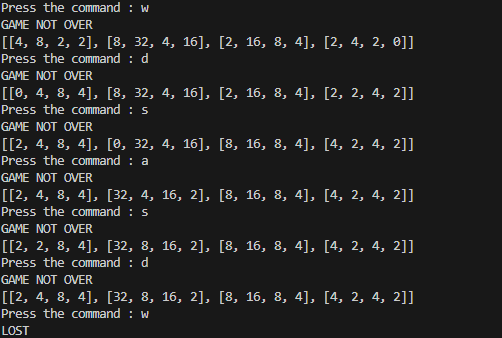
Code Breakdown:
**1. Game Initialization
- mat = logic.start_game() creates a 4×4 grid with all zeros.
- Places the first 2 in a random empty cell.
- Displays movement controls (W/A/S/D).
**2. Game Loop (User Input)
- while True keeps the game running until it ends.
- x = input("Press the command: ") takes movement input (W/A/S/D).
**3. Handling Moves: Executes the corresponding movement function:
- **W / w: logic.move_up(mat)
- **S / s: logic.move_down(mat)
- **A / a: logic.move_left(mat)
- **D / d: logic.move_right(mat)
**4. Updating the Grid and Game State: Grid is updated after the move.
- **status = logic.get_current_state(mat) checks the game state.
- ****"WON":** The player has reached 2048, the game ends.
- ****"GAME NOT OVER":** A new 2 is added to a random empty cell using logic.add_new_2(mat).
- ****"LOST":** No moves left, the game ends.
- The updated grid is printed after each move.
**5. Invalid Input Handling: If the user presses a key other than W/A/S/D or w/a/s/d, the program prints Invalid Key Pressed.