Apply uppercase to a column in Pandas dataframe (original) (raw)
Last Updated : 03 Oct, 2025
In Pandas, you can easily convert all text in a column to uppercase using either the .str.upper() method or .apply() with a lambda function. This helps standardize text data for analysis or reporting.
Load the DataSet:
To download the dataset used in this article, click here
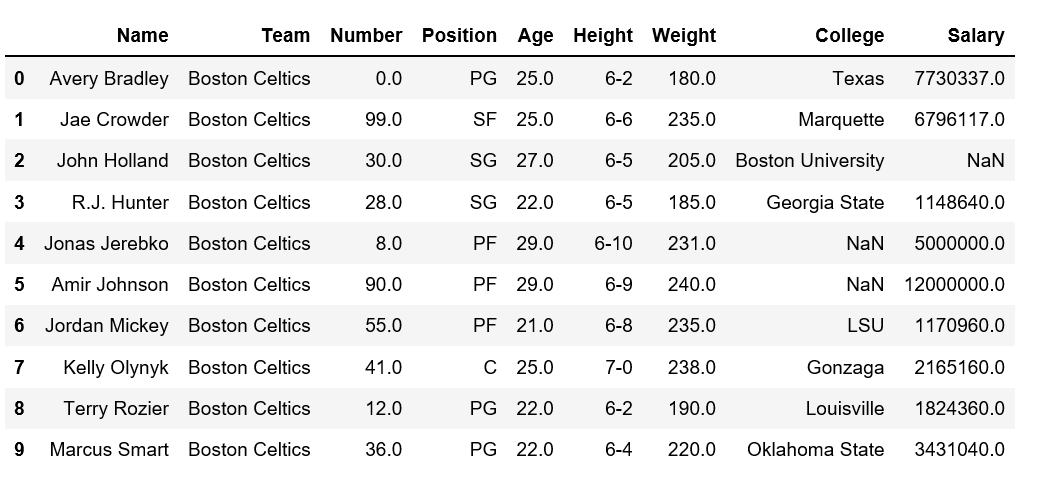
Use .read_csv() method to load the csv file into a dataframe:
Python `
import pandas as pd
df = pd.read_csv(r'enter the path to dataset here') df = data.head(10)
`
Method 1: Using .str.upper()
Python `
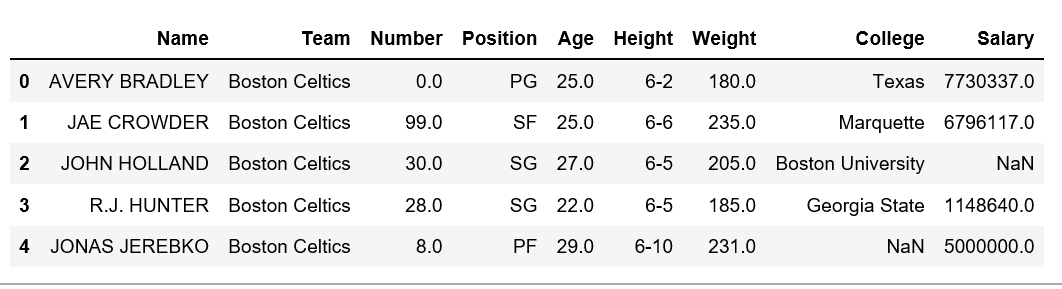
data['Name'] = data['Name'].str.upper()
`
**Output
Method 2: Using apply() with a lambda function
Python `
data.dropna(inplace=True)
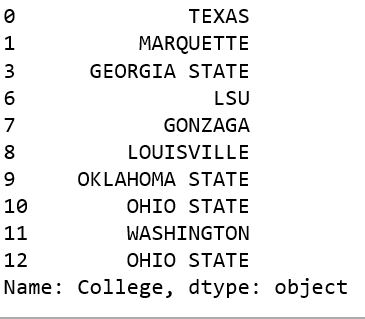
data['College'] = data['College'].apply(lambda x: x.upper())
`
**Output
**Explanation:
- **data.dropna(inplace=True): Removes rows with any missing values to avoid errors.
- **data['College'].apply(lambda x: x.upper()): Converts all entries in the 'College' column to uppercase.