Autocomplete ComboBox in PythonTkinter (original) (raw)
Autocomplete ComboBox in Python-Tkinter
Last Updated : 12 Jul, 2025
Prerequisites: Python GUI – tkinterThe Listbox widget is used to display a list of items from which a user can select a number of items. But have you ever wondered, how to return the list of possible results when a key is pressed? Let's see the following approach towards the same.Working of Program
- List consisting of words is initialized.
- Entry box and Listbox are created and are added to the root window.
- Bind function is used for event handling. Key release event is handled for an Entry field.
- When any key is pressed in the Entry,
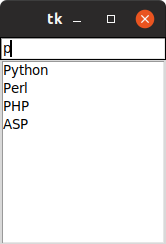
checkkey()function is called. checkkey()function then compares the entered string with existing list keywords and populates Listbox with matching keywords.- Then this data is sent to update function which then updates the Listbox.
Below is the approach.
Python 1== `
from tkinter import *
Function for checking the
key pressed and updating
the listbox
def checkkey(event):
value = event.widget.get()
print(value)

# get data from l
if value == '':
    data = l
else:
    data = []
    for item in l:
        if value.lower() in item.lower():
            data.append(item)

# update data in listbox
update(data)
def update(data):
# clear previous data
lb.delete(0, 'end')

# put new data
for item in data:
    lb.insert('end', item)
Driver code
l = ('C','C++','Java', 'Python','Perl', 'PHP','ASP','JS' )
root = Tk()
#creating text box e = Entry(root) e.pack() e.bind('', checkkey)
#creating list box lb = Listbox(root) lb.pack() update(l)
root.mainloop()
`
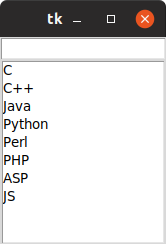
Output: