Build an Application for Screen Rotation Using Python (original) (raw)
Last Updated : 11 Dec, 2022
In this article, we are going to write a python script for screen rotation and implement it with GUI.
The display can be modified to four orientations using some methods from the rotatescreen module, it is a small Python package for rotating the screen in a system.
Installation:
pip install rotate-screen
Approach:
Step 1) Import the required module in the python script.
Python3 `
Import required module
import rotatescreen
`
Step 2) Create an object of rotatescreen.get_primary_display() to access the main screen of the system.
Python3 `
Accessing the main screen
rotate_screen = rotatescreen.get_primary_display()
`
Step 3) Now use various methods to rotate the screen.
- set_landscape(), Rotate Up
- set_portrait_flipped(), Rotate Left
- set_landscape_flipped(), Rotate Down
- set_portrait(), Rotate Right Python3 `
Methods to change orientation
for landscape
rotate_screen.set_landscape()
portrait at left
rotate_screen.set_portrait_flipped()
landscape at down
rotate_screen.set_landscape_flipped()
portrait at right
rotate_screen.set_portrait()
`
Below is the complete program of the above approach along with GUI implementation.
Python3 `
Import required modules
from tkinter import * import rotatescreen
User defined function
for rotating screen
def Screen_rotation(temp): screen = rotatescreen.get_primary_display() if temp == "up": screen.set_landscape() elif temp == "right": screen.set_portrait_flipped() elif temp == "down": screen.set_landscape_flipped() elif temp == "left": screen.set_portrait()
Creating tkinter object
master = Tk() master.geometry("100x100") master.title("Screen Rotation") master.configure(bg='light grey')
Variable classes in tkinter
result = StringVar()
Creating buttons to change orientation
Button(master, text="Up", command=lambda: Screen_rotation( "up"), bg="white").grid(row=0, column=3) Button(master, text="Right", command=lambda: Screen_rotation( "right"), bg="white").grid(row=1, column=6) Button(master, text="Left", command=lambda: Screen_rotation( "left"), bg="white").grid(row=1, column=2) Button(master, text="Down", command=lambda: Screen_rotation( "down"), bg="white").grid(row=3, column=3)
mainloop()
this code belongs to Satyam kumar (ksatyam858)
`
Output:
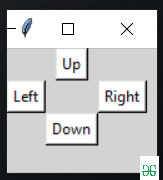
Code Explanation:
- The code starts by importing the required modules.
- The rotatescreen module is used to rotate the screen.
- Then, a user defined function called Screen_rotation() is created and assigned to it.
- This function will be executed when the button "Up" is pressed on the master window of tkinter object.
- Next, variables are declared for storing text and result variable which will hold string values respectively.
- Button objects are then created with different texts and commands assigned to them so that they can change orientation of screen in response to pressing their respective buttons on master window of tkinter object.
- Finally, mainloop() method is called which starts executing all these functions one after another until it reaches its end point where it stops running any more code from this program
- So, the above code is a tkinter program that rotates the screen in various ways.