Count number of Faces using Python OpenCV (original) (raw)
Last Updated : 15 Jul, 2025
Prerequisites: Face detection using dlib and openCV
In this article, we will use image processing to detect and count the number of faces. We are not supposed to get all the features of the face. Instead, the objective is to obtain the bounding box through some methods i.e. coordinates of the face in the image, depending on different areas covered by the number of the coordinates, number faces that will be computed.
Required libraries:
- OpenCVlibrary in python is a computer vision library, mostly used for image processing, video processing, and analysis, facial recognition and detection, etc.
- Dlib library in python contains the pre-trained facial landmark detector, that is used to detect the (x, y) coordinates that map to facial structures on the face.
- Numpyis a general-purpose array-processing package. It provides a high-performance multidimensional array object and tools for working with these arrays.
Below is the step-wise approach to Count the Number of faces:
Step 1: Import required libraries.
Python3 `
Import libraries
import cv2 import numpy as np import dlib
`
Step 2: Open the default camera to capture faces and use the dlib library to get coordinates.
Python3 `
(0) in VideoCapture is used to
connect to your computer's default camera
cap = cv2.VideoCapture(0)
Get the coordinates
detector = dlib.get_frontal_face_detector()
`
Step 3: Count the number of faces.
- Capture the frames continuously.
- Convert the frames to grayscale(not necessary).
- Take an iterator i and initialize it to zero.
- Each time you get the coordinates to the face structure in the frame, increment the iterator by 1.
- Plot the box around each detected face along with its face count. Python3 `
while True:
# Capture frame-by-frame
ret, frame = cap.read()
frame = cv2.flip(frame, 1)

# Our operations on the frame come here
gray = cv2.cvtColor(frame, cv2.COLOR_BGR2GRAY)
faces = detector(gray)

# Counter to count number of faces
i = 0
for face in faces:
    x, y = face.left(), face.top()
    x1, y1 = face.right(), face.bottom()
    cv2.rectangle(frame, (x, y), (x1, y1), (0, 255, 0), 2)

    # Increment the iterartor each time you get the coordinates
    i = i+1

    # Adding face number to the box detecting faces
    cv2.putText(frame, 'face num'+str(i), (x-10, y-10),
                cv2.FONT_HERSHEY_SIMPLEX, 0.7, (0, 0, 255), 2)
    print(face, i)

# Display the resulting frame
cv2.imshow('frame', frame)
`
Step 4: Terminate the loop.
Python3 `
Enter key 'q' to break the loop
if cv2.waitKey(1) & 0xFF == ord('q'): break
`
Step 5: Clear windows.
Python3 `
When everything done, release
the capture and destroy the windows
cap.release() cv2.destroyAllWindows()
`
Below is the complete program of the above approach:
Python3 `
Import required libraries
import cv2 import numpy as np import dlib
Connects to your computer's default camera
cap = cv2.VideoCapture(0)
Detect the coordinates
detector = dlib.get_frontal_face_detector()
Capture frames continuously
while True:
# Capture frame-by-frame
ret, frame = cap.read()
frame = cv2.flip(frame, 1)

# RGB to grayscale
gray = cv2.cvtColor(frame, cv2.COLOR_BGR2GRAY)
faces = detector(gray)

# Iterator to count faces
i = 0
for face in faces:

    # Get the coordinates of faces
    x, y = face.left(), face.top()
    x1, y1 = face.right(), face.bottom()
    cv2.rectangle(frame, (x, y), (x1, y1), (0, 255, 0), 2)

    # Increment iterator for each face in faces
    i = i+1

    # Display the box and faces
    cv2.putText(frame, 'face num'+str(i), (x-10, y-10),
                cv2.FONT_HERSHEY_SIMPLEX, 0.7, (0, 0, 255), 2)
    print(face, i)

# Display the resulting frame
cv2.imshow('frame', frame)

# This command let's us quit with the "q" button on a keyboard.
if cv2.waitKey(1) & 0xFF == ord('q'):
    break
Release the capture and destroy the windows
cap.release() cv2.destroyAllWindows()
`
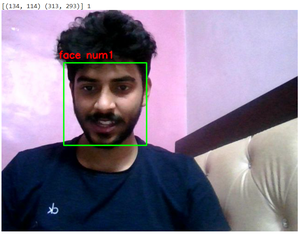
Output: