Count Values in Pandas Dataframe (original) (raw)
Last Updated : 28 Jul, 2025
Counting values in Pandas dataframe is important for understanding the distribution of data, checking for missing values or summarizing data. In this article, we will learn various methods to count values in a Pandas DataFrame.
We will be using a sample DataFrame to learn about various methods:
Python `
import pandas as pd
data = { 'Name': ['Alice', 'Bob', 'Alice', 'Charlie', 'Bob', 'Alice'], 'Age': [25, 30, 25, 35, 30, 25], 'City': ['New York', 'Chicago', 'New York', 'San Francisco', 'Chicago', 'New York'] }
df = pd.DataFrame(data) print(df)
`
**Output:

Dataframe
1. Counting Unique Values in a Column
To count the unique values in a specific column of a DataFrame we can use the nunique() method. This method returns the number of unique values in the column.
Python `
Count unique values in the 'Name' column
unique_names = df['Name'].nunique() print(unique_names)
`
**Output:
3
There are 3 unique names ('Alice', 'Bob' and 'Charlie').
2. Counting Non-Null Values
Pandas provides the count() method to count non-null values in a DataFrame or a specific column. This method excludes NaN values.
Python `
Count non-null values in the 'Age' column
non_null_ages = df['Age'].count() print(non_null_ages)
`
**Output:
6
Here count() tells us that there are 6 non-null entries in the 'Age' column.
3. Counting Missing (Null) Values
To count the number of missing or null values in a DataFrame we can use the isnull() function along with sum(). This combination will return the count of missing values in each column.
Python `
Count missing values in the DataFrame
missing_values = df.isnull().sum() print(missing_values)
`
**Output:
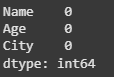
In this example there are no missing values in the DataFrame, as indicated by the zeros in the output. To count missing values in a specific column:
Python `
Count missing values for 'Age' column in the DataFrame
missing_age_values = df['Age'].isnull().sum() print(missing_age_values)
`
**Output:
0
4. Using value_counts() to Count Occurrences
The value_counts() method is frequently used functions for counting values in a Pandas DataFrame. It returns the frequency of unique values in a column ordered by the frequency of occurrences.
Python `
Count values across multiple columns
column_counts = df.apply(pd.Series.value_counts) print(column_counts)
`
**Output:
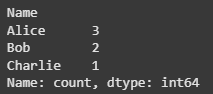
Here we see that 'Alice' appears 3 times, 'Bob' appears twice and 'Charlie' appears once.
5. Handling NaN Values During Counting
By default value_counts() excludes NaN values. If we want to include NaN in the count pass the dropna=False argument:
Python `
Adding a NaN value in the 'City' column at index 2
df.loc[2, 'City'] = np.nan
Include NaN values in the count
nan_included_counts = df['City'].value_counts(dropna=False) print(nan_included_counts)
`
**Output:
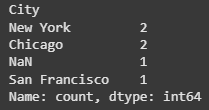
The output shows the count of unique values in the 'City' column including NaN as a distinct value.
6. Count Values by Grouping Data
We can also count values in different groups using the groupby() method. This is useful when we want to count occurrences of values within each category of another column.
Python `
Count occurrences of values in 'Name' column grouped by 'Age'
grouped_counts = df.groupby('Age')['Name'].value_counts() print(grouped_counts)
`
**Output:
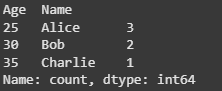
The output displays the count of names within each age group showing how many times each name appears for each age.
What does the value_counts() function return for a column?
- Number of missing values
- Number of unique values
- Frequency of each unique value
- Sum of all values
Explanation:
value_counts() gives the frequency of each unique value in a column.
Which method is used to count the number of missing values in each column?
- df.count()
- df.isnull().sum()
- df.value_counts()
- df.unique()
Explanation:
isnull().sum() counts null values column-wise.
**Which method counts unique values in a column?
- nunique()
- count()
- duplicated()
- unique()
Explanation:
nunique() returns the number of distinct values.

Quiz Completed Successfully
Your Score : 2/3
Accuracy : 0%
Login to View Explanation
1/3
1/3 < Previous Next >