Create a ChatBot with OpenAI and Streamlit in Python (original) (raw)
Last Updated : 23 Jul, 2025
ChatGPT is an advanced chatbot built on the powerful GPT-3.5 language model developed by OpenAI.There are numerous Python Modules and today we will be discussing Streamlit and OpenAI Python API to create a chatbot in Python streamlit. The user can input his/her query to the chatbot and it will send the response.

OpenAI and Streamlit
**Required Modules
pip install openai
pip install streamlit
pip install streamlit-chat
Steps to create a ChatBot with OpenAI and Streamlit in Python
Here we are going to see the steps to use OpenAI in Python with Streamlit to create a chatbot.
**Step 1: Log in to your OpenAI account after creating one.
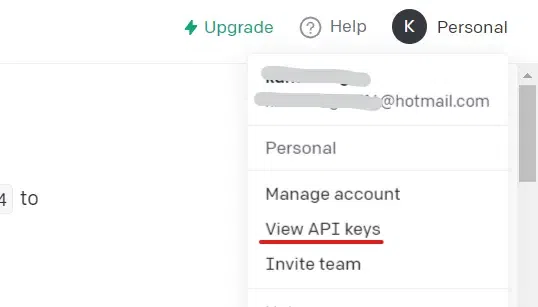
**Step 2: As shown in the figure below, after logging in, select **Personal from the top-right menu, and then select ****"View API keys".**
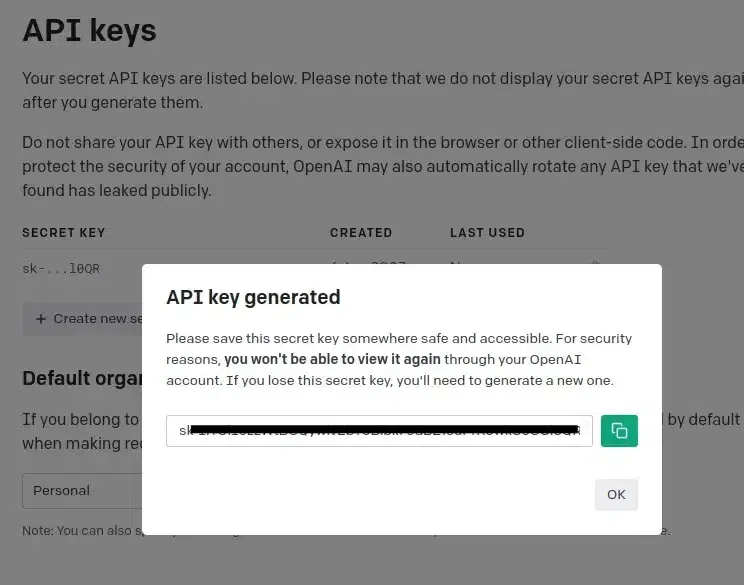
**Step 3: After completing step 2, a page containing API keys is displayed, and the button ****"Create new secret key"** is visible. A secret key is generated when you click on that, copy it and **save it somewhere else because it will be needed in further steps.
Step 4: Import the **openai,**streamlit, and streamlit_chat library, and then do as follows. Store the created key in the below-mentioned variable.
python `
import streamlit as st import openai from streamlit_chat import message openai.api_key = 'API_KEY'
`
**Step 5: Now we define a function to generate a response from ChatGPT using the "**create" endpoint of OpenAI.
Python `
def api_calling(prompt): completions = openai.Completion.create( engine="text-davinci-003", prompt=prompt, max_tokens=1024, n=1, stop=None, temperature=0.5, ) message = completions.choices[0].text return message
`
**Step 6: Now we create the header for the streamlit application and we are defining the user_input and openai_response in the session_state.
Python `
st.title("ChatGPT ChatBot With Streamlit and OpenAI") if 'user_input' not in st.session_state: st.session_state['user_input'] = []
if 'openai_response' not in st.session_state: st.session_state['openai_response'] = []
def get_text(): input_text = st.text_input("write here", key="input") return input_text
user_input = get_text()
if user_input: output = api_calling(user_input) output = output.lstrip("\n")
# Store the output
st.session_state.openai_response.append(user_input)
st.session_state.user_input.append(output)
`
**Step 7: Here we are using the message functions to show the previous chat of the user on the right side and the chatbot response on the left side. It shows the latest chat first. The query input by the user is shown with a different avatar.
Python `
message_history = st.empty()
if st.session_state['user_input']: for i in range(len(st.session_state['user_input']) - 1, -1, -1): # This function displays user input message(st.session_state["user_input"][i], key=str(i), avatar_style="icons") # This function displays OpenAI response message(st.session_state['openai_response'][i], avatar_style="miniavs", is_user=True , key=str(i) + 'data_by_user')
`
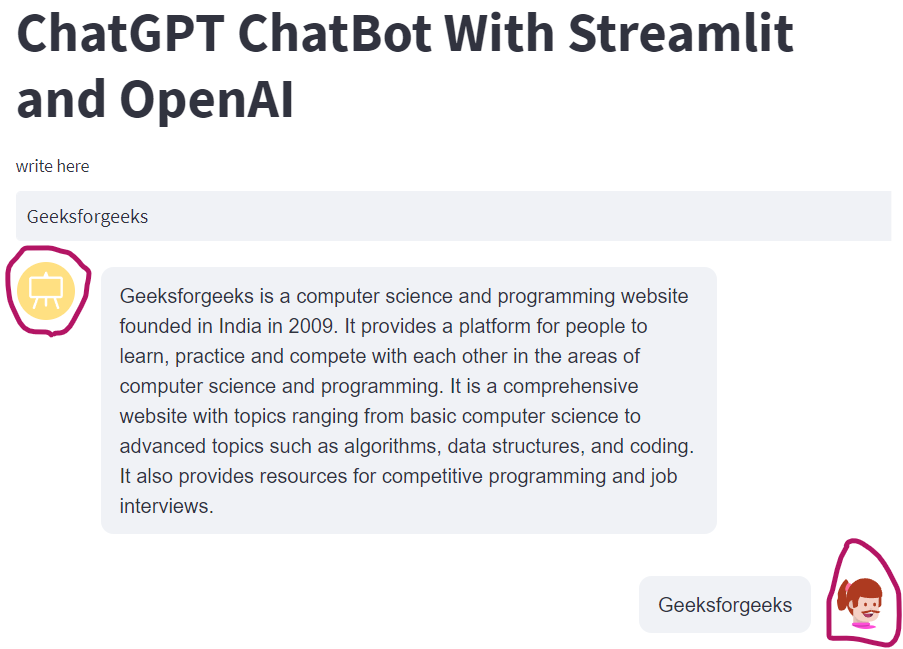
Chat History
**Complete Code :
Python `
import streamlit as st import openai from streamlit_chat import message
openai.api_key = "YOUR_API_KEY"
def api_calling(prompt): completions = openai.Completion.create( engine="text-davinci-003", prompt=prompt, max_tokens=1024, n=1, stop=None, temperature=0.5, ) message = completions.choices[0].text return message
st.title("ChatGPT ChatBot With Streamlit and OpenAI") if 'user_input' not in st.session_state: st.session_state['user_input'] = []
if 'openai_response' not in st.session_state: st.session_state['openai_response'] = []
def get_text(): input_text = st.text_input("write here", key="input") return input_text
user_input = get_text()
if user_input: output = api_calling(user_input) output = output.lstrip("\n")
# Store the output
st.session_state.openai_response.append(user_input)
st.session_state.user_input.append(output)
message_history = st.empty()
if st.session_state['user_input']: for i in range(len(st.session_state['user_input']) - 1, -1, -1): # This function displays user input message(st.session_state["user_input"][i], key=str(i),avatar_style="icons") # This function displays OpenAI response message(st.session_state['openai_response'][i], avatar_style="miniavs",is_user=True, key=str(i) + 'data_by_user')
`