Create a GUI to extract Lyrics from song Using Python (original) (raw)
Last Updated : 15 Jul, 2025
In this article, we are going to write a python script to extract lyrics from the song and bind with its GUI application. We will use **lyrics-extractor to get lyrics of a song just by passing in the song name, it extracts and returns the song's title and song lyrics from various websites. Before starting, install the **lyrics-extractor module. Run this command into your terminal.
pip install lyrics-extractor
Requirements
Need an API Key and Engine ID of Google Custom Search JSON API.
**Engine ID
- Create a Custom Search Engine to get your Engine ID here.
- We have to create our own Programmable Search Engine (Google Custom Search Engine) and add Link to fetch lyrics.
- Programmable Search Engine is based on Google's core search technology.
- It is a search engine for your website and has a task to find information as the user choose.
Choose any link of one to get your search engine:
https://genius.com/
https://lyricsted.com/
http://www.lyricsbell.com/
https://glamsham.com/
http://www.lyricsoff.com/
https://lyricsmint.com/
**JSON API :
- The custom search JSON API is able to retrieve and display search result from Programmable Search Engine.
- To use the custom search JSON API we have to create Programmable Search Engine.
- Visit here to get your API key.
**Approach:
- Import the modules.
from lyrics_extractor import SongLyrics
- Pass the Google Custom Search JSON API key and Engine ID into **SongLyrics().
extract_lyrics = SongLyrics(Your_API_KEY, GCS_ENGINE_ID)
- Get the lyrics by passing the song name as a parameter to **extract_lyrics.get_lyrics() method.
extract_lyrics.get_lyrics("Shape of You")
Below is the implementation.
Python `
importing modules
from lyrics_extractor import SongLyrics
pass the GCS_API_KEY, GCS_ENGINE_ID
extract_lyrics = SongLyrics("AIzaSewfsdfsdfOq0oTixw","frewrewrfsac")
extract_lyrics.get_lyrics("Tujhse Naraz Nahi Zindagi Lyrics")
`
**Output:
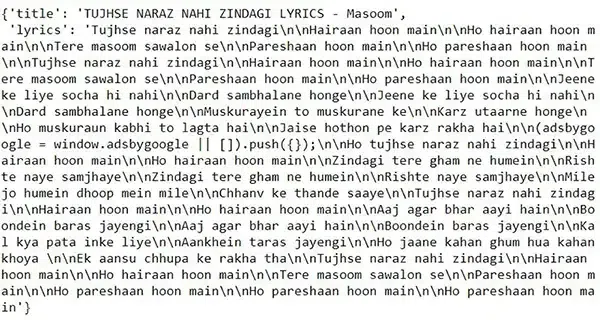
Note: Enter your own API key and engine id otherwise it will generate an error.
**Extract lyrics Application with Tkinter:
Python `
import modules
from tkinter import * from lyrics_extractor import SongLyrics
user defined function
def get_lyrics():
extract_lyrics = SongLyrics(
    "Aerwerwefwdssdj-nvN3Oq0oTixw", "werwerewcxzcsda")

temp = extract_lyrics.get_lyrics(str(e.get()))
res = temp['lyrics']
result.set(res)
object of tkinter
and background set to light grey
master = Tk() master.configure(bg='light grey')
Variable Classes in tkinter
result = StringVar()
Creating label for each information
name using widget Label
Label(master, text="Enter Song name : ", bg="light grey").grid(row=0, sticky=W)
Label(master, text="Result :", bg="light grey").grid(row=3, sticky=W)
Creating label for class variable
name using widget Entry
Label(master, text="", textvariable=result, bg="light grey").grid(row=3, column=1, sticky=W)
e = Entry(master, width=50) e.grid(row=0, column=1)
creating a button using the widget
b = Button(master, text="Show", command=get_lyrics, bg="Blue")
b.grid(row=0, column=2, columnspan=2, rowspan=2, padx=5, pady=5,)
mainloop()
`
Note: Enter your own API key and engine id otherwise it will generate an error.
**Output:
