Delete files older than N days in Python (original) (raw)
Last Updated : 23 Jul, 2025
In this article, we will learn to delete files that are older than a given number of days using Python. This work can be done manually but it is difficult to do when files are more in number, so we will use Python to make this task simple. We will learn three ways to do this task using Python:
- Delete files using OS and time modules
- Delete files using os.walk and DateTime
- Delete files using shutil.rmtree of Shutil Module.
Deleting files using os and time modules
File Structure of directory where code exists.

File Structure of demo directory (this folder will be used for testing code) before running code.

Code Implementation:
Importing the necessary modules and Defining the folder in which the action must be done. The N stands for the number of days. The folder where we need to do the delete operation should be changed to the current working directory. Obtain a list of every file that exists in the specified directory hence Check whether or not each file is older than N days by looping through all of them. Delete any file that is more than N number of days old.
Python3 `
importing required modules
import os import time
folder is the name of the folder in which we
have to perform the delete operation
folder = "demo"
N is the number of days for which
we have to check whether the file
is older than the specified days or not
N = 3
changing the current working directory
to the folder specified
os.chdir(os.path.join(os.getcwd(), folder))
get a list of files present in the given folder
list_of_files = os.listdir()
get the current time
current_time = time.time()
"day" is the number of seconds in a day
day = 86400
loop over all the files
for i in list_of_files: # get the location of the file file_location = os.path.join(os.getcwd(), i) # file_time is the time when the file is modified file_time = os.stat(file_location).st_mtime
# if a file is modified before N days then delete it
if(file_time < current_time - day*N):
    print(f" Delete : {i}")
    os.remove(file_location)
`
Output:

File Structure of demo directory after running code.

Deleting files using os.walk and datetime
File Structure of directory where code exists:
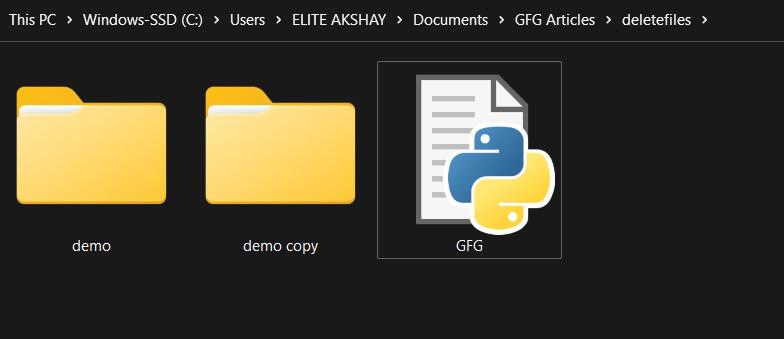
File Structure of demo directory (this folder will be used for testing code) before running code.

Code Implementation:
Import the required modules. Define the folder in which we have to perform the operation. Define the value of N which is the number of days. Define a function to perform the delete operation based on the condition. Loop using os.walk to check all files one by one. Get the modification time of each file using datetime module. If any file is older than N days then delete it.
Python3 `
importing required modules
import os import datetime
folder is the name of the folder in which we have to perform the delete operation
folder = "demo"
N is the number of days for which we have to check whether the file is older than the specified days or not
N = 3
function to perform delete operation based on condition
def check_and_delete(folder):
loop to check all files one by one
os.walk returns 3 things: current path, files in the current path, and folders in the current path
for (root,dirs,files) in os.walk(folder, topdown=True): for f in files: # temp variable to store path of the file file_path = os.path.join(root,f) # get the timestamp, when the file was modified timestamp_of_file_modified = os.path.getmtime(file_path) # convert timestamp to datetime modification_date = datetime.datetime.fromtimestamp(timestamp_of_file_modified) # find the number of days when the file was modified number_of_days = (datetime.datetime.now() - modification_date).days if number_of_days > N: # remove file os.remove(file_path) print(f" Delete : {f}")
call function
check_and_delete(folder)
`
Output:
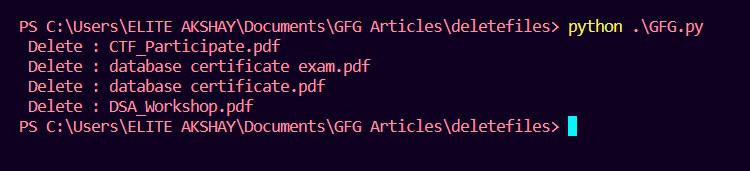
File Structure of demo directory after running code.

Deleting files using shutil.rmtree
File Structure of directory where code exists:
File Structure of demo directory (this folder will be used for testing code) before running code.

Code Implementation:
Import required modules and define the folder in which we have to perform the operation. Define the value of N which is the number of days. Change the current working directory to the folder in which we have to perform the delete operation. Get a list of all files present in the given directory. Loop over all the files and check whether they are older than N days or not. If any file is older than N days then delete it using os.remove(). If any folder is older than N days then delete it using shutil.rmtree().
Python3 `
importing required modules
import os import time import shutil
folder is the name of the folder in which
we have to perform the delete operation
folder = "demo"
N is the number of days for which we have
to check whether the file is older
than the specified days or not
N = 3
changing the current working
directory to the folder specified
os.chdir(os.path.join(os.getcwd(), folder))
get a list of files present in the given folder
list_of_files = os.listdir()
get the current time
current_time = time.time()
"day" is the number of seconds in a day
day = 86400
loop over all the files
for i in list_of_files: # get the location of the file file_location = os.path.join (os.getcwd(), i) # file_time is the time when # the file is modified file_time = os.stat (file_location).st_mtime # if a file is modified before N # days then delete it if(file_time < current_time - day*N): print(f" Delete : {i}") # if it is a file then # delete using os.remove if os.path.isfile(file_location): os.remove(file_location) # if it is a folder then delete # using shutil.rmtree elif os.path.isdir(file_location): shutil.rmtree(file_location)
`
Output:

File Structure of demo directory after running code.
