Different Types of Joins in Pandas (original) (raw)
Last Updated : 23 Jul, 2025
The Pandas module contains various features to perform various operations on Dataframes like join, concatenate, delete, add, etc. In this article, we are going to discuss the various types of join operations that can be performed on PandasDataframe. There are five types of Joins in Pandas.
- Inner Join
- Left Outer Join
- Right Outer Join
- Full Outer Join or simply Outer Join
- Index Join
To understand different types of joins, we will first make two DataFrames, namely **a and b.
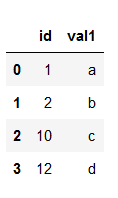
**Dataframe a:
Python3 `
importing pandas
import pandas as pd
Creating dataframe a
a = pd.DataFrame()
Creating Dictionary
d = {'id': [1, 2, 10, 12], 'val1': ['a', 'b', 'c', 'd']}
a = pd.DataFrame(d)
printing the dataframe
a
`
**Output:
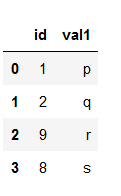
**DataFrame b:
Python3 `
importing pandas
import pandas as pd
Creating dataframe b
b = pd.DataFrame()
Creating dictionary
d = {'id': [1, 2, 9, 8], 'val1': ['p', 'q', 'r', 's']} b = pd.DataFrame(d)
printing the dataframe
b
`
**Output:
Types of Joins in Pandas
We will use these two Dataframes to understand the different types of joins.
Pandas **Inner Join
Inner join is the most common type of join you’ll be working with. It returns a Dataframe with only those rows that have common characteristics. This is similar to the intersection of two sets.

**Example:
Python3 `
importing pandas
import pandas as pd
Creating dataframe a
a = pd.DataFrame()
Creating Dictionary
d = {'id': [1, 2, 10, 12], 'val1': ['a', 'b', 'c', 'd']}
a = pd.DataFrame(d)
Creating dataframe b
b = pd.DataFrame()
Creating dictionary
d = {'id': [1, 2, 9, 8], 'val1': ['p', 'q', 'r', 's']} b = pd.DataFrame(d)
inner join
df = pd.merge(a, b, on='id', how='inner')
display dataframe
df
`
**Output:

Pandas **Left Join
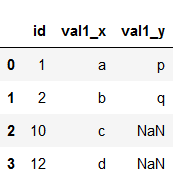
With a left outer join, all the records from the first Dataframe will be displayed, irrespective of whether the keys in the first Dataframe can be found in the second Dataframe. Whereas, for the second Dataframe, only the records with the keys in the second Dataframe that can be found in the first Dataframe will be displayed.
 **Example:
Python3 `
importing pandas
import pandas as pd
Creating dataframe a
a = pd.DataFrame()
Creating Dictionary
d = {'id': [1, 2, 10, 12], 'val1': ['a', 'b', 'c', 'd']}
a = pd.DataFrame(d)
Creating dataframe b
b = pd.DataFrame()
Creating dictionary
d = {'id': [1, 2, 9, 8], 'val1': ['p', 'q', 'r', 's']} b = pd.DataFrame(d)
left outer join
df = pd.merge(a, b, on='id', how='left')
display dataframe
df
`
**Output:
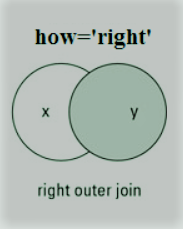
Pandas **Right Outer Join
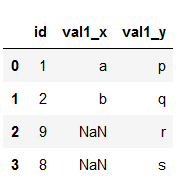
For a right join, all the records from the second Dataframe will be displayed. However, only the records with the keys in the first Dataframe that can be found in the second Dataframe will be displayed.
**Example:
Python3 `
importing pandas
import pandas as pd
Creating dataframe a
a = pd.DataFrame()
Creating Dictionary
d = {'id': [1, 2, 10, 12], 'val1': ['a', 'b', 'c', 'd']}
a = pd.DataFrame(d)
Creating dataframe b
b = pd.DataFrame()
Creating dictionary
d = {'id': [1, 2, 9, 8], 'val1': ['p', 'q', 'r', 's']} b = pd.DataFrame(d)
right outer join
df = pd.merge(a, b, on='id', how='right')
display dataframe
df
`
**Output:
Pandas **Full Outer Join
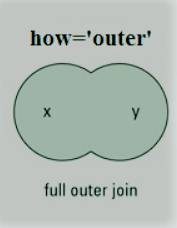
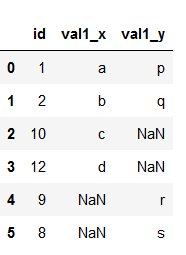
A full outer join returns all the rows from the left Dataframe, and all the rows from the right Dataframe, and matches up rows where possible, with NaNs elsewhere. But if the Dataframe is complete, then we get the same output.
**Example:
Python3 `
importing pandas
import pandas as pd
Creating dataframe a
a = pd.DataFrame()
Creating Dictionary
d = {'id': [1, 2, 10, 12], 'val1': ['a', 'b', 'c', 'd']}
a = pd.DataFrame(d)
Creating dataframe b
b = pd.DataFrame()
Creating dictionary
d = {'id': [1, 2, 9, 8], 'val1': ['p', 'q', 'r', 's']} b = pd.DataFrame(d)
full outer join
df = pd.merge(a, b, on='id', how='outer')
display dataframe
df
`
**Output:
**Pandas Index Join
To merge the Dataframe on indices pass the _left_index and _right_index arguments as True i.e. both the Dataframes are merged on an index using default Inner Join.
Python3 `
importing pandas
import pandas as pd
Creating dataframe a
a = pd.DataFrame()
Creating Dictionary
d = {'id': [1, 2, 10, 12], 'val1': ['a', 'b', 'c', 'd']}
a = pd.DataFrame(d)
Creating dataframe b
b = pd.DataFrame()
Creating dictionary
d = {'id': [1, 2, 9, 8], 'val1': ['p', 'q', 'r', 's']} b = pd.DataFrame(d)
index join
df = pd.merge(a, b, left_index=True, right_index=True)
display dataframe
df
`
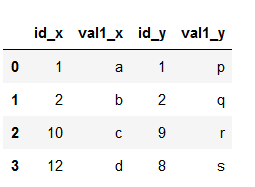
**Output: