Erosion and Dilation of images using OpenCV in Python (original) (raw)
Last Updated : 12 Jun, 2026
Morphological operations process images based on the arrangement of neighboring pixels. Erosion and dilation are two fundamental techniques used to modify object boundaries, remove noise, fill gaps, and refine shapes in binary and grayscale images.
- Boundary Refinement: Modify object size and shape by shrinking or expanding regions.
- Noise Reduction: Remove small unwanted regions and improve image quality.
Erosion
Erosion shrinks foreground regions by removing pixels from object boundaries. It is commonly used to eliminate small white noise, separate connected objects, and reduce the size of foreground features in an image.
**Code Implementation:
Used image can be downloaded from here.

- Create a 5×5 kernel that defines the neighborhood used for the erosion operation.
- Apply
cv2.erode()to remove pixels from object boundaries, reducing the size of foreground regions and eliminating small white noise. - Display the processed image to observe the effect of boundary shrinking. Python `
import cv2 import numpy as np import matplotlib.pyplot as plt
img = cv2.imread('input.png', 0)
kernel = np.ones((5, 5), np.uint8)
img_erosion = cv2.erode(img, kernel, iterations=1)
plt.figure(figsize=(10, 5))
plt.subplot(1, 2, 1) plt.imshow(img, cmap='gray') plt.title("Original Image") plt.axis('off')
plt.subplot(1, 2, 2) plt.imshow(img_erosion, cmap='gray') plt.title("After Erosion") plt.axis('off')
plt.tight_layout() plt.show()
`
**Output:
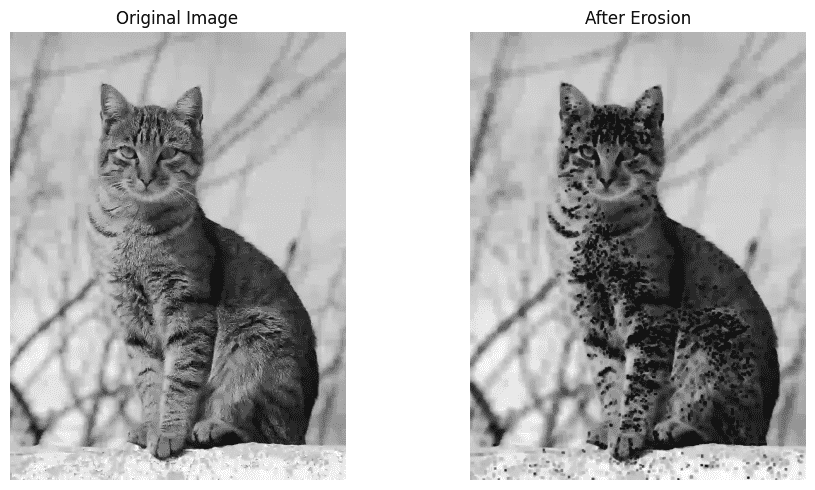
The output image contains thinner foreground regions because pixels along object boundaries are removed.
Dilation
Dilation expands foreground regions by adding pixels to object boundaries. It is commonly used to fill small gaps, connect nearby objects, and enhance the visibility of foreground features.
**Code Implementation:
- Create a 5×5 kernel that defines the neighborhood used for the dilation operation.
- Apply
cv2.dilate()to add pixels around object boundaries, increasing the size of foreground regions and filling small gaps. - Display the processed image to observe the effect of boundary expansion. Python `
import cv2 import numpy as np import matplotlib.pyplot as plt
img = cv2.imread('input.png', 0)
kernel = np.ones((5, 5), np.uint8)
img_dilation = cv2.dilate(img, kernel, iterations=1)
plt.figure(figsize=(10, 5))
plt.subplot(1, 2, 1) plt.imshow(img, cmap='gray') plt.title("Original Image") plt.axis('off')
plt.subplot(1, 2, 2) plt.imshow(img_dilation, cmap='gray') plt.title("After Dilation") plt.axis('off')
plt.tight_layout() plt.show()
`
**Output:
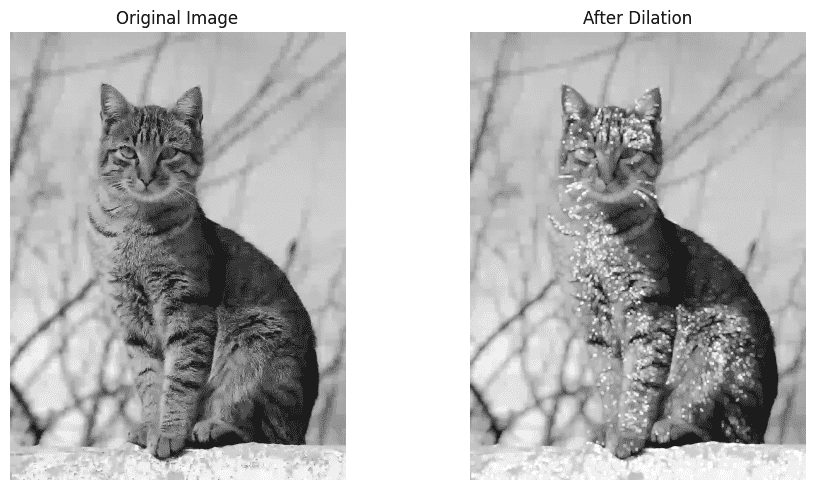
The output displays the original image alongside the dilated image, where foreground regions appear larger due to the addition of boundary pixels.
**Difference Between Erosion and Dilation
| Feature | Erosion | Dilation |
|---|---|---|
| Main Purpose | Shrinks foreground objects | Expands foreground objects |
| Visual Effect | Objects appear smaller and thinner | Objects appear larger and thicker |
| Edge Behavior | Removes pixels from object boundaries | Adds pixels to object boundaries |
| Noise Handling | Removes small white noise and unwanted details | Fills small gaps and holes in objects |
| Applications | Noise removal, object separation, boundary refinement | Gap filling, object enhancement, object connection |