Extracting patches from large images using Python (original) (raw)
Last Updated : 23 Jul, 2025
In this article, we are going to look at how we can extract patches from large images in Python. We will be using the patchify library to extract patches from images. Patchy is a Python library that can split images into small overlap able patches by given patch cell size, and merge patches into the original images. We prefer to utilize small photos while training any deep learning system because they yield superior results. You can install the patchify library using the pip command:
pip install patchify
For the purposes of this article, we are going to work with the following image:

Step 1: Let's first start by importing the necessary libraries. The following code imports all the necessary libraries:
Python3 `
import urllib.request from PIL import Image import numpy as np from patchify import patchify
`
Step 2: We are using the urllib library to load the image directly from a link. The following code loads the image in the environment:
Python3 `
urllib.request.urlretrieve( 'https://media.geeksforgeeks.org/wp-content/uploads/20221123162339/gfg300x300.png', "gfg.png")
img = (Image.open("gfg.png"))
We can display the image
display(img)
`
Output:

Step 4: Printing the size of the image.
Python3 `
img_arr = np.asarray(img) print(img_arr.shape)
`
Output:
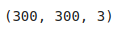
Step 5: Now let's create patches of sizes (250,250,3). To create patches, I am going to use the patchify function from the patchify library. This method splits the method into small images. It has the following syntax:
patchify(imageToPatch,patchSize,step)
Parameter:
- imageToPatch: The original image which needs to be patched.
- patchSize: The size of each patch image.
- step: The step size.
The following code patches the original image into patches of sizes (250,250,3).
Python3 `
patches=patchify(img_arr,(250,250,3)) print(patches.shape)
`
Output:

Step 6: We can display the first patch image. Similarly, you can split the image into patches of different sizes.
Python3 `
patch_img_arr=patches[0,0,0,:,:,:] patch_img=Image.fromarray(patch_img_arr) display(patch_img)
`
Output:
