FastAPI Response Model (original) (raw)
Last Updated : 11 May, 2026
The response_model acts as a security gate and a data formatter between the internal logic (database, raw data) and the outside logic. Its main features are:
- **Data Filtering: removes extra fields returned by your database automatically, that shouldn't be public.
- **Type Conversion: Automatically converts data types (e.g., a UUID object or a Datetime object becomes a standard string in the JSON).
- **Documentation: Your models are automatically reflected in the /docs (Swagger UI), creating a clear contract for frontend developers.
- **Validation: If the returned data does not match the defined model (for example, None instead of a string), FastAPI raises a server error instead of returning invalid data to the client.
Without a response model, an API may expose sensitive data such as hashed passwords, internal IDs, or timestamps. Defining a response model restricts the output to specified fields, ensuring only intended data is returned to the client.
Implementation Guide
**1. Define Your Schemas: It is a better practice to separate your Input model (what the user sends) from your Output model (what the user sees).
Python `
from fastapi import FastAPI from pydantic import BaseModel, EmailStr
app = FastAPI()
Internal 'Database' representation (contains sensitive info)
class UserInDB(BaseModel): username: str hashed_password: str email: EmailStr is_active: bool = True
Public 'Response' representation (hides the password)
class UserOut(BaseModel): username: str email: EmailStr
`
**2. Apply the response_model: You apply the model in the path operation decorator, not in the function signature.
Python `
@app.post("/users/", response_model=UserOut) async def create_user(user: UserInDB): # Even though we return the full UserInDB (with hashed_password), # FastAPI will filter it and only return what is in UserOut. return user
`
**Input:
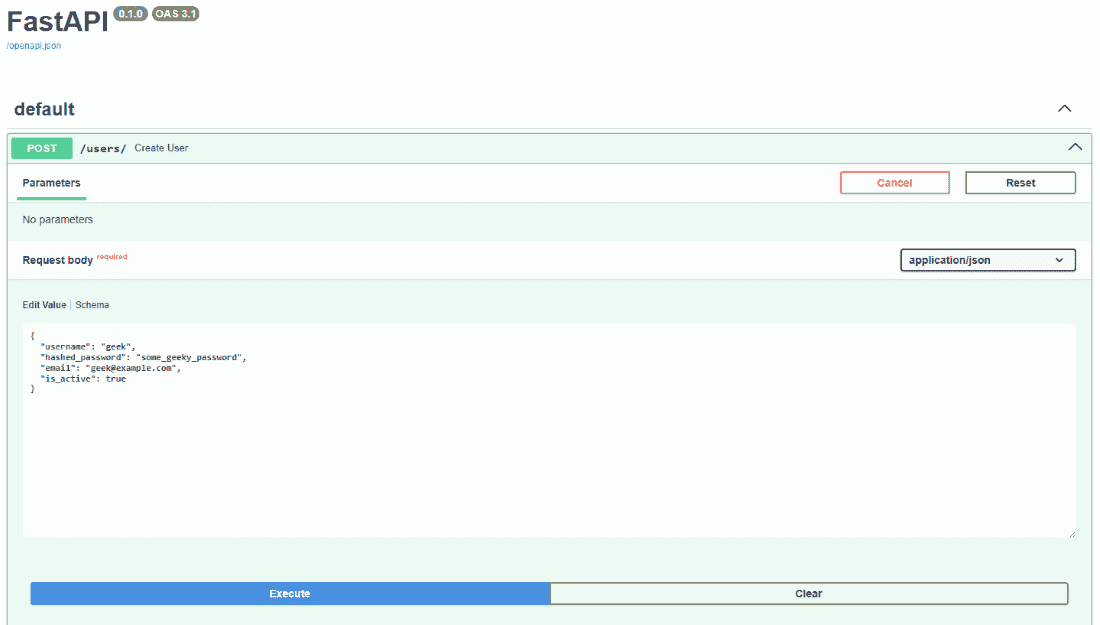
Request
**Output:
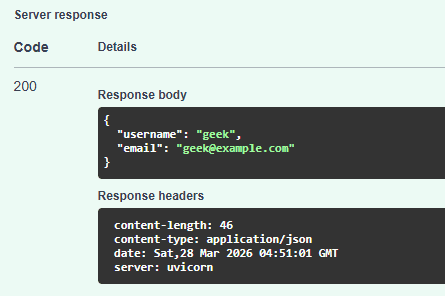
Response
Advanced Control: Filtering Defaults
We can hide fields that haven't been changed or are empty (if required) by using the following decorator parameters:
| Parameter | Effect |
|---|---|
| response_model_exclude_unset | Only includes fields that were actually set in the code. |
| response_model_exclude_none | Removes any field with a null value from the final JSON. |