Fetch Unseen Emails From Gmail Inbox (original) (raw)
Last Updated : 15 Jul, 2025
Python is a widely used high-level, general-purpose, interpreted, multi-utility, dynamic programming language. It can be used to do a wide range of tasks like machine learning, web application development, cross-platform GUI development, and much more. Fetching Gmail is another of a task that could be achieved by Python. You may need to fetch a mail from your inbox in your project or website for any reason. In this tutorial, we'll learn about how to fetch unseen emails from Gmail Inbox/Sent Mails.
To begin, we will be required an app password that is generated by Google Security, since using Password cannot be secure using in some projects or scripts directly.
How to Generate App Password :
- Go to account.google.com with your account.
- In left tabs, choose Security.
- Under Signing into Google, Choose App Password.
- Confirm your identity.
- Choose Custom.
- Choose any name for your Application and Generate the Password.
- That's your App Password. Copy the password, we'll be needing that.
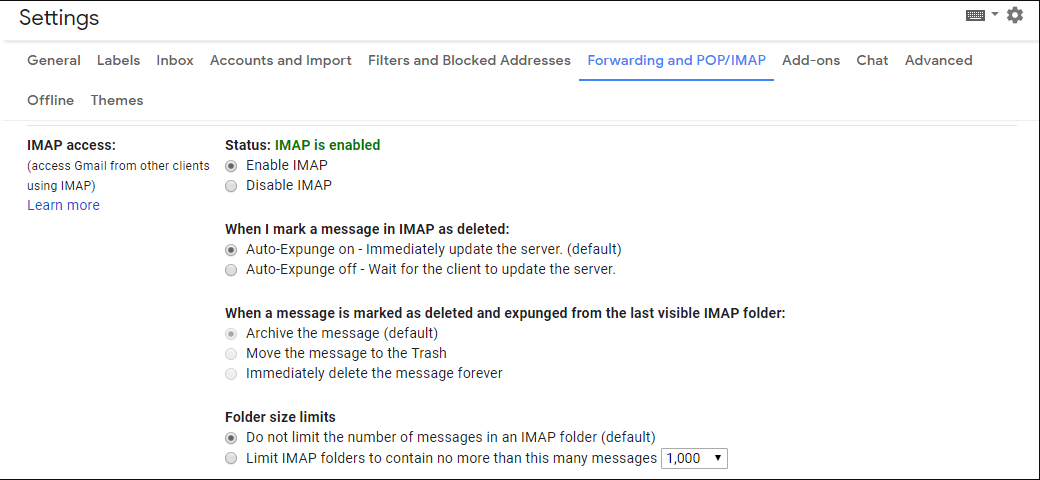
You'll also need to Enable IMAP in the Google Settings.
The Library you'll use are :
- imaplib
- webbrowser
- os
That's all for the prerequisite. Let's see the code now.
Python3 `
import required libraries
import imaplib import email from email.header import decode_header import webbrowser import os
use your email id here
username = ""
use your App Password you
generated above here.
password = ""
create a imap object
imap = imaplib.IMAP4_SSL("imap.gmail.com")
login
result = imap.login(username, password)
Use "[Gmail]/Sent Mails" for fetching
mails from Sent Mails.
imap.select('"[Gmail]/All Mail"', readonly = True)
response, messages = imap.search(None, 'UnSeen') messages = messages[0].split()
take it from last
latest = int(messages[-1])
take it from start
oldest = int(messages[0])
for i in range(latest, latest-20, -1): # fetch res, msg = imap.fetch(str(i), "(RFC822)")
for response in msg:
    if isinstance(response, tuple):

       msg = email.message_from_bytes(response[1])
       # print required information
       print(msg["Date"])
       print(msg["From"])
       print(msg["Subject"])

for part in msg.walk():
    if part.get_content_type() == "text / plain":
        # get text or plain data
        body = part.get_payload(decode = True)
        print(f'Body: {body.decode("UTF-8")}', )
`
Output: This code will fetch you the top 20 unseen emails in the inbox.


