Flask HTTP Method (original) (raw)
Last Updated : 20 May, 2026
HTTP methods define how a client (browser) interacts with a server in a web application. They are used to handle different types of requests like fetching data, sending data or updating resources. Common HTTP Methods are:
- GET request data from the server.
- POST submit data to be processed to the server.
- PUT replaces the entire resource with new data. If it doesn’t exist, a new one is created.
- PATCH updates only specific parts of a resource without replacing the whole thing.
- DELETE deletes the data on the server at a specified location.
GET Method
GET method is used to request data from a server. It appends data to the URL in a name-value pair format. It should not be used for sensitive data since URLs are visible in browser history.
**Example: We'll build a Flask app that takes a number as input, calculates its square and displays the result. Our app will have three files:
- **app.py contains the Flask app code.
- **squarenum.html homepage where users enter a number and send it to the Flask app.
- **answer.html displays the calculated square of the number.
**app.py
Python `
from flask import Flask, request, render_template app = Flask(name)
@app.route('/square', methods=['GET']) def squarenumber(): num = request.args.get('num')
if num is None:
    return render_template('squarenum.html')
elif num.strip() == '':
    return "<h1>Invalid number. Please enter a number.</h1>"
try:
    square = int(num) ** 2
    return render_template('answer.html', squareofnum=square, num=num)
except ValueError:
    return "<h1>Invalid input. Please enter a valid number.</h1>"
if name == 'main': app.run(debug=True)
`
**Explanation:
- request.args.get('num') retrieves the number from the URL parameters.
- if num is None, the user is visiting the page for the first time otherwise an error message is displayed.
- the square of the number is calculated and passed to the answer.html template.
**squarenum.html
HTML `
Square Of Number!Welcome to the Maths page!
Logic shapes every choice of our daily lives.
Logical thinking enables someone to learn and
make decisions that affect their way of life. !
`
**answer.html
HTML `
Answer Page!Keep Learning Maths!
Square of number {{num}} is :{{squareofnum}}
`
Run the application and visit development server:
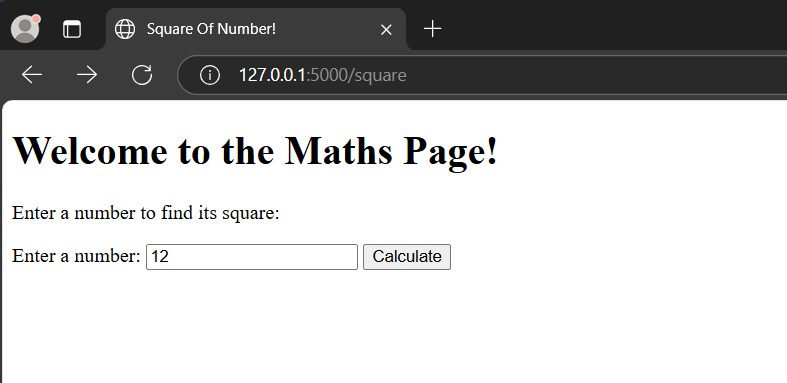
Square of Number!
On clicking the Calculate button one can notice, the value entered, appended, to the URL and the output displayed.
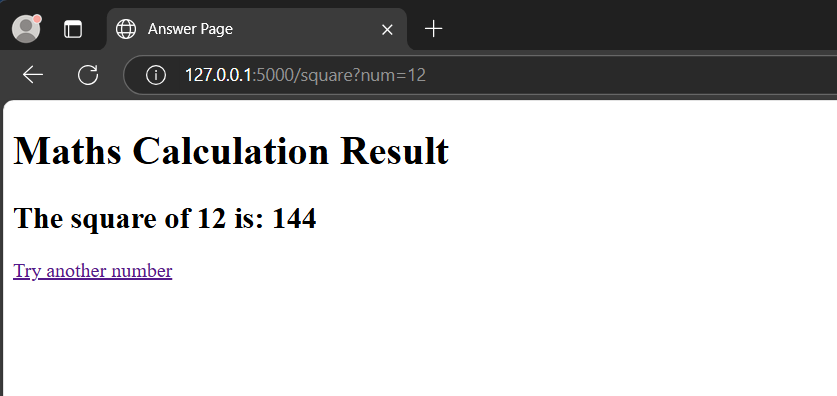
Calculation Result
POST Method
POST method is used to send data to the server for processing. Unlike GET, it does not append data to the URL. Instead, it sends data in the request body, making it a better choice for sensitive or large data.
**Example: We will modify our previous Flask app to use POST instead of GET. The app will have the same three files the only changes are made in the app.py and squarenum.html file.
**app.py
Python `
from flask import Flask, request, render_template app = Flask(name)
@app.route('/square', methods=['GET', 'POST'])
def squarenumber():
if request.method == 'POST':
num = request.form.get('num')
if num.strip() == '':
return "
Invalid number
" square = int(num) ** 2 return render_template('answer.html', squareofnum=square, num=num) return render_template('squarenum.html')if name == 'main': app.run(debug=True)
`
**Explanation:
- Supports both GET and POST route now accepts both GET (to render the form) and POST (to process the input).
- Data is sent in the request body instead of request.args.get('num'), we use request.form.get('num') to retrieve the number from the form.
- More secure since data is not appended to the URL, it is not visible in browser history or logs.
- Same logic for processing input app still checks if the number is provided, calculates its square and renders the result using answer.html.
**squarenum.html
HTML `
Square Of Number!Welcome to the Maths Page!
Enter a number to find its square:
<form method="POST" action="/square">
    <label>Enter a number: </label>
    <input type="text" name="num">
    <input type="submit" value="Calculate">
</form>
`
Run the application and visit development server:
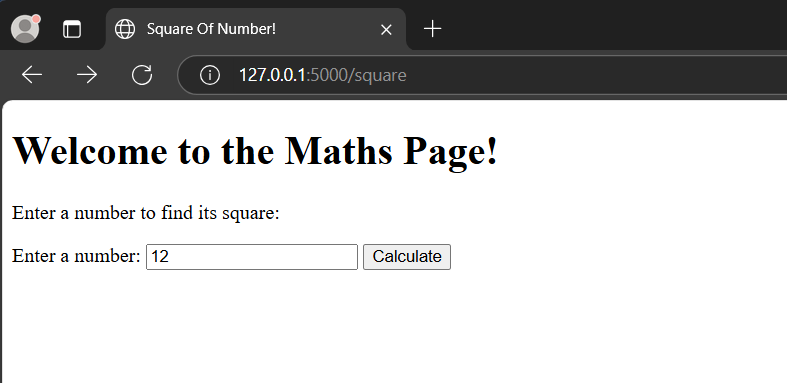
Square of Number
On clicking the Calculate button, data is posted back to the server and the result page is rendered. Please note, the value entered is not visible in the URL now as the method used, is POST.
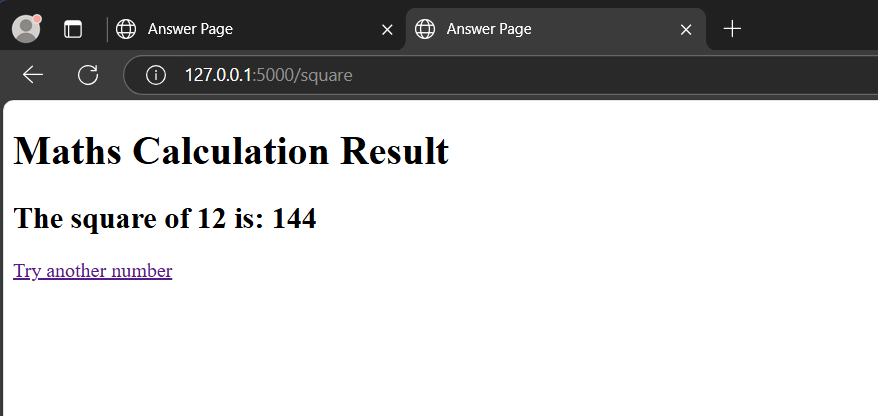
Answer Page
To know more, refer to this article GET vs POST