{{ form.as_table }} Render Django Forms as table (original) (raw)
Last Updated : 11 Jun, 2026
The {{ form.as_table }} method renders Django form fields as HTML table rows. Each form field is displayed inside a
**Example:
{% csrf\_token %}{{ form.as\_table }}
Rendering Django Forms as HTML Tables
**Example: Create a project named geeksforgeeks with an app named geeks and create a sample Django Form to render it.
In **geeks /forms.py
Python `
from django import forms
creating a form
class InputForm(forms.Form):
first_name = forms.CharField(max_length = 200)
last_name = forms.CharField(max_length = 200)
roll_number = forms.IntegerField(
                 help_text = "Enter 6 digit roll number"
                 )
password = forms.CharField(widget = forms.PasswordInput())
`
In **views.py,
Python `
from django.shortcuts import render from .forms import InputForm
Create your views here.
def home_view(request): context ={} context['form']= InputForm() return render(request, "home.html", context)
`
In **templates /home.html,
html `
{% csrf_token %}`
Open http://localhost:8000/: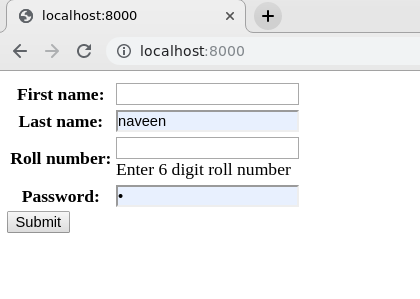 Let's check the source code whether the form is rendered as a table or not. By rendering as a table it is meant that all input fields will be enclosed in
](http://localhost:8000/:)
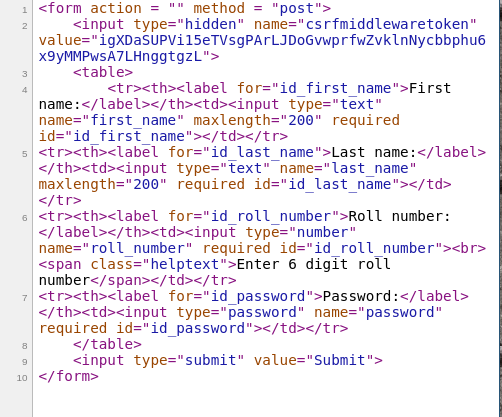
**Explanation:
- **Create Form Class: InputForm defines the form fields using Django form classes.
- **Instantiate Form: The view creates an instance of InputForm.
- **Pass Form to Template: The form object is included in the template context.
- **Render Form: {{ form.as_table }} converts form fields into HTML table rows.
- **Protect Form Submission: {% csrf_token %} adds CSRF protection for POST requests.
- **Display Form: The generated table is rendered in the browser.
**Note: {{ form.as_table }} only controls how form fields are rendered in the template. It does not affect form validation, submission handling, or database operations.
Other Form Rendering Methods
| Method | Output |
|---|---|
| {{ form.as_table }} | Renders fields inside |
| {{ form.as_p }} | Renders fields inside tags |
| {{ form.as_ul }} | Renders fields inside |
Related Articles
How to Create a Basic Project using MVT in Django? How to Create an App in Django ? {{ form.as_p }} {{ form.as_ul }}