Get Live Weather Desktop Notifications Using Python (original) (raw)
Last Updated : 8 Jun, 2026
Desktop notifications provide a quick way to receive real-time information without opening an application. In this project, we'll build a Python script that fetches live weather data for a city using the Open-Meteo API and displays it as a desktop notification. This program:
- Automatically finds the latitude and longitude of the given city.
- Fetches real-time weather information without requiring an API key.
- Displays the weather details directly on your desktop as a notification.
How the Weather Notification System Works
- **Accept a City Name: The program uses a city name to identify the desired location.
- **Fetch Coordinates: The Open-Meteo Geocoding API converts the city name into latitude and longitude values.
- **Retrieve Weather Data: The Open-Meteo Weather API uses these coordinates to fetch current weather information.
- **Extract Key Details: Temperature and wind speed are extracted from the API response.
- **Display Notification: The weather details are shown as a desktop notification.
Modules Needed
In this script, we are going to use these libraries libraries
- **requests: For sending HTTP requests and fetching data from APIs.
pip install requests
- **plyer: For displaying desktop notifications across different operating systems.
pip install plyer
Step-by-Step Implementation
Step 1****:** Import the Required Modules
Python `
import requests from plyer import notification
`
Step 2: Get the Coordinates of the City
We’ll use the Open-Meteo Geocoding API to convert a city name into its latitude and longitude. We can change the city name to our liking.
Python `
city = "Delhi" geo_url = "https://geocoding-api.open-meteo.com/v1/search" geo_params = {"name": city, "count": 1} geo_res = requests.get(geo_url, params=geo_params).json()
`
**Explanation:
- **geo_params: Dictionary with search parameters (name of the city, count as number of results).
- **requests.get(geo_url, params=geo_params): Sends a GET request to the geocoding API with parameters.
- ****.json():** Converts the API response from JSON format into a Python dictionary.
Step 3: Fetch Current Weather Data
If the city exists, we’ll use its coordinates to get temperature and wind speed from the Open-Meteo Weather API.
Python `
if "results" in geo_res: lat = geo_res["results"][0]["latitude"] lon = geo_res["results"][0]["longitude"]
weather_url = "https://api.open-meteo.com/v1/forecast"
weather_params = {
    "latitude": lat,
    "longitude": lon,
    "current_weather": True
}
weather_res = requests.get(weather_url, params=weather_params).json()

# Printing the fetched weather info, we can remove this step later
print(weather_res)
`
**Output: We can see the raw data that we fetched in the terminal.

Weather info
**Explanation:
- **lat & lon: Extract latitude and longitude from the API response.
- **weather_params: Contains coordinates and tells API to return only current weather.
- **requests.get(weather_url, params=weather_params): Fetches weather details for the city.
Step 4: Display the Notification
Once we have the weather data, we’ll show it on the desktop.
Python `
if "current_weather" in weather_res:
    temp = weather_res["current_weather"]["temperature"]
    wind = weather_res["current_weather"]["windspeed"]
    weather_info = f"{city}: {temp}°C, Wind {wind} km/h"

    print("Weather:", weather_info)

    notification.notify(
        title="Weather Update",
        message=weather_info,
        timeout=5
    )
else:
    print("Weather data not found")
else: print("City not found")
`
**Explanation:
- **temp & wind: Extract temperature and wind speed from the API response.
- **weather_info: Format weather data as a readable string.
- **notification.notify(...): Shows the weather info in a desktop popup.
- **timeout=5: Notification stays visible for 5 seconds.
Complete Code
Python `
import requests from plyer import notification
1. Get coordinates from city name
city = "Delhi" geo_url = "https://geocoding-api.open-meteo.com/v1/search" geo_params = {"name": city, "count": 1} geo_res = requests.get(geo_url, params=geo_params).json()
if "results" in geo_res: lat = geo_res["results"][0]["latitude"] lon = geo_res["results"][0]["longitude"]
# 2. Get weather data
weather_url = "https://api.open-meteo.com/v1/forecast"
weather_params = {
    "latitude": lat,
    "longitude": lon,
    "current_weather": True
}
weather_res = requests.get(weather_url, params=weather_params).json()

if "current_weather" in weather_res:
    temp = weather_res["current_weather"]["temperature"]
    wind = weather_res["current_weather"]["windspeed"]
    weather_info = f"{city}: {temp}°C, Wind {wind} km/h"

    print("Weather:", weather_info)

    # 3. Cross-platform notification
    notification.notify(
        title="Weather Update",
        message=weather_info,
        timeout=5
    )
else:
    print("Weather data not found")
else: print("City not found")
`
Let's run the script to get the current weather information for "New York" city:
**Output:
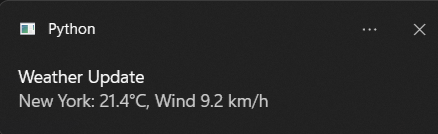
Live Weather Info for "New York"
Let's try to fetch info for "Delhi" city.
**Output:
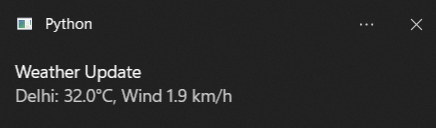
Live Weather Info for "Delhi"