How to Add Authentication to App with FlaskLogin (original) (raw)
We can implement authentication, login/logout functionality in flask app using Flask-Login. In this article, we'll explore how to add authentication to a Flask app using Flask-Login.
To get started, install Flask, Flask-Login, Flask-SQLAlchemy and Werkzeug using this command:
pip install flask flask_sqlalchemy flask_login werkzeug
- **Flask-Login: Manages user sessions and authentication.
- **Flask-SQLAlchemy: Stores user data like usernames and passwords.
- **Werkzeug: Used for secure password hashing and verification.
File structure
The file structure of our app should be similar to the structure given in image below.
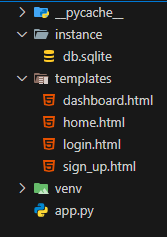
File structure
Stepwise Implementation
Step 1: Import the necessary modules.
- Import necessary classes from Flask, Flask-SQLAlchemy, Werkzeug and Flask-Login.
- Create a Flask app and configure it to use an SQLite database.
- Set a secret key for session security.
- Initialize Flask-SQLAlchemy and LoginManager. Python `
from flask import Flask, render_template, request, url_for, redirect from flask_sqlalchemy import SQLAlchemy from flask_login import LoginManager, UserMixin, login_user, logout_user, login_required, current_user from werkzeug.security import generate_password_hash, check_password_hash
Initialize Flask app
app = Flask(name) app.config["SQLALCHEMY_DATABASE_URI"] = "sqlite:///db.sqlite" app.config["SQLALCHEMY_TRACK_MODIFICATIONS"] = False app.config["SECRET_KEY"] = "supersecretkey"
Initialize database and login manager
db = SQLAlchemy(app) login_manager = LoginManager() login_manager.init_app(app) login_manager.login_view = "login"
`
Step 2: Create a User Model & Database
- Define a Users class inheriting from db.Model and UserMixin.
- Define columns for id, username, and password.
- Initialize the database and create the table schema. Python `
User model
class Users(UserMixin, db.Model): id = db.Column(db.Integer, primary_key=True) username = db.Column(db.String(250), unique=True, nullable=False) password = db.Column(db.String(250), nullable=False)
Create database
with app.app_context(): db.create_all()
`
Step 3: Adding a user loader
Before adding user authentication, we need a function for Flask-Login to retrieve a user by ID. Flask-SQLAlchemy handles this, so we can simply use the get() method with the user ID.
Python `
Load user for Flask-Login
@login_manager.user_loader def load_user(user_id): return Users.query.get(int(user_id))
`
Step 4: Registering new accounts with Flask-Login
- Create an HTML registration form (sign_up.html).
- Create a /register route to handle user registration.
**sign_up.html code:
HTML `
Sign UpCreate an account
{% if error %}
    <p class="error">{{ error }}</p>
{% endif %}

<form action="/register" method="post">
    <label for="username">Username:</label>
    <input type="text" name="username" required />
    <label for="password">Password:</label>
    <input type="password" name="password" required />
    <button type="submit">Sign Up</button>
</form>
`
To define a new route in Flask, we use the @app.route decorator, which specifies the URL path and allowed methods. By default, it only supports GET requests, but for form submissions, we need to enable POST as well.
Python `
Register route
@app.route('/register', methods=["GET", "POST"]) def register(): if request.method == "POST": username = request.form.get("username") password = request.form.get("password")
    if Users.query.filter_by(username=username).first():
        return render_template("sign_up.html", error="Username already taken!")

    hashed_password = generate_password_hash(password, method="pbkdf2:sha256")

    new_user = Users(username=username, password=hashed_password)
    db.session.add(new_user)
    db.session.commit()

    return redirect(url_for("login"))

return render_template("sign_up.html")
`
**Explanation:
- We check if the request method is POST using Flask’s request object.
- If so, we create a new user using the Users model, getting the username and password from request.form.get().
- The user is added to the session, and changes are committed.
- Finally, we redirect the user to the login route using redirect(url_for("login")).
Step 5: Allowing users to log in with Flask-Login
- Create an HTML login form (login.html).
- Implement a /login route to authenticate users.
**login.html
HTML `
LoginLogin to your account
{% if error %}
    <p class="error">{{ error }}</p>
{% endif %}

<form action="/login" method="post">
    <label for="username">Username:</label>
    <input type="text" name="username" required />
    <label for="password">Password:</label>
    <input type="password" name="password" required />
    <button type="submit">Login</button>
</form>
`
**login route:
Python `
Login route
@app.route("/login", methods=["GET", "POST"]) def login(): if request.method == "POST": username = request.form.get("username") password = request.form.get("password")
    user = Users.query.filter_by(username=username).first()

    if user and check_password_hash(user.password, password):
        login_user(user)
        return redirect(url_for("dashboard"))
    else:
        return render_template("login.html", error="Invalid username or password")

return render_template("login.html")
`
**Explanation:
- Check if the request method is POST.
- If POST, filter the database for a user with the entered username.
- Compare the stored password with the entered password.
- If they match, log in the user using Flask-Login’s login_user function.
- Redirect the user to the dashboard route.
- If the request is GET, render the login template.
**dashboard.html
HTML `
DashboardYou are logged in as {{ username }}!
`
Step 6: Logout Functionality
Implement a /logout route using Flask-Login’s logout_user function.
Python `
Logout route
@app.route("/logout") @login_required def logout(): logout_user() return redirect(url_for("login"))
`
Complete Code
Add the logout functionality and code initializer.
Python `
from flask import Flask, render_template, request, url_for, redirect from flask_sqlalchemy import SQLAlchemy from flask_login import LoginManager, UserMixin, login_user, logout_user, login_required, current_user from werkzeug.security import generate_password_hash, check_password_hash
Initialize Flask app
app = Flask(name) app.config["SQLALCHEMY_DATABASE_URI"] = "sqlite:///db.sqlite" app.config["SQLALCHEMY_TRACK_MODIFICATIONS"] = False app.config["SECRET_KEY"] = "supersecretkey"
Initialize database and login manager
db = SQLAlchemy(app) login_manager = LoginManager() login_manager.init_app(app) login_manager.login_view = "login"
User model
class Users(UserMixin, db.Model): id = db.Column(db.Integer, primary_key=True) username = db.Column(db.String(250), unique=True, nullable=False) password = db.Column(db.String(250), nullable=False)
Create database
with app.app_context(): db.create_all()
Load user for Flask-Login
@login_manager.user_loader def load_user(user_id): return Users.query.get(int(user_id))
Register route
@app.route('/register', methods=["GET", "POST"]) def register(): if request.method == "POST": username = request.form.get("username") password = request.form.get("password")
    if Users.query.filter_by(username=username).first():
        return render_template("sign_up.html", error="Username already taken!")

    hashed_password = generate_password_hash(password, method="pbkdf2:sha256")

    new_user = Users(username=username, password=hashed_password)
    db.session.add(new_user)
    db.session.commit()

    return redirect(url_for("login"))

return render_template("sign_up.html")
Login route
@app.route("/login", methods=["GET", "POST"]) def login(): if request.method == "POST": username = request.form.get("username") password = request.form.get("password")
    user = Users.query.filter_by(username=username).first()

    if user and check_password_hash(user.password, password):
        login_user(user)
        return redirect(url_for("dashboard"))
    else:
        return render_template("login.html", error="Invalid username or password")

return render_template("login.html")
Protected dashboard route
@app.route("/dashboard") @login_required def dashboard(): return render_template("dashboard.html", username=current_user.username)
Logout route
@app.route("/logout") @login_required def logout(): logout_user() return redirect(url_for("login"))
if name == "main": app.run(debug=True)
`
**Output and Testing
- Navigate to /register to create an account.
- After registering, you will be redirected to /login.
- Upon logging in, users will be redirected to the dashboard page.
- Clicking "Logout" will end the session and redirect to the home page.
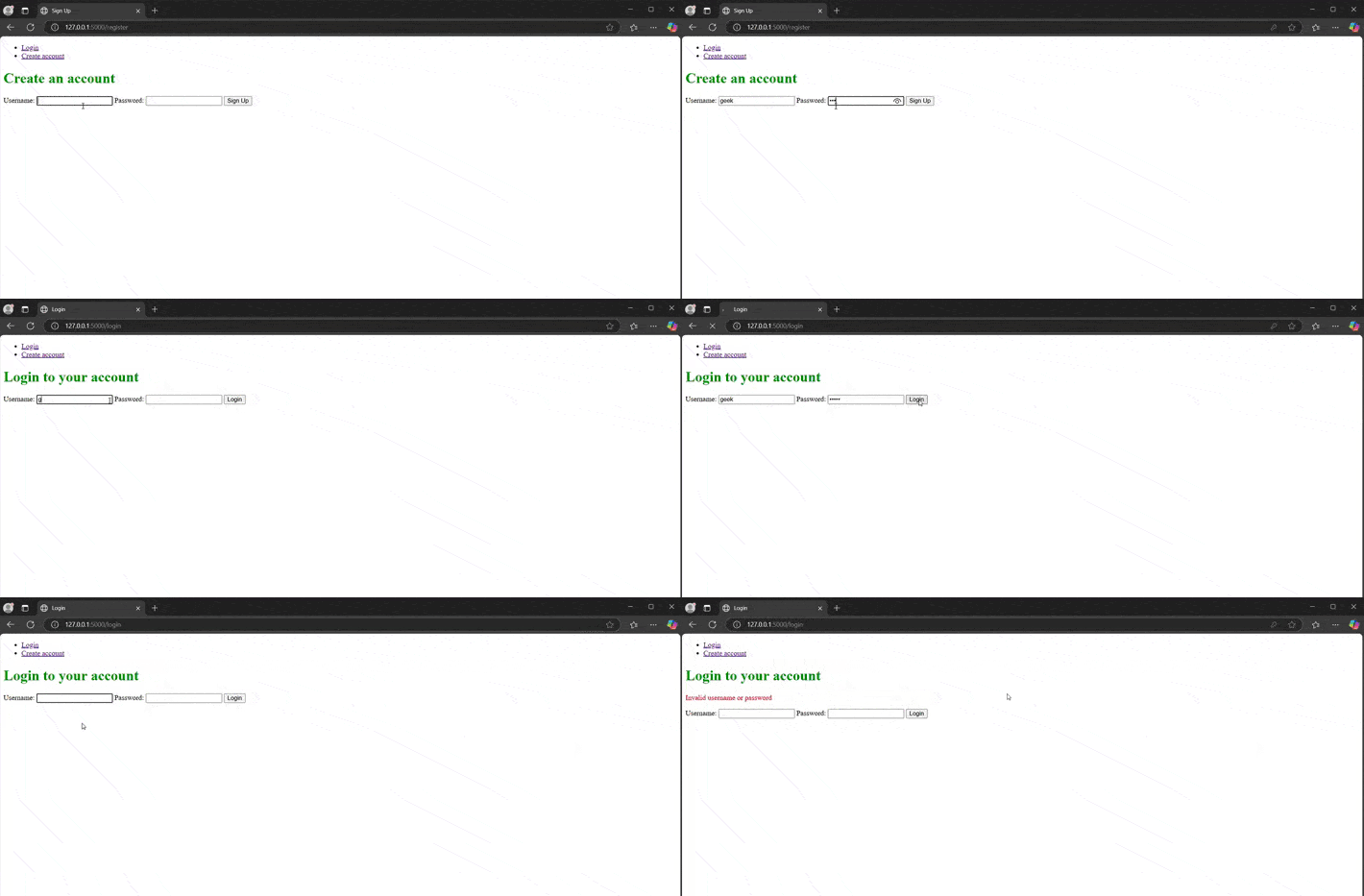
Demonstration of login and register
Now, whenever the user is logged in, they can log out by clicking the logout link on the dashboard page using the logout_user() function provided by Flask-Login.