How to Convert Index to Column in Pandas Dataframe? (original) (raw)
Last Updated : 15 Jul, 2025
Pandas is a powerful tool which is used for data analysis and is built on top of the python library. The Pandas library enables users to create and manipulate dataframes (Tables of data) and time series effectively and efficiently. These dataframes can be used for training and testing machine learning models and Analyzing data.
Converting Index to Columns
By default, each row of the dataframe has an index value. The rows in the dataframe are assigned index values from 0 to the (number of rows - 1) in a sequentially order with each row having one index value. There are many ways to convert an index to a column in a pandas dataframe. Let's create a dataframe.
Python3 `
importing the pandas library as pd
import pandas as pd
Creating the dataframe df
df = pd.DataFrame({'Roll Number': ['20CSE29', '20CSE49', '20CSE36', '20CSE44'], 'Name': ['Amelia', 'Sam', 'Dean', 'Jessica'], 'Marks In Percentage': [97, 90, 70, 82], 'Grade': ['A', 'A', 'C', 'B'], 'Subject': ['Physics', 'Physics', 'Physics', 'Physics']})
Printing the dataframe
df
`
Output:
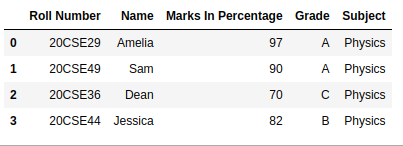
Method 1: The simplest method is to create a new column and pass the indexes of each row into that column by using the Dataframe.index function.
Python3 `
import pandas as pd
df = pd.DataFrame({'Roll Number': ['20CSE29', '20CSE49', '20CSE36', '20CSE44'], 'Name': ['Amelia', 'Sam', 'Dean', 'Jessica'], 'Marks In Percentage': [97, 90, 70, 82], 'Grade': ['A', 'A', 'C', 'B'], 'Subject': ['Physics', 'Physics', 'Physics', 'Physics']})
Printing the dataframe
df['index'] = df.index df
`
Output:
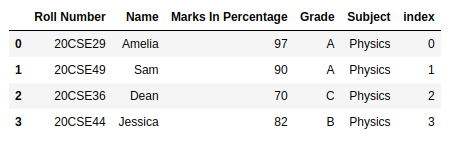
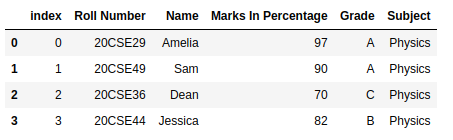
Method 2: We can also use the Dataframe.reset_index function to convert the index as a column. The inplace parameter reflects the change in the dataframe to stay permanent.
Python3 `
import pandas as pd
df = pd.DataFrame({'Roll Number': ['20CSE29', '20CSE49', '20CSE36', '20CSE44'], 'Name': ['Amelia', 'Sam', 'Dean', 'Jessica'], 'Marks In Percentage': [97, 90, 70, 82], 'Grade': ['A', 'A', 'C', 'B'], 'Subject': ['Physics', 'Physics', 'Physics', 'Physics']})
Printing the dataframe
df.reset_index(level=0, inplace=True) df
`
Output: