How to create a vector in Python using NumPy (original) (raw)
A vector is simply a one-dimensional (1-D) array which can represent anything from a list of numbers to a set of values like coordinates or measurements. In NumPy, vectors are treated as 1-D arrays and we can perform various mathematical operations on them such as addition, subtraction and dot products using simple and efficient code. In this article, we will see the process of creating vectors using NumPy and some basic vector operations such as arithmetic and dot products.
Creating Vectors in NumPy
There are various ways to create vectors in NumPy. The method we choose depends on the specific requirements of our task. Let’s see some common approaches.
1. Using np.array()
The simplest and most common method to create a vector is by converting a Python list into a NumPy array using the function.
**Syntax:
np.array(list)
Return: It returns 1-D array of vectors.
In this example we will create a horizontal vector and a vertical vector.
Python `
import numpy as np
list1 = [1, 2, 3] list2 = [[10], [20], [30]] vector1 = np.array(list1) vector2 = np.array(list2)
print("Horizontal Vector") print(vector1)
print("----------------")
print("Vertical Vector") print(vector2)
`
**Output:
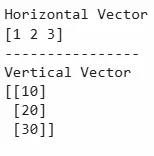
Using np.array()
2. Using np.arange()
It is used to create a sequence of values with regularly spaced values which can be used to create a vector.
**Syntax:
np.arange(start, stop, step)
**Argument:
- **start: Starting value of the sequence (inclusive).
- **stop: End value of the sequence (exclusive).
- **step: The increment between values (optional, default is 1).
**Return: It returns a vector with values ranging from start to stop with an optional step.
Python `
import numpy as np
vector = np.arange(1, 6)
print("Vector using np.arange():", vector)
`
**Output:
Vector using np.arange(): [1 2 3 4 5]
3. Using np.linspace()
It is used to create a vector with evenly spaced values between a given range.
**Syntax:
np.linspace(start, stop, num=50)
**Argument:
- **start: Starting value.
- **stop: Ending value.
- **num: The number of points in the vector (default is 50).
**Return: It returns a vector with **num evenly spaced values between start and stop.
Python `
import numpy as np
vector = np.linspace(0, 10, 5)
print("Vector using np.linspace():", vector)
`
**Output:
Vector using np.linspace(): [ 0. 2.5 5. 7.5 10. ]
4. Using np.zeros() and np.ones()
**np.zeros() and **np.ones() are methods used to create vectors filled with zeros or ones respectively. These methods are used for initializing vectors when we need a specific starting value such as in mathematical or computational tasks that require known initial values.
**Syntax:
np.zeros(shape)
np.ones(shape)
**Arguments:
- **shape: The shape of the array. For a 1-D vector, pass an integer value representing the number of elements.
**Return:
- np.zeros() returns a vector of zeros.
- np.ones() returns a vector of ones. Python `
import numpy as np
vector_zeros = np.zeros(5) print("Vector using np.zeros():", vector_zeros)
vector_ones = np.ones(5) print("Vector using np.ones():", vector_ones)
`
**Output:

Using np.zeros() and np.ones()
Performing Operations on Vectors
Let's see some other operations on Vectors using Numpy.
**1. Basic Arithmetic operation
In this example we will see basic arithmetic operations which are element-wise between two vectors of equal length to result in a new vector with the same length.
Python `
import numpy as np
list1 = [5, 6, 9] list2 = [1, 2, 3]
vector1 = np.array(list1)
print("First Vector : " + str(vector1))
vector2 = np.array(list2)
print("Second Vector : " + str(vector2))
addition = vector1 + vector2 print("Vector Addition : " + str(addition))
subtraction = vector1 - vector2 print("Vector Subtraction : " + str(subtraction))
multiplication = vector1 * vector2 print("Vector Multiplication : " + str(multiplication))
division = vector1 / vector2 print("Vector Division : " + str(division))
`
**Output:
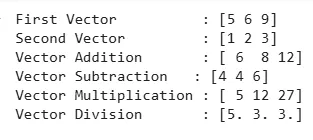
Basic Arithmetic operation
**2. Vector Dot Product
The dot product also known as the scalar product is a fundamental operation in vector algebra. It involves multiplying corresponding elements of two vectors and summing the results. The dot product of two vectors results in a scalar value.
Python `
import numpy as np
list1 = [5, 6, 9] list2 = [1, 2, 3]
vector1 = np.array(list1) print("First Vector : " + str(vector1))
vector2 = np.array(list2) print("Second Vector : " + str(vector2))
dot_product = vector1.dot(vector2) print("Dot Product : " + str(dot_product))
`
**Output:
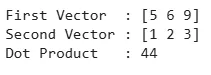
Vector Dot Product
**3. Vector-Scalar Multiplication
Multiplying a vector by a scalar is called scalar multiplication. To perform scalar multiplication, we need to multiply the scalar by each component of the vector.
Python `
import numpy as np
list1 = [1, 2, 3]
vector = np.array(list1) print("Vector : " + str(vector))
scalar = 2 print("Scalar : " + str(scalar))
scalar_mul = vector * scalar print("Scalar Multiplication : " + str(scalar_mul))
`