How to Get Regression Model Summary from ScikitLearn (original) (raw)
Last Updated : 23 Jul, 2025
In this article, we are going to see how to get a regression model summary from sci-kit learn.
It can be done in these ways:
- Scikit-learn Packages
- Stats model package
Example 1: Using scikit-learn.
You may want to extract a summary of a regression model created in Python with Scikit-learn. Scikit-learn does not have many built-in functions for analyzing the summary of a regression model because it is generally used for prediction. Scikit learn has different attributes and methods to get the model summary.
We imported the necessary packages. Then the iris dataset is loaded from sklearn.datasets. And feature and target arrays are created then test and train sets are created using the train_test_split() method and the simple linear regression model is created then train data is fitted into the model, and predictions are carried out on the test set using .predict() method.
Python3 `
Import packages
from sklearn.linear_model import LinearRegression from sklearn.model_selection import train_test_split from sklearn.datasets import load_iris
Load the data
irisData = load_iris()
Create feature and target arrays
X = irisData.data y = irisData.target
Split data into train and test sets
X_train, X_test, y_train, y_test = train_test_split( X, y, test_size=0.2, random_state=42)
model = LinearRegression()
model.fit(X_train, y_train)
predicting on the X_test data set
print(model.predict(X_test))
summary of the model
print('model intercept :', model.intercept_) print('model coefficients : ', model.coef_) print('Model score : ', model.score(X, y))
`
Output:
[ 1.23071715 -0.04010441 2.21970287 1.34966889 1.28429336 0.02248402
1.05726124 1.82403704 1.36824643 1.06766437 1.70031437 -0.07357413
-0.15562919 -0.06569402 -0.02128628 1.39659966 2.00022876 1.04812731
1.28102792 1.97283506 0.03184612 1.59830192 0.09450931 1.91807547
1.83296682 1.87877315 1.78781234 2.03362373 0.03594506 0.02619043]
model intercept : 0.2525275898181484
model coefficients : [-0.11633479 -0.05977785 0.25491375 0.54759598]
Model score : 0.9299538012397455
Example 2: Using the summary() method of Stats model package
In this method, we use the statsmodels. formula.api package. If you want to extract a summary of a regression model in Python, you should use the statsmodels package. The code below demonstrates how to use this package to fit the same multiple linear regression model as in the earlier example and obtain the model summary.
To access and download the CSV file click here.
Python3 `
import packages
import numpy as np import pandas as pd import statsmodels.formula.api as smf
loading the csv file
df = pd.read_csv('headbrain1.csv') print(df.head())
fitting the model
df.columns = ['Head_size', 'Brain_weight'] model = smf.ols(formula='Head_size ~ Brain_weight', data=df).fit()
model summary
print(model.summary())
`
Output:
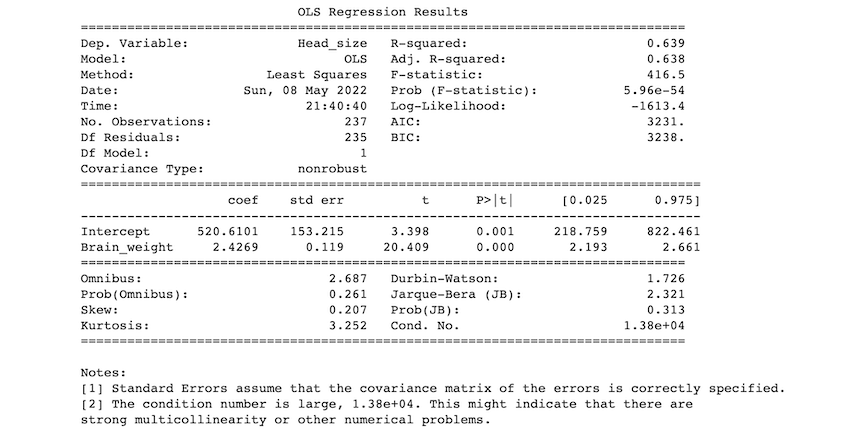
Description of some of the terms in the table :
- R-squared value: The R-squared value ranges from 0 to 1. An R-squared of 100% indicates that changes in the independent variable completely explain all changes in the dependent variable (s). If the r-squared value is 1, it indicates a perfect fit. The r-squared value in our example is 0.638.
- F-statistic: The F-statistic compares the combined effect of all variables. Simply put, if your alpha level is greater than your p-value, you should reject the null hypothesis.
- coef: the coefficients of the regression equation's independent variables.
Our predictions:
If we use 0.05 as our significance level, we reject the null hypothesis and accept the alternative hypothesis as p< 0.05. As a result, we can conclude that there is a relation between head size and brain weight.