How to lowercase strings in a column in Pandas dataframe (original) (raw)
Last Updated : 01 Oct, 2025
In Pandas, you can easily lowercase all values in a column using either the .str.lower() method or .apply() method with a lambda function.
Creating a Sample DataFrame:
Python `
import pandas as pd
creating a sample dataframe
df = pd.DataFrame({'A': ['John', 'bODAY', 'MinA', 'Peter', 'nicky'], 'B': ['masters', 'graduate', 'graduate', 'Masters', 'Graduate'], 'C': [27, 23, 21, 23, 24]})
df
`
**Output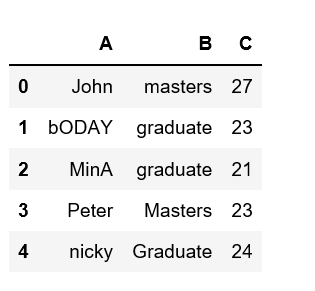 Let's see how can we lowercase column names in Pandas dataframe:
Method 1: Using .str.lower()
The simplest and most common way is to use .str.lower() on the column.
Python `
df['A'] = df['A'].str.lower() df
`
**Output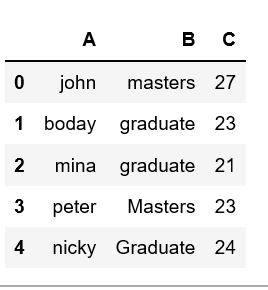
**Explanation: str.lower(): converts all the elements of the column it's appied on to lowercase, which in this case is column 'A'.
**Note: .str.lower() works only on string-type columns.
Method 2: Using .apply() with lambda
You can also use ".apply()" to apply the lower() function to each element:
Python `
df['A'].apply(lambda x: x.lower()) df
`
**Output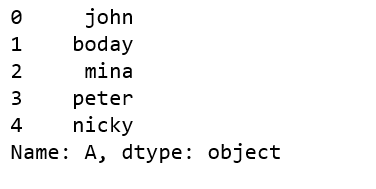
**Explanation:
- ****.apply():** runs a function on each element of the column.
- **lambda x: x.lower(): applies the built-in lower() method to each string.
**Note: This method works the same as .str.lower() but is more flexible since you can apply any custom function inside lambda.