How to make calculator using kivy | Python (original) (raw)
Last Updated : 12 Jul, 2025
Kivy is a platform-independent GUI tool in Python. As it can be run on Android, IOS, linux and Windows etc. It is basically used to develop the Android application, but it does not mean that it can not be used on Desktops applications.
???????? Kivy Tutorial - Learn Kivy with Examples.
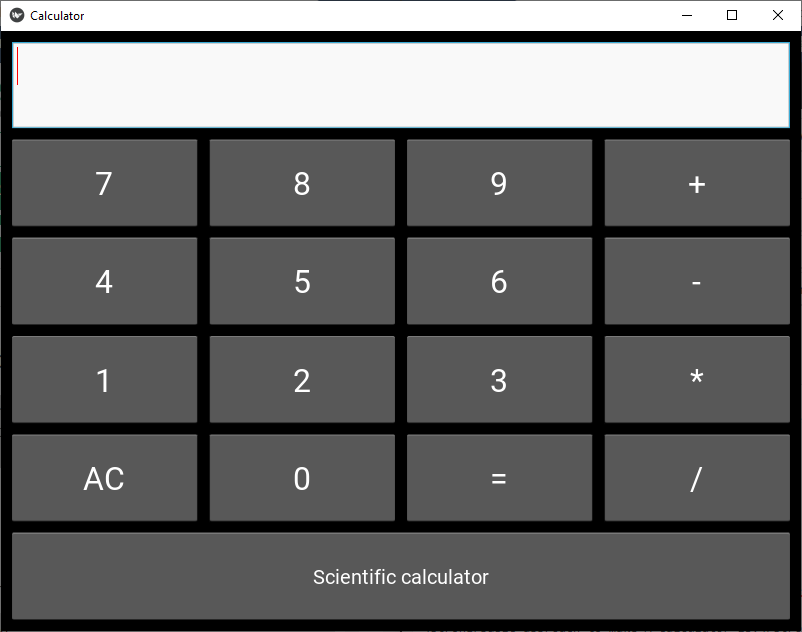
In this article, we will learn how to make a simple calculator using Kivy.
Prerequisites:
- Basic knowledge of Mathematics
- Python
- Kivy
- Widgets and code understanding of kivy
Basic approach to make A calculator:
import kivy
import kivyApp
import Gridlayout
import config(to configure/adjust the window size)
Set minimum version(optional)
Create Layout class : define Calculator function in it : In this i am using try-catch because if any arithmetic exception occur it will through the error
create App class
create .kv file (name same as the app class): 1) create buttons 2) Add the style to the buttons 3) Add functionalities of the button
return Layout/widget/Class(according to requirement)
Run an instance of the class
Implementation of the Approach:
main.py
Python3 `
Program to create a calculator
Program to Show how to create a switch
import kivy module
import kivy
base Class of your App inherits from the App class.
app:always refers to the instance of your application
from kivy.app import App
this restrict the kivy version i.e
below this kivy version you cannot
use the app or software
kivy.require('1.9.0')
for making multiple buttons to arranging
them we are using this
from kivy.uix.gridlayout import GridLayout
for the size of window
from kivy.config import Config
Setting size to resizable
Config.set('graphics', 'resizable', 1)
Config.set('graphics', 'width', '400')
Config.set('graphics', 'height', '400')
Creating Layout class
class CalcGridLayout(GridLayout):
# Function called when equals is pressed
def calculate(self, calculation):
    if calculation:
        try:
            # Solve formula and display it in entry
            # which is pointed at by display
            self.display.text = str(eval(calculation))
        except Exception:
            self.display.text = "Error"
Creating App class
class CalculatorApp(App):
def build(self):
    return CalcGridLayout()
creating object and running it
calcApp = CalculatorApp() calcApp.run()
`
calculator.kv
Python3 `
Custom button
<CustButton@Button>: font_size: 32
Define id so I can refer to the CalcGridLayout
class functions
Display points to the entry widget
: id: calculator display: entry rows: 6 padding: 10 spacing: 10
# Where input is displayed
BoxLayout:
    TextInput:
        id: entry
        font_size: 32
        multiline: False

# When buttons are pressed update the entry
BoxLayout:
    spacing: 10
    CustButton:
        text: "7"
        on_press: entry.text += self.text
    CustButton:
        text: "8"
        on_press: entry.text += self.text
    CustButton:
        text: "9"
        on_press: entry.text += self.text
    CustButton:
        text: "+"
        on_press: entry.text += self.text

BoxLayout:
    spacing: 10
    CustButton:
        text: "4"
        on_press: entry.text += self.text
    CustButton:
        text: "5"
        on_press: entry.text += self.text
    CustButton:
        text: "6"
        on_press: entry.text += self.text
    CustButton:
        text: "-"
        on_press: entry.text += self.text

BoxLayout:
    spacing: 10
    CustButton:
        text: "1"
        on_press: entry.text += self.text
    CustButton:
        text: "2"
        on_press: entry.text += self.text
    CustButton:
        text: "3"
        on_press: entry.text += self.text
    CustButton:
        text: "*"
        on_press: entry.text += self.text

# When equals is pressed pass text in the entry
# to the calculate function
BoxLayout:
    spacing: 10
    CustButton:
        text: "AC"
        on_press: entry.text = ""
    CustButton:
        text: "0"
        on_press: entry.text += self.text
    CustButton:
        text: "="
        on_press: calculator.calculate(entry.text)
    CustButton:
        text: "/"
        on_press: entry.text += self.text
BoxLayout:
    CustButton:
        font_size: 20
        text: "Scientific calculator"
        on_press: entry.text = ""
`
Output: