How to read Dictionary from File in Python? (original) (raw)
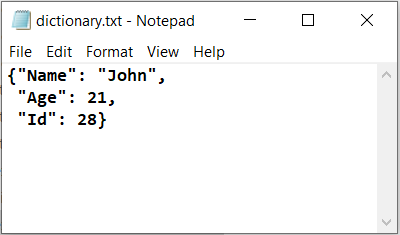
In Python, reading a dictionary from a file involves retrieving stored data and converting it back into a dictionary format. Depending on how the dictionary was saved—whether as text, JSON, or binary-different methods can be used to read and reconstruct the dictionary for further use in your program. In the following examples, the input file used is dictionary.txt.
Using pickle
Pickle is a quick way to save and load Python objects by packing them into a binary file. It preserves the exact data structure, but the file isn’t human-readable. Use pickle for fast, internal Python data storage.
Python `
import pickle d = {"Name": "John", "Age": 21, "Id": 28}
with open("dictionary.pkl", "wb") as file: pickle.dump(d, file)
with open("dictionary.pkl", "rb") as file: d = pickle.load(file)
print(type(d),d)
`
**Output
<class 'dict'> {'Name': 'John', 'Age': 21, 'Id': 28}
**Explanation: pickle.dump() write this dictionary **d into a file named **dictionary.pkl in binary format (wb means write binary). Later, the file is opened again in read-binary mode (rb) and pickle.load() reads the data from the file and converts it back into a dictionary.
Using json module
JSON is a popular, readable text format for saving data, compatible with many programming languages. It’s ideal for sharing dictionaries, but values must be simple types like strings or numbers.
Python `
import json with open('dictionary.json', 'r') as file: d = json.load(file)
print(type(d),d)
`
**Output
<class 'dict'> {'Name': 'John', 'Age': 21, 'Id': 28}
**Explanation: json.load() reads data from the file **dictionary.json, which is in JSON format and converts it back into a Python dictionary. The file is opened in read mode ('r').
Using ast.literal_eval()
Sometimes dictionaries are saved as strings resembling Python code. **ast.literal_eval() safely converts these strings back to dictionaries by only parsing basic data types, making it safer than eval().
Python `
import ast with open('dictionary.txt', 'r') as file: data = file.read()
d = ast.literal_eval(data)
print(type(d),d)
`
**Output
<class 'dict'> {'Name': 'John', 'Age': 21, 'Id': 28}
**Explanation: dictionary.txt is opened in read mode and its contents (a string that looks like a Python dictionary) are read into data. ast.literal_eval() safely converts this string back into a real Python dictionary.
Using eval()
eval() runs a string as Python code, converting a dictionary saved as a string back into a real dictionary. But it’s risky if the file isn’t trusted, since it can execute harmful code. Use only when you’re completely sure the file is safe.
Python `
with open('dictionary.txt', 'r') as file: data = file.read()
d = eval(data) print(type(d),d)
`
**Output
<class 'dict'> {'Name': 'John', 'Age': 21, 'Id': 28}
**Explanation: dictionary.txt is opened in read mode and its contents are read as a string into data. eval(data) then converts this string into a Python dictionary by executing it as code.