How to rebuild all the indexes of a collection using PyMongo? (original) (raw)
Last Updated : 7 Jul, 2025
**Rebuilding indexes in a MongoDB collection helps optimize performance particularly after large write or update operations. In PyMongo, index rebuilding can be done using **db.command() which is the recommended way to trigger index rebuilding in modern MongoDB versions. This process drops and recreates all indexes, ensuring they remain efficient and up-to-date for query execution.
Syntax
db.command('reIndex', <collection_name>)
**Parameter:
- **reIndex: command that tells to rebuild all indexes.
- ****<collection_name>:** name of the collection (as a string) whose indexes should be rebuilt.
Sample of Collection
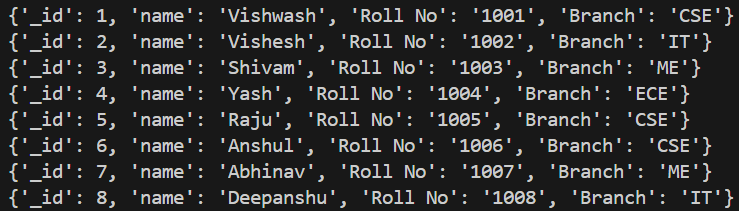
Snapshot of Terminal showing Sample Collection
Example 1:
This code uses **db.command() to rebuild all indexes on the **Student collection.
Python `
from pymongo import MongoClient
client = MongoClient('localhost', 27017) db = client['GFG'] collection_name = 'Student'
Rebuild all indexes on the 'Student' collection
result = db.command('reIndex', 'Student') print(result)
`
**Output

Output after Rebuilding Indexes
Example 2:
In this Example, new students documents are inserted into the **Student collection and then uses the **db.command() method to rebuild all indexes on the collection.
Python `
from pymongo import MongoClient
client = MongoClient("mongodb://localhost:27017/") db = client["GFG"] collection = db["Student"]
Insert some new records
students = [ {"_id": 10, "name": "Ankit", "Roll No": "1021", "Branch": "CSE"}, {"_id": 11, "name": "Neha", "Roll No": "1022", "Branch": "IT"} ] collection.insert_many(students)
Print only the newly inserted documents
print("Newly inserted documents:") for doc in collection.find({"_id": {"$in": [10, 11]}}): print(doc)
Rebuild indexes
result = db.command("reIndex", "Student")
#Printing rebuilded indexes print("Reindex result:") print(result)
`