How to reduce dimensionality on Sparse Matrix in Python? (original) (raw)
Last Updated : 7 Jul, 2025
In real world applications such as Natural Language Processing or image processing, data is often represented as large matrices that contain mostly zeros called as sparse matrices. Working with this high dimensional data can be computationally expensive and memory intensive. To handle this more efficiently, dimensionality reduction techniques is applied means shrinking the sparse matrix into a lower dimensional form while preserving most important features.
In Python, a common way to do this is:
- Converting data into a sparse format like CSR (Compressed Sparse Row).
- Then, applying dimensionality reduction methods such as Truncated Singular Value Decomposition (TruncatedSVD) using the scikit-learn library.
Let's understand this with an Example.
Example
This Example demonstrates dimensionality reduction of a sparse matrix using TruncatedSVD. It loads the digits dataset, standardizes it, converts it to a CSR sparse format and then reduces the number of features from 64 to 10 while preserving essential information.
Python `
from sklearn.preprocessing import StandardScaler from sklearn.decomposition import TruncatedSVD from scipy.sparse import csr_matrix from sklearn import datasets from numpy import count_nonzero
digits = datasets.load_digits() print(digits.data)
shape of the dense matrix
print(digits.data.shape)
X = StandardScaler().fit_transform(digits.data) print(X)
representing in CSR form
X_sparse = csr_matrix(X) print(X_sparse)
specify the no of output features
tsvd = TruncatedSVD(n_components=10)
apply the truncatedSVD function
X_sparse_tsvd = tsvd.fit(X_sparse).transform(X_sparse) print(X_sparse_tsvd)
shape of the reduced matrix
print(X_sparse_tsvd.shape)
`
**Output
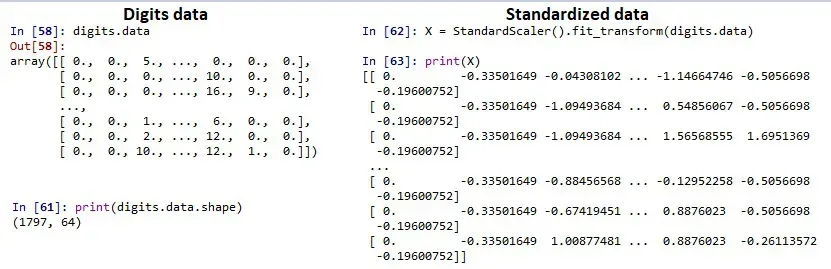
Dataset and Standarized Data
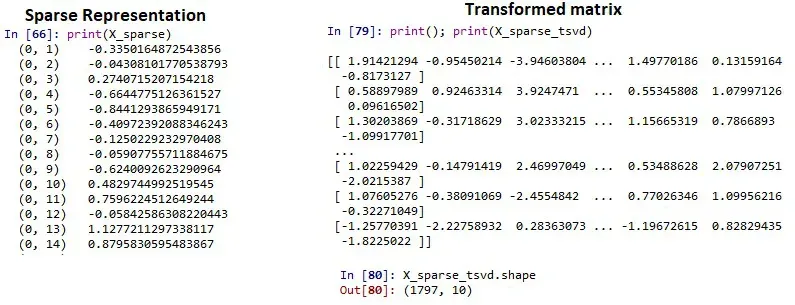
Sparse Representation and Transformed Matrix
Verifying Dimensionality Reduction
After applying TruncatedSVD, below code prints original number of features and the reduced number of features to confirm that dimensionality reduction has been successfully applied.
Python `
print("Original number of features:", X.shape[1]) print("Reduced number of features:", X_sparse_tsvd.shape[1])
`