How to return a JSON response from a Flask API ? (original) (raw)
When building a REST API with Flask, JSON is the standard format used to send data between the server and client. It's simple, readable and works well across platforms. Flask makes it easy to return JSON responses, which is useful for sending data like user info, product details or status messages to web or mobile apps.
For example, if the API wants to return user data, the JSON response might look like this:
{
"name": "Lily",
"age": 25
}
Before building a Flask REST API, make sure Flask library is already installed. Also to install the flask-restful library, use below command:
pip install Flask Flask-RESTful
Now, let’s explore 2 ways to build a simple Flask REST API that returns a JSON response.
Flask jsonify object
jsonify() function converts Python data (like dictionaries or lists) into a JSON response. It automatically sets the Content-Type to application/json, so the client knows the response is in JSON format.
Follow these steps to create the API using jsonify:
1. Create a new python file named 'main.py'.
2. import Flask, jsonify and request from the flask framework.
from flask import Flask, jsonify
3. Initialize the Flask app:
app = Flask(__name__)
4. Define a function named ReturnJSON() to return a sample JSON response.
5. Create a route for the function using:
@app.route('/path_of_the_response', methods = ['GET'])
6. Inside the function, check if the request method is GET. Then, create a Python dictionary and return it as a JSON response:
if request.method == 'GET':
data = {"message": "Hello, this is a JSON response!"}
return jsonify(data)
7. Run the Flask app by adding the following at the end of the file:
if __name__=='__main__':
app.run(debug=True)
8. Run the main.py file using your terminal or IDE to start the API.
**Sample code :
Python `
from flask import Flask, jsonify, request
app = Flask(name)
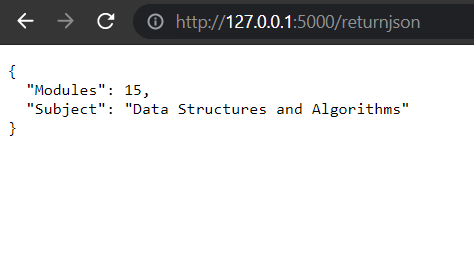
@app.route('/returnjson', methods=['GET']) def return_json(): data = { "modules": 15, "subject": "Data Structures and Algorithms" } return jsonify(data)
if name == 'main': app.run(debug=True)
`
**Output
flask_restful library
flask_restful is a Flask extension. It uses classes (Resource) instead of route decorators, making the code cleaner and more organized. Each class handles HTTP methods like GET, POST, etc., making this approach ideal for larger or more structured APIs.
Follow these steps to create the API using flask_restful:
1. Create a new python file named 'main.py'.
2. Import Flask from the flask framework.
3. Import API and Resource from the 'flask_restful' library.
4. Initialize the Flask app:
app = Flask(__name__)
5. Create an API object using:
api = Api(app)
6. Define a resource class called ReturnJSON, and create a get() method inside it that returns a Python dictionary. The flask_restful library automatically converts this dictionary into a JSON response.
7. Add this resource to the API using:
api.add_resource(ReturnJSON, '/returnjson')
8. Run the Flask app:
if __name__ == '__main__':
app.run(debug=True)
**Sample code:
Python `
from flask import Flask from flask_restful import Api, Resource
app = Flask(name)
api = Api(app)
class ReturnJSON(Resource):
def get(self):
data = {
"modules": 15,
"subject": "Data Structures and Algorithms"
}
return data
api.add_resource(ReturnJSON, '/returnjson')
if name=='main': app.run(debug=True)
`