How to Round Numbers in Python? (original) (raw)
Rounding a number simplifies it while keeping its value as close as possible to the original. Python provides various methods to round numbers, depending on how we want to handle the precision or rounding behavior. In this article, we'll cover the most commonly used techniques for rounding numbers in Python, along with examples. For example, Input is 3.5 then Output should be 4.
Using Built-in round() Function
Python’s built-in round() function rounds a number to a given precision. If no precision is specified, it rounds to the nearest integer.
python `
print(round(11))
print(round(22.7))
print(round(4.465, 2))
print(round(4.476, 2))
print(round(4.473, 2))
`
Output
11 23 4.46 4.48 4.47
**Explanation:
- **round(x) rounds **x to the nearest integer.
- **round(x, n) rounds **x to **n decimal places.
Using Truncation (Cutting Off Digits)
Truncation cuts off digits after a specified number of decimal places without rounding. It works for both positive and negative numbers.
python `
def truncate(num, dec=0): mult = 10 ** dec return int(num * mult) / mult
print(truncate(16.5)) print(truncate(-3.853, 1)) print(truncate(3.815, 2)) print(truncate(346.8, -1)) print(truncate(-2947.48, -3))
`
Output
16.0 -3.8 3.81 340.0 -2000.0
**Explanation:
- Multiplies by **10^dec, truncates, and divides back.
- Useful when you only want to chop off digits, not round.
Using math.ceil() and math.floor()
Python’s math module provides two essential functions:
- **ceil(x): Rounds up to the nearest integer.
- **floor(x): Rounds down to the nearest integer. python `
import math
print(math.ceil(4.2)) print(math.ceil(-0.5)) print(math.floor(2.2)) print(math.floor(-0.5))
`
**Explanation:
- **ceil(x) always rounds up.
- **floor(x) always rounds down, even for negative numbers.
Round Up to Specific Decimal Places
If we want to round up to a specified decimal place, you can combine multiplication, math.ceil(), and division.
python `
import math
def round_up(num, dec=0): mult = 10 ** dec return math.ceil(num * mult) / mult
print(round_up(2.1)) print(round_up(2.23, 1)) print(round_up(2.543, 2)) print(round_up(22.45, -1)) print(round_up(2352, -2))
`
Output
3.0 2.3 2.55 30.0 2400.0
**Explanation:
- Shifts decimal **right, applies **ceil(), and shifts **back.
- Works for **positive and **negative numbers.
We can follow the diagram below to understand round up and round down. Round up to the right and down to the left.
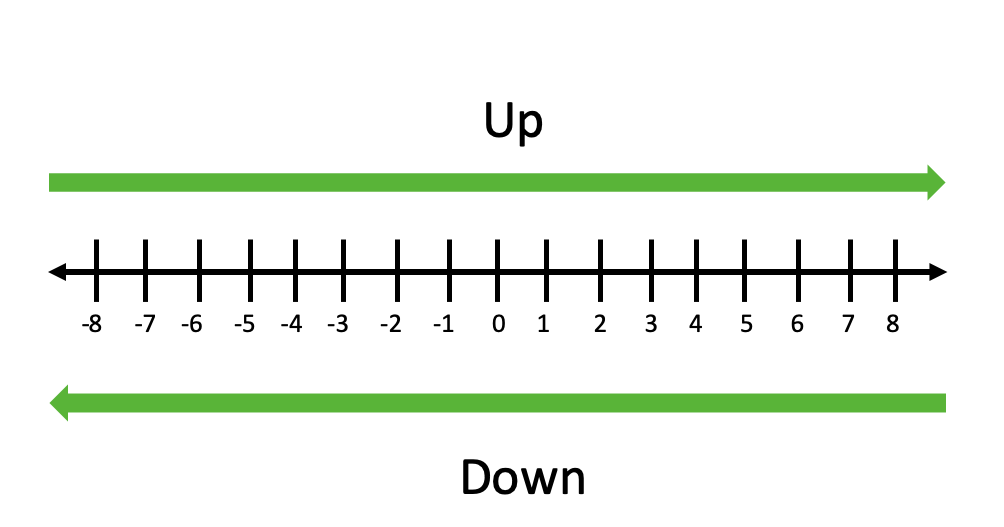
Rounding up always rounds a number to the right on the number line and rounding down always rounds a number to the left on the number line.
Round Down to Specific Decimal Places
Similarly, for rounding down we can use **floor() function instead of **ceil():
python `
import math
def round_down(num, dec=0): mult = 10 ** dec return math.floor(num * mult) / mult
print(round_down(2.5)) print(round_down(2.48, 1)) print(round_down(-0.5))
`
**Explanation: Same shifting logic as round up, but using **floor().
Round Numbers Using NumPy
NumPy provides the **np.round() function for rounding arrays or numbers efficiently.
Python `
import numpy as np
arr = np.array([1.234, 2.567, 3.789])
print("Nearest integer:", np.round(arr)) print("Two decimals:", np.round(arr, 2))
`
Output
Nearest integer: [1. 3. 4.] Two decimals: [1.23 2.57 3.79]
**Explanation:
- **np.round(arr) rounds to the nearest whole number.
- **np.round(arr, n) rounds to n decimals.
Round Numbers in Python using Rounding Bias concept
When rounding large datasets, we must avoid rounding bias. Python supports several rounding methods for that and most generally used methods are:
1. Rounding Half Up
Always rounds .5 upward.
python `
import math
def round_half_up(num, dec=0): mult = 10 ** dec return math.floor(num * mult + 0.5) / mult
print(round_half_up(1.28, 1)) print(round_half_up(-1.5)) print(round_half_up(-1.225, 2))
`
**Explanation: Adds **0.5 before flooring to simulate "round half up."
2. Rounding Half Down
Always rounds .5 downward.
python `
import math
def round_half_down(num, dec=0): mult = 10 ** dec return math.ceil(num * mult - 0.5) / mult
print(round_half_down(2.5)) print(round_half_down(-2.5)) print(round_half_down(2.25, 1))
`
**Explanation: Subtracts 0.5 before applying ceil() to simulate "round half down."
Rounding Half to Even (Bankers' Rounding)
Python’s built-in round() uses round half to even strategy, which rounds .5 to the nearest even number to minimize bias.
- If n is positive and d >= 5, round up
- If n is positive and d = 5, round down
- If n is negative and d >= 5, round down
- If n is negative and d < 5, round up
After rounding as per the rules mentioned above, we can shift the decimal place back to the left.
python `
from decimal import Decimal
print(Decimal("0.1")) print(Decimal(0.1)) print(Decimal("1.65").quantize(Decimal("1.0"))) print(Decimal("1.675").quantize(Decimal("1.00")))
`
Output
0.1 0.1000000000000000055511151231257827021181583404541015625 1.6 1.68
**Explanation:
- **Decimal offers precise control over decimal rounding.
- **quantize() rounds to specified decimal places with minimal floating-point error.
**Related articles: