How to use Glob() Function to Find Files Recursively in Python (original) (raw)
Last Updated : 3 Oct, 2025
**Glob is a powerful pattern-matching technique widely used in Unix and Linux environments for matching file and directory names based on wildcard patterns. Python’s built-in **glob module provides similar functionality, enabling you to easily find files and directories matching specific patterns. The glob module uses Unix shell-style wildcards such as:
- * matches zero or more characters
- ? matches exactly one character
- [abc] or [a-z] matches any one character from the set or range
Because glob follows these patterns, it offers a simple yet powerful way to search files by name patterns without manually parsing directories.
Why Use glob?
- **Built-in module: No need to install external libraries.
- **Efficient: According to benchmarks, glob is generally faster than manual directory scanning.
- **Simple API: Easy to use for common and complex file searches.
- **Wildcard support: Search with flexible patterns, not just exact names.
Recursive File Search with glob
From Python 3.5 onwards, the glob module supports recursive searching using the ** pattern combined with the recursive=True argument. It's Key Points include:
- ** means “this directory and all subdirectories, recursively.”
- You must set recursive=True for ** to be interpreted as recursive.
- Both glob.glob() (returns a list) and glob.iglob() (returns an iterator) support recursion.
Syntax
glob.glob(pathname, *, recursive=False)
glob.iglob(pathname, *, recursive=False)
- pathname: The pattern string, which can include wildcards and directory paths.
- recursive: Boolean flag to enable recursive matching with **.
**Example:
Python3 1== `
Python program to demonstrate
glob using different wildcards
import glob
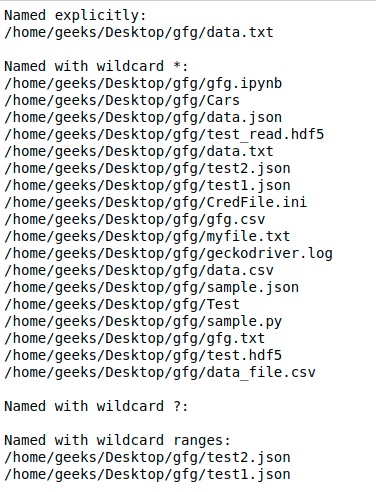
print('Named explicitly:') for name in glob.glob('/home/geeks/Desktop/gfg/data.txt'): print(name)
Using '*' pattern
print('\nNamed with wildcard :') for name in glob.glob('/home/geeks/Desktop/gfg/'): print(name)
Using '?' pattern
print('\nNamed with wildcard ?:') for name in glob.glob('/home/geeks/Desktop/gfg/data?.txt'): print(name)
Using [0-9] pattern
print('\nNamed with wildcard ranges:') for name in glob.glob('/home/geeks/Desktop/gfg/[0-9].'): print(name)
`
**Output :
Using Glob() function to find files recursively
We can use the function
glob.glob()
or
glob.iglob()
directly from glob module to retrieve paths recursively from inside the directories/files and subdirectories/subfiles.
**Syntax:
glob.glob(pathname, *, recursive=False)
glob.iglob(pathname, *, recursive=False)
**Note:
When recursive is set
True
"
**
" followed by path separator
('./**/')
will match any files or directories.
**Example:
Python3 1== `
Python program to find files
recursively using Python
import glob
Returns a list of names in list files.
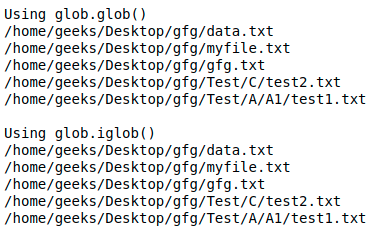
print("Using glob.glob()") files = glob.glob('/home/geeks/Desktop/gfg/**/*.txt', recursive = True) for file in files: print(file)
It returns an iterator which will
be printed simultaneously.
print("\nUsing glob.iglob()") for filename in glob.iglob('/home/geeks/Desktop/gfg/**/*.txt', recursive = True): print(filename)
`
**Output :
**For older versions of python:
The most simple method is to use
as it is specifically designed and optimized to allow recursive browsing of a directory tree. Or we can also use
to get all the files in directory and subdirectories and then filter out. Let us see it through an example-
**Example:
Python3 1== `
Python program to find files
recursively using Python
import os
Using os.walk()
for dirpath, dirs, files in os.walk('src'): for filename in files: fname = os.path.join(dirpath,filename) if fname.endswith('.c'): print(fname)
""" Or We can also use fnmatch.filter() to filter out results. """ for dirpath, dirs, files in os.walk('src'): for filename in fnmatch.filter(files, '*.c'): print(os.path.join(dirpath, filename))
Using os.listdir()
path = "src" dir_list = os.listdir(path) for filename in fnmatch.filter(dir_list,'*.c'): print(os.path.join(dirpath, filename))
`
**Output :
./src/add.c
./src/subtract.c
./src/sub/mul.c
./src/sub/div.c
./src/add.c
./src/subtract.c
./src/sub/mul.c
./src/sub/div.c
./src/add.c
./src/subtract.c
./src/sub/mul.c
./src/sub/div.c