Introduction to pygame (original) (raw)
**Pygame is a set of Python modules designed for writing video games. It adds functionality on top of the excellent SDL library, enabling you to create fully-featured games and multimedia programs in the Python language. It's key benefits include:
- **Beginner-Friendly: Simple Python syntax makes it ideal for newcomers.
- **Active Community: Rich with tutorials, examples and global support.
- **Cross-Platform: Works on Windows, Mac and Linux.
- **Versatile: Suitable for games, simulations and interactive apps.
- **Free & Open Source: No cost, no restrictions.
Installing Pygame
Pygame requires Python 3.6.1 or later, as newer versions are more beginner-friendly and offer improved performance. If you don’t have Python installed, download it from python.org.
To install Pygame, use the following command:
python3 -m pip install -U pygame --user
After installation, verify if it works by running a built-in example:
python3 -m pygame.examples.aliens
If the game launches successfully, you are ready to start using Pygame!
**Creating your first pygame program
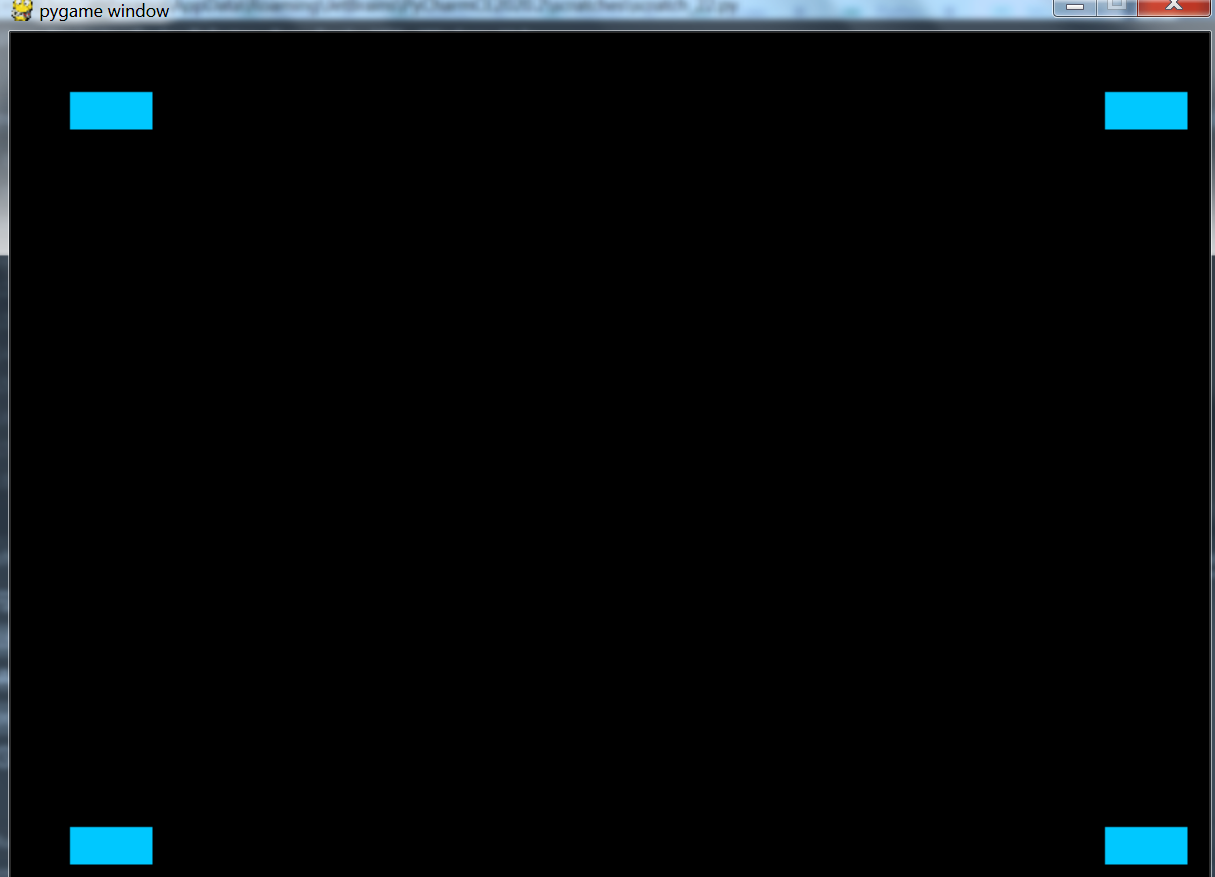
Once Pygame is installed, let’s create a simple program that displays four squares on the screen.
**Importing Pygame Modules
# Import the pygame module
import pygame
# Import constants for easier access to key events
from pygame.locals import *
Before using any Pygame functionality, we need to import its modules.
Understanding key pygame concepts
- **Sprite: A 2D object (like our square) displayed on the screen.
- **Surface: A canvas for drawing (even the screen is a Surface).
- **Rect: A rectangle object for positioning and collisions.
Implementation code:
Python `
import pygame from pygame.locals import *
class Sq(pygame.sprite.Sprite): def init(self): super().init() self.surf = pygame.Surface((25, 25)) self.surf.fill((0, 200, 255))
pygame.init() # Init Pygame win = pygame.display.set_mode((800, 600)) # Game window 800x600
Create 4 squares
s1, s2, s3, s4 = Sq(), Sq(), Sq(), Sq()
Game loop
run = True while run: for e in pygame.event.get(): if e.type == QUIT or (e.type == KEYDOWN and e.key == K_BACKSPACE): run = False
# Draw squares in corners
win.blit(s1.surf, (40, 40))
win.blit(s2.surf, (40, 530))
win.blit(s3.surf, (730, 40))
win.blit(s4.surf, (730, 530))

pygame.display.flip()
`
**Output
**Explanation:
- **Sq class creates a 25x25 light blue square sprite in Pygame by extending pygame.sprite.Sprite, initializing the parent class, and filling the surface with color (0, 200, 255).
- **pygame.event.get() handles all incoming events. If the event type is QUIT, the game exits when the window close button is clicked. Similarly, if a KEYDOWN event occurs and the Backspace key is pressed (e.key == pygame.K_BACKSPACE), the game will exit.
- **win.blit(s1.surf, (40, 40)) draws square 1 at the top-left, s2 at the bottom-left, s3 at the top-right and s4 at the bottom-right.
- **pygame.display.flip() updates the screen to show the drawn squares.
Catch the falling blocks mini game
Let’s create a simple, real game where a player-controlled paddle catches falling blocks. Its features include:
- Move the paddle left/right using the arrow keys.
- Catch falling blocks to earn points.
- Game Over if a block hits the ground. Python `
import pygame import random import sys
pygame.init() # Init pygame W, H = 600, 600 # Screen setup
screen = pygame.display.set_mode((W, H)) pygame.display.set_caption("Catch the Falling Blocks")
WHT, BLU, RED, BLK = (255, 255, 255), (0, 200, 255), (255, 0, 0), (0, 0, 0) # Colors
Clock and font
clock = pygame.time.Clock() font = pygame.font.SysFont(None, 36)
Paddle and block
paddle = pygame.Rect(W // 2 - 60, H - 20, 120, 10) block = pygame.Rect(random.randint(0, W - 20), 0, 20, 20) b_speed = 5
score = 0 # Score
Game loop
run = True while run: screen.fill(BLK)
for e in pygame.event.get():
    if e.type == pygame.QUIT:
        pygame.quit()
        sys.exit()

# Paddle movement
keys = pygame.key.get_pressed()
if keys[pygame.K_LEFT] and paddle.left > 0:
    paddle.move_ip(-8, 0)
if keys[pygame.K_RIGHT] and paddle.right < W:
    paddle.move_ip(8, 0)

# Move block
block.y += b_speed

# Block caught
if block.colliderect(paddle):
    block.y = 0
    block.x = random.randint(0, W - 20)
    score += 1
    b_speed += 0.5  # Speed up

# Block missed
if block.y > H:
    game_over = font.render(f"Game Over! Final Score: {score}", True, RED)
    screen.blit(game_over, (W // 2 - 150, H // 2))
    pygame.display.flip()
    pygame.time.wait(2000)
    run = False

# Draw objects
pygame.draw.rect(screen, WHT, paddle)
pygame.draw.rect(screen, BLU, block)

# Display score
score_text = font.render(f"Score: {score}", True, WHT)
screen.blit(score_text, (10, 10))

pygame.display.flip()
clock.tick(60)
`